

Introduction
In ASP.NET 2.0 back in 2005, the ASP.NET membership was introduced and there are various changes applied to handle the application authentication and authorization until now. The ASP.NET Identity is the brand new way to handle the ASP.NET application in Visual Studio.
In the current scenario, the ASP.NET team workers learned a lot from the feedback by customers. The team workers know that the user registering in an application by entering their user name and password is no longer valid and now the social trends of the web has become more popular. Users interact in the web in real time with their social providers credentials, such as Facebook , Twitter and so on. There should be a login system based on the social provider authentication in the application.
You all know that 2008 ASP.NET added a new design pattern named Model, View, Controller (MVC) that is also used to build unit testable ASP.NET applications. Developers who wanted to unit test their application logic also wanted to be able to do that to the membership system.
After considering the changes in web applications, Microsoft developed ASP.NET Identity to do the following targets.
One ASP.NET
- It can be used in all project templates available for ASP.NET Web Application like in MVC, Web Forms, Web Pages, Web API and SignalR.
- ASP.NET Identity is also used in building the web, phone, store or hybrid applications.
Easy to Plug-In
- You can control the schema of user information. As an example, you can easily enable your system to store the information while registering an account by the user in the application.
- It stores the user data in a database as a default. It uses the Entity Framework code First Implementation to implement all of its persistence mechanism.
- The modification of the database columns can easily be done by you because you control the schema.
Unit Testing
- You can do the unit testing on the web application. ASP.NET Identity makes the web application more unit testable.
Role Based
- You can easily add roles now to the application as Administrator to enable the authorization to other users and restrict them.
Claim Based Authentication
- The ASP.NET Identity supports the claim based authentication to represent the set of claims by the user. A claim includes rich information about the user's identity and membership.
Social Provider Availability
- You can now easily work with the social authentication providers. There are many social providers available to log-in, such as Google, Facebook, Twitter, Microsoft and other social providers and store the specific data for the user.
Windows Azure Active Directory (WAAD)
- Now, the WAAD log-in functionality is also available for the application registration. You can also store the user specific data by using this.
OWIN Integration
- Now, the authentication of ASP.NET is based on OWIN middleware that is to be used by any OWIN-based host. The ASP.NET Identity does not depend upon the System.Web namespace, it is a fully flexible OWIN framework and is used in any OWIN hosted application.
- The ASP.NET Identity uses the OWIN Cookie Authentication instead of Forms Authentication. In a simple way, it uses the OWIN authentication for user log-in and log-out in the web site.
NuGet Package
- The ASP.NET Project templates like MVC, Web Forms, Web API in Visual Studio 2013, all use the ASP.NET Identity through the NuGet Package. The latest NuGet Package 2.7 is available now in NuGet gallery for download.
- The availability of ASP.NET Identity in NuGet Package makes it easier to the ASP.NET team to iterate the new features and provide them to the developers in an agile manner.
Start ASP.NET Identity
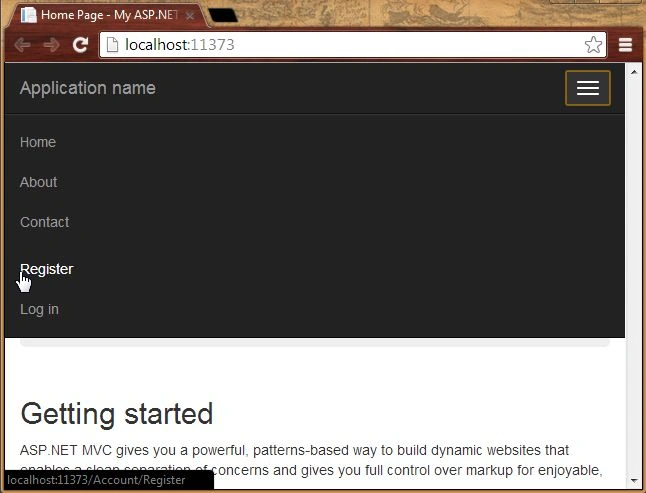
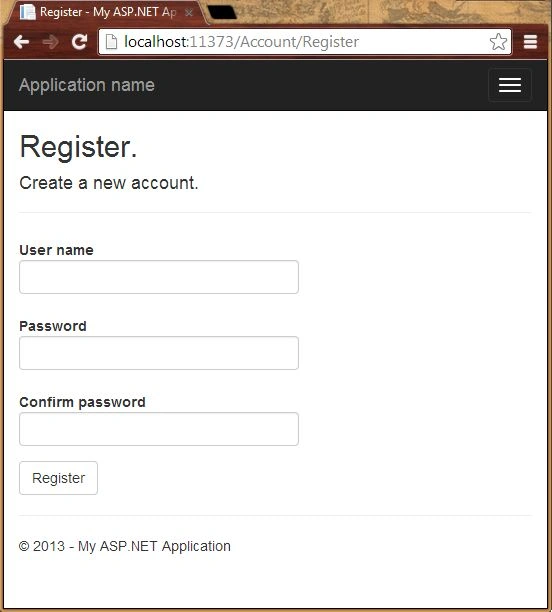
As you know, ASP.NET Identity is used in Visual Studio 2013 for creating ASP.NET Web Applications in various project templates like ASP.NET MVC, ASP.NET Web Forms, Web API and Single Page Applications (SPA), So, in this section we will create the web application using the MVC project template and introduce you to the ASP.NET Identity with which we can register a user and login by the user credentials.
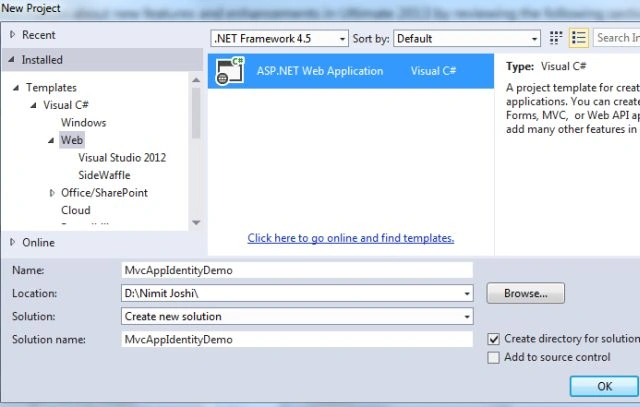
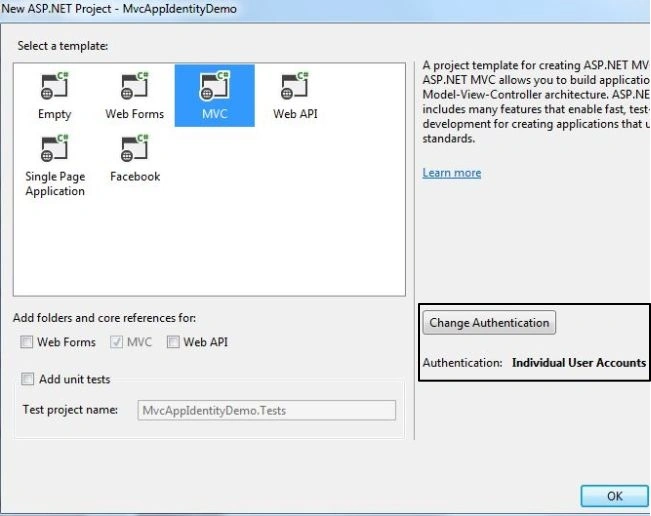
Use the following procedure to create the ASP.NET MVC Web Application.
Creating Application





GinaPosted Jun 8, 2018, 4:06 PM
How can I create a list of registered users?
mithun poddarPosted Mar 17, 2015, 1:00 AM
how could i assign user to role for as per required time period in AspNetUserRoles
Trail BlazerPosted Sep 5, 2014, 9:39 AM
@Sara, Well it is almost exact copy of the article you linked
SaraPosted Jun 8, 2014, 2:12 PM
Why does this article look so similar to this? http://www.asp.net/identity/overview/getting-started/introduction-to-aspnet-identity
raha amirchermahiniPosted Feb 15, 2014, 3:46 AM
Great thanks . If we want to add email in this registration form so how and where we must add email field to this form ?which files must be review to add the email field ?