

Introduction
This article talks about ASP.NET Core, ASP.NET Core features, versions of ASP.NET Core, why we are using ASP.NET Core, and how to configure Visual Studio for developing a simple web application using ASP.NET Core.
Definition
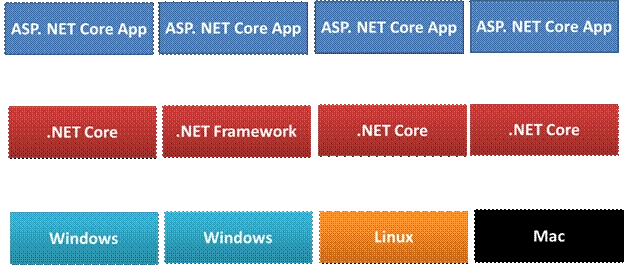
ASP.NET Core is a cross-platform and open source framework. ASP.NET Core supports Windows, Mac, and Linux operation system. It is used for developing modern, cloud-based, and high-performance web applications.
Why ASP.NET Core
ASP.NET Core provides core and extra features which means it is supported in .NET Framework and .NET Core. It supports cross-platform applications that work on Windows, Linux, and Mac operating systems. We can build Desktop, Web, Cloud, Mobile, Gaming, IoT, and AI applications using ASP.NET Core.
.NET Core Versions
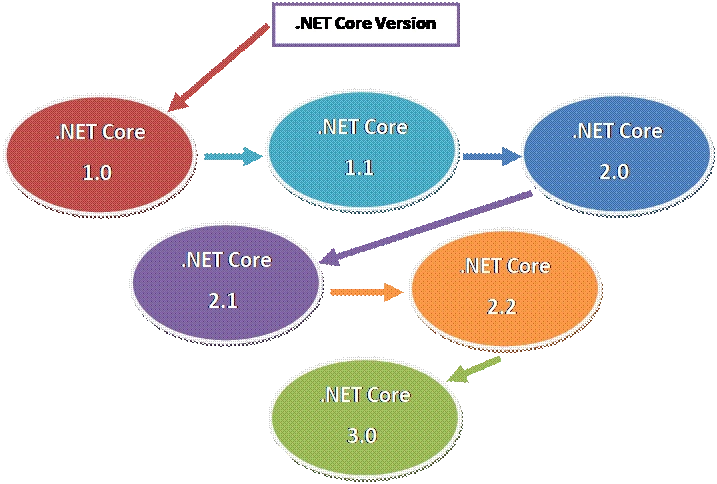
.NET Core Version History
The below table shows the ASP .NET Core versions with their release dates and supported version of Visual Studio.
|
Version
|
Release Date
|
Release With
|
Support .NET Core Version
|
|
.NET Core 1.0
|
27-Jun-2016
|
Visual Studio 2015 Update 3
|
1.0
|
|
.NET Core 1.1
|
16-Nov-2016
|
Visual Studio 2017 Version 15.0
|
1.0, 1.1
|
|
.NET Core 2.0
|
14-Aug-2017
|
Visual Studio 2017 Version 15.3
|
1.0, 1.1, 2.0
|
|
.NET Core 2.1
|
30-May-2018
|
Visual Studio 2017 Version 15.7
|
1.0, 1.1, 2.0, 2.1
|
|
.NET Core 2.2
|
04-Dec-2018
|
Visual Studio 2017 Version 15.9
|
1.0, 1.1, 2.0, 2.1, 2.2
|
|
.NET Core 3.0 Preview 6
|
12-Jun-2019
|
Visual Studio 2019
|
1.0, 1.1, 2.0, 2.1, 2.2, 3.0
|
Sundaram SubramanianPosted Sep 5, 2019, 9:03 PM
Good one. More informative for me !!!
Chittaranjan SwainPosted Aug 29, 2019, 5:32 AM
Nice article.