

This article will share with you the steps to create a simple SharePoint Hosted Add-in using Napa tool, with the help of PnP JavaScript Library in SharePoint Online, to access the data from Host web.
SharePoint Add-In is an independent component used for including a new functionality or expanding the old functionality to SharePoint. The SharePoint Add-In can access data and use components between two webs, called Host web and Add-In web.
- Host Web: A SharePoint site used to install the SharePoint Add-In.
- Add-In Web: A special child web site that is created during the installation of Add-In and all the components mentioned in Add-In are deployed to the web.
To access data from Add-In web, refer to the link below:
Prerequisites
- Developer Site Collection
- Napa Add-In tool or Visual Studio
- PnP, fetch, and e6-promise JS files
Getting start with SharePoint Add-In
- Navigate to Developer Site Collection and then, to the Site Contents page.
- Click “Napa” Office 365 Development Tools link or Tile from Site Content Page. This will open a Napa tool in a new window.
- The Napa tool will list out the existing created Add-Ins. From the same page, click “Add New Project” tile.

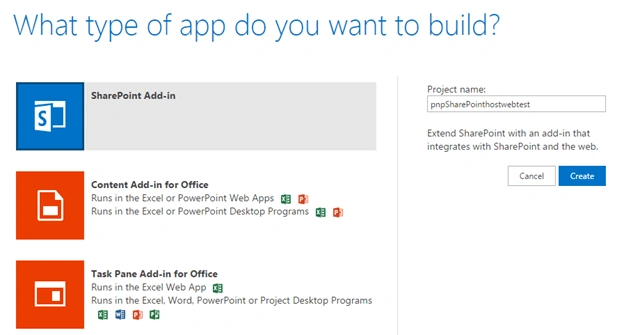
- That’ll redirect us to Add-In create page. There, we have different options to select the Add-In type.
- Select “SharePoint Add-in” type and enter the project name as “pnpSharePointhostwebTest” for the add-in application in the “Project name” textbox. Then, click “Create” button.
- In the Add-in application, select “Properties” icon to update the properties of the Add-in.
- Modify the project title as a user friendly name. For example, enter “PnP SharePoint Host Web Testing application”. Leave the other fields as default. Then, click “Apply” button that is available at the bottom of the page, under left navigation.

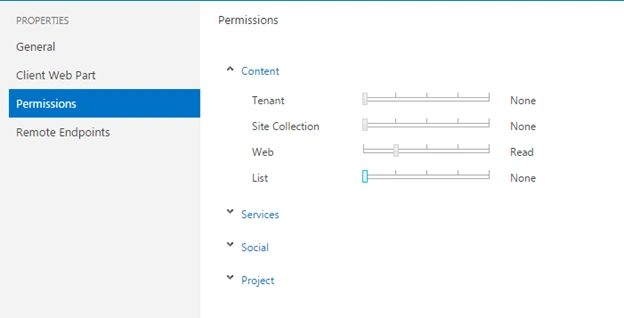
- We need to set the permissions to the add-in in order to access the data from Host web. For that, in the properties page, select “Permissions” in left navigation.
- In our example, we are going to read only web information and lists available from the web. So, the Read permission is enough for the web object. So, set the Web permission to “Read”.
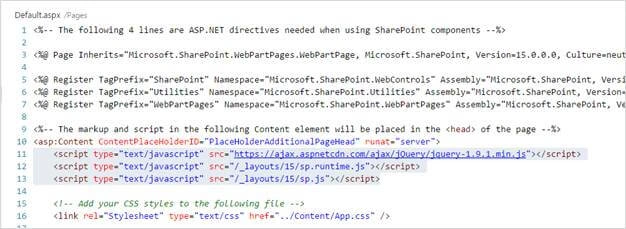
- Remove the not-required JavaScript file references from the Default.aspx page. In our example, we will remove the jquery, sp.js and sp.runtime JS files.
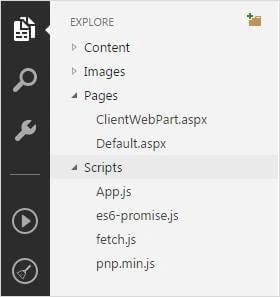
- Add the required files (pnp.min.js, fetch.js and es6-promise.js) to the Scripts folder.
- After uploading the files, open Default.aspx page and add the below JavaScript file reference lines within PlaceHolderAdditionalPageHead content place holder.
- <script type="text/javascript" src="../scripts/fetch.js"></script>
- <script type="text/javascript" src="../scripts/es6-promise.js"></script>
- <script type="text/javascript" src="../scripts/pnp.min.js"></script>
- Now, open “App.js” file and remove all the lines and add the below lines:
- 'use strict';
- function pnpReady() {
- var addinweb = getUrlParamByName("SPAppWebUrl");
- var hostweb = getUrlParamByName("SPHostUrl");
- //Retrieve Host Web Title and collection of Lists from the current web
- $pnp.sp.crossDomainWeb(addinweb, hostweb).expand("Lists").select("Title,Lists").get().then(function(result) {
- var contetTypeInfo = "<strong>Lists from website: " + result.Title + "</strong><br/>";
- for (var i = 0; i < result.Lists.length; i++) {
- contetTypeInfo += "Name: " + result.Lists[i].Title + "<br/>ID:" + result.Lists[i].Id + "<br/><br/>";
- }
- document.getElementById("message").innerHTML = contetTypeInfo;
- }).catch(function(err) {
- alert(err);
- });
- }
- //Call the PnP method after the page load
- document.addEventListener('DOMContentLoaded', function() {
- pnpReady();
- });
- //To retrieve the parameter value from query string in URL
- function getUrlParamByName(name) {
- name = name.replace(/[\[]/, "\\[").replace(/[\]]/, "\\]");
- var regex = new RegExp("[\\?&]" + name + "=([^&#]*)");
- var results = regex.exec(location.search);
- return results === null ? "" : decodeURIComponent(results[1].replace(/\+/g, " "));
- }
- After adding the lines, the app.js file will look like the following:

To use the same code in an On-Premise environment, add the below snippet to ensure the response should have retrieved in JSON format.- $pnp.setup({
- headers: {
- "Accept": "application/json; odata=verbose"
- }
- });
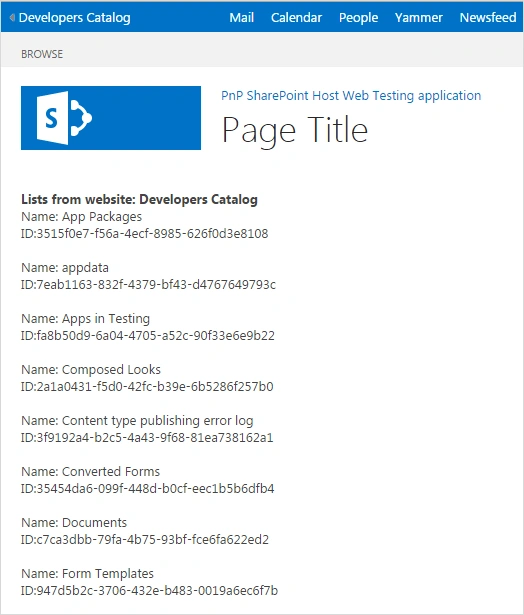
The code in this example shows the Host Website’s Title and populates the lists (ID and Title) available on the web.
Output
Conclusion
From this article, we learned how to create a SharePoint add-in to access the information from Host web, using PnP JavaScript Library in SharePoint Online.
Tarun DPosted Aug 1, 2016, 2:15 AM
Thanks for sharing..
Vignesh ManiPosted Jul 30, 2016, 8:10 PM
Nice