

Introduction
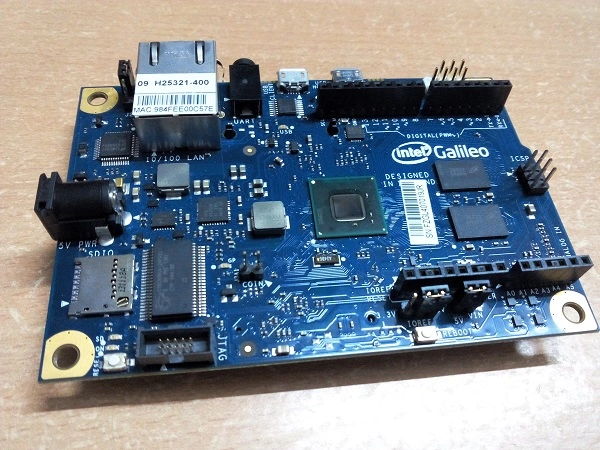
An Intel Galileo board Gen 1 or 2 board, a power supply and cable, a micro USB cable (this won't come with Galileo) and a LED (optional).
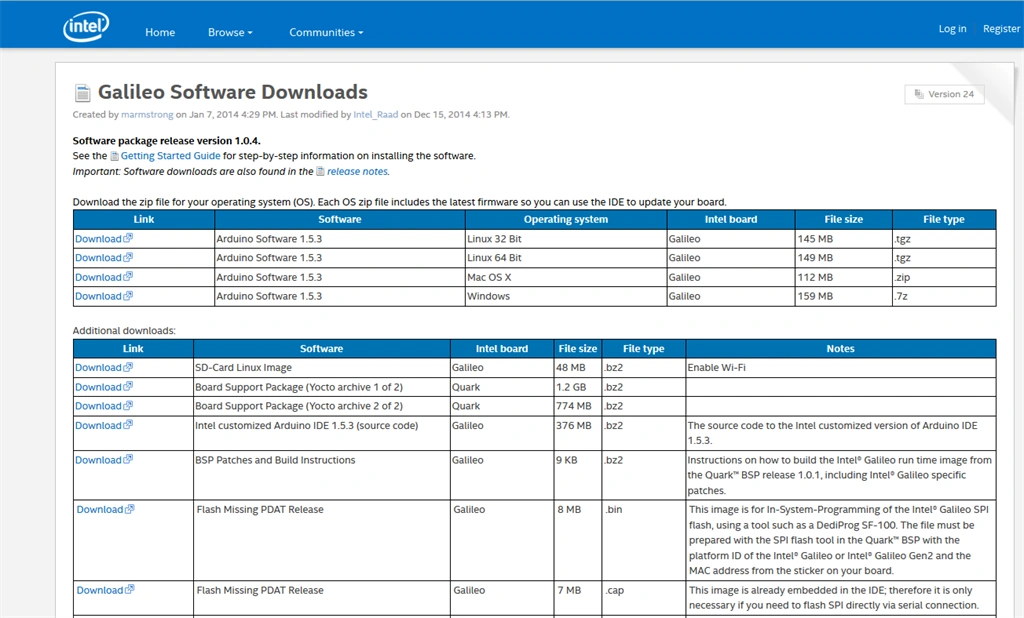
- Extract the contents of the Zip file.
- Power up the Galileo. You will see the power LED light up. Galileo will start booting from the customized version of Linux. Wait a few seconds.
- Now we are ready to make the rest of the connections, we will connect the Galileo to a computer via USB cable. Now we see the USB LED light up.
- When we connect the Galileo for the first time we need to install the drivers. In Device Manager we can see that the device needs a driver since the device will be appearing under Other devices as Gadget Serial v2.4.
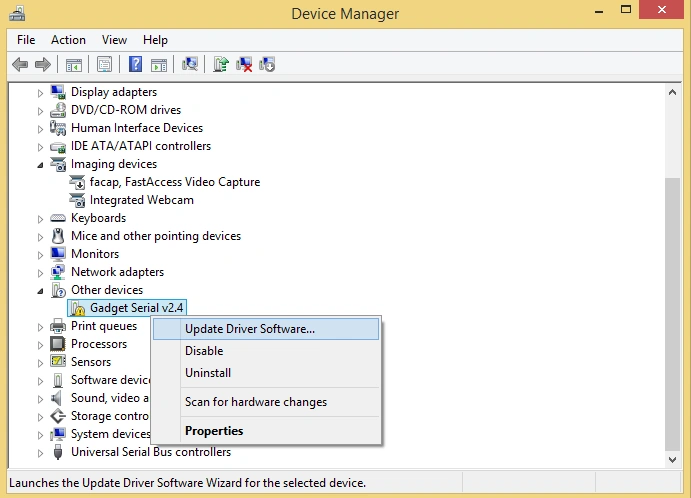
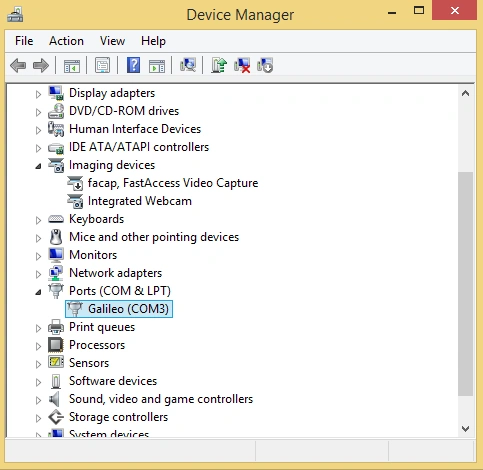
- Right-click on that and select Update Driver Software from the menu, from there browse to the directory that we have recently downloaded. Also, turn on the checkbox beneath that to include subfolders. Click next, It will automatically detect the driver software. Click Install. After installation, we can see our Galileo device is appearing under "Ports" listening on a specific COM port. Remember the COM port. Now our Galileo is connected.
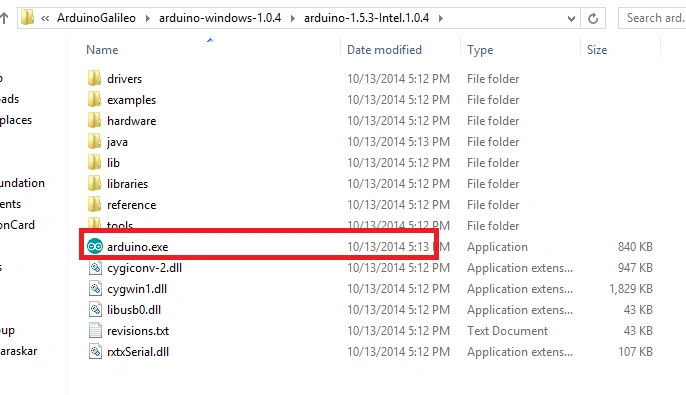
- Run Arduino.exe to open up the Arduino IDE for Galileo.
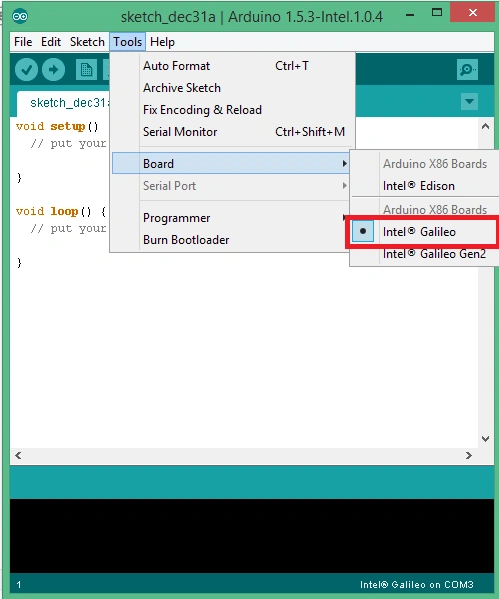
- Now we need to point the Arduino IDE to our Galileo. From Tools under Board select your Galileo Gen1 or Gen 2. In my case it is Galileo Gen 1.
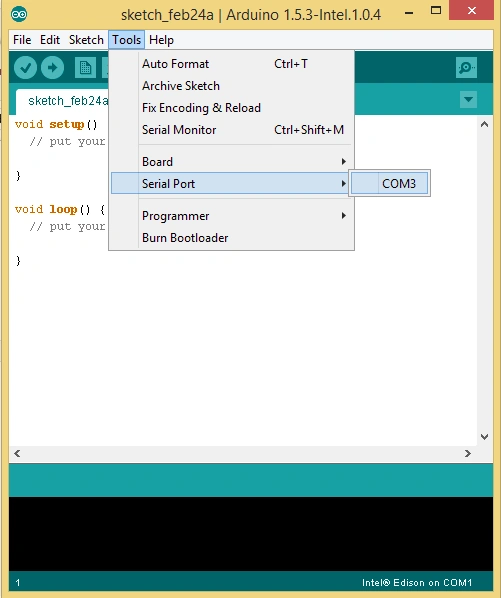
- We also want to ensure that our Arduino IDE is pointing to the correct serial port. From Tools under Serial Port select the COM port on which Galileo is listening. You can check that from Device Manager.
- Finally, we need to update our Galileo Framework. From Help select Firmware Update. It will take some time and the Galileo can be disconnected and connected during this process since the firmware is updating. Finally, you will receive a prompt that the Galileo Firmware is updated.
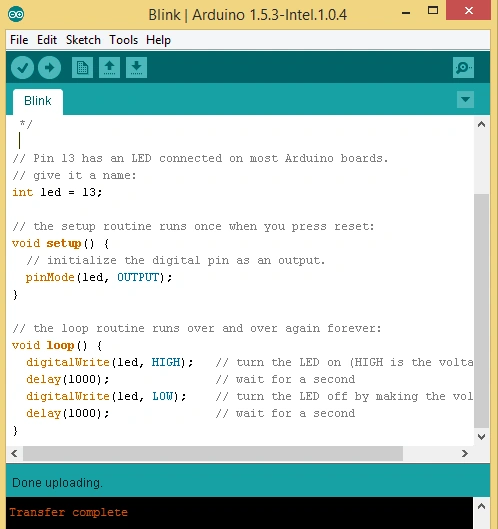
- Now we are ready to write our first program (Sketch) for Galileo.
- setup()
- loop()
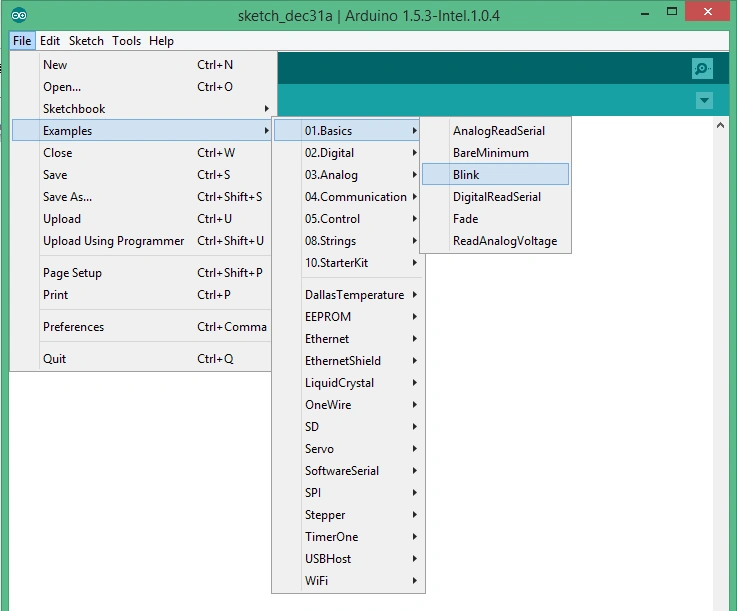
- int led = 13;
- void setup()
- {
- pinMode(led, OUTPUT);
- }
- // the loop routine runs over and over again forever:
- void loop()
- {
- digitalWrite(led, HIGH); // turn the LED on (HIGH is the voltage level)
- delay(1000); // wait for a second
- digitalWrite(led, LOW); // turn the LED off by making the voltage LOW
- delay(1000); // wait for a second
- }
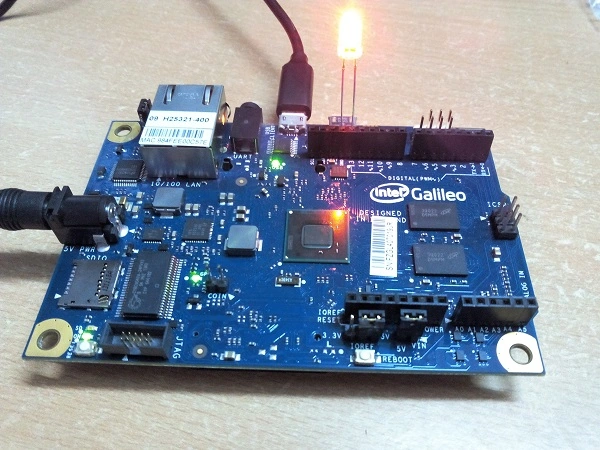
- The longer leg will be the cathode and the shorter will be the anode
- When we examine the LED from the top we see the two metal posts, the smaller of the two is the anode and the bigger is the cathode
Pooja BaraskarPosted Jul 31, 2015, 4:28 PM
Atul Babbar Intel Edison is good for start or if you wanna work with Windows on IoT go for Raspberry pi2 as it also works on Windows 10. Programming can be done in c,c++ there are many languages from which you can choose including visual editors with drag and drop functionality where you need not to write any code. probably I will be writing on that very soon.
Atul BabbarPosted Jul 29, 2015, 12:40 PM
Dear Pooja Baraskar , very informative and ease article. thanks a lot..I have 6 to 7 years of experience ASP.NET and C#....but I am new to IOT..is it possible to use C# in IOT also?...can you suggest me any board to start with and has scope in future usage also...like raspberry Pi or Intel or any other boards to start with and any new language that to be used?....Thanks in advance...
Gowtham RajamanickamPosted May 12, 2015, 1:21 PM
good
NitinPosted May 12, 2015, 12:54 PM
excellent article
Sibeesh VenuPosted May 12, 2015, 6:27 AM
Good one
Yashwant VishwakarmaPosted May 12, 2015, 2:52 AM
Nice info Pooja Baraskar, Prakash Tripathi last comment also useful for all IoTians :) Keep it up guys ...
Prakash TripathiPosted May 9, 2015, 2:59 PM
I have figured out two online portals where this is available in India. http://www.embeddedmarket.com/products/Intel-Galileo-Board/ and https://www.mgsuperlabs.co.in/estore/Intel-Galileo . Not sure if they are Gen2.
Prakash TripathiPosted May 9, 2015, 2:55 PM
May I know what are the other use cases this Hardware can be used?
Prakash TripathiPosted May 9, 2015, 2:54 PM
I wonder if we can get all the required hardware in India as well (in reasonable price :) )
Prakash TripathiPosted May 9, 2015, 2:52 PM
Good one..These kind of things too excites me, however I have explored much so far.
Neelesh VishwakarmaPosted Apr 16, 2015, 7:20 AM
Pooja Baraskar I am glad for you :)
Suresh MPosted Apr 16, 2015, 3:48 AM
Good one .....
Gowtham RajamanickamPosted Apr 16, 2015, 2:18 AM
Good one...
Manoj BhoirPosted Apr 16, 2015, 12:57 AM
Good one and very well explained!
Vikram ChaudharyPosted Apr 16, 2015, 12:46 AM
awesome stuff
Santhakumar MunuswamyPosted Apr 16, 2015, 12:16 AM
thanks for your efforts it is really appreciated
Santhakumar MunuswamyPosted Apr 16, 2015, 12:16 AM
Excellent Work
Former memberPosted Apr 15, 2015, 10:08 PM
In my opinion this should be a featured article !! thought editorial team
Former memberPosted Apr 15, 2015, 10:06 PM
Thanks young girl Pooja Baraskar for making me proud .... happy to see you growing !!! and welcome to our beloved C#CORNER site ! and not only one article let the articles keep coming :) :)
Guest UserPosted Apr 15, 2015, 7:43 PM
very nice Pooja Baraskar! I always wanted to pool money & setup lab where developers can play with electronic devices . So we could deep dive & code till assembly level rather just coding for Web Server or Mobile apps
Neelesh VishwakarmaPosted Apr 15, 2015, 2:58 PM
Nicely done Pooja Baraskar :)
Karthik Muthu KaruppanPosted Apr 15, 2015, 12:59 PM
Good one
Sivaraman DhamodaranPosted Apr 15, 2015, 11:18 AM
Good stuff Pooja. I saw {Not worked :) } My friend working intel dialogic cards for IVRS on telephone. I do see the led blinks (ON for 1 sec, OFF for 1 sec. How do you come out of loop?
Mahesh ChandPosted Apr 15, 2015, 10:30 AM
This is great Pooja. I didn't know about this device from Intel. Very well written. Appreciate it!
Sibeesh VenuPosted Apr 15, 2015, 8:35 AM
Good one.
Abhishek JaiswalPosted Apr 15, 2015, 4:51 AM
That's interesting to see Galileo working and see someone working on IoT as well.. Good work. and am agree with ur view.. I'm doing all these IoT stuff using an Arduino ethernet shield and board and several sensors. I would like to discuss some of the things related to IoT and what we can create with that with u. Looking forward to see some more interesting stuff. Keep it up! :)
Pooja BaraskarPosted Apr 15, 2015, 2:12 AM
Being a programmer I enjoyed a lot while doing these electronics stuffs. I was amazed by different types of sensors and their performance. I strongly believe that Internet of Things is next big thing.
Sam HobbsPosted Apr 15, 2015, 1:52 AM
Welcome to C# Corner, Pooja. I wish I had time to learn interesting things like that.