

Getting Started with jQuery Traversing
Once we have selected some HTML elements and want to modify, we need to traverse those elements, Traversing is a technique which is used to select elements by the relationships to other elements. By this technique we can start with one selector and can go on desire elements. Commonly used traversing functions are given below:
- each()
- first()
- last()
- next()
- prev()
- parent()
- children()
- siblings()
each()
Example
- <!DOCTYPE html>
- <html xmlns="http://www.w3.org/1999/xhtml">
- <head>
- <title>each function in juquery traversing</title>
- <script src="Scripts/jquery-2.1.4.min.js"></script>
- <style type="text/css">
- .main{
- height:100px;
- width:100px;
- padding:10px;
- background-color:yellow;
- display:inline-block;
- }
- </style>
- <script type="text/javascript">
- $(document).ready(function() {
- $(".main").each(function() {
- $(this).css("background-color", "red");
- });
- });
- </script>
- </head>
- <body>
- <div class="main">Div 1</div>
- <div class="main">Div 2</div>
- <div class="main">Div 3</div>
- </body>
- </html>
Output
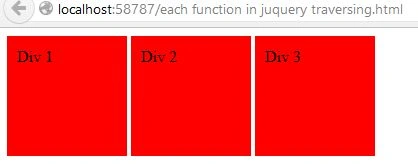
Figure 1: Image for each function
First()
Example
- $(document).ready(function() {
- $("div").first().css({
- "color": "red",
- "border": "2px solid red",
- "background-color": "white"
- });
- });
Output: This function works for all the divs in the body sections excluding the first div.
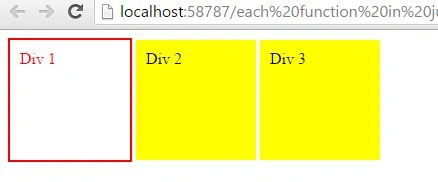
Figure 2: image after first function
last()
Example:
- $(document).ready(function() {
- $("div").last().css({
- "color": "red",
- "border": "2px solid red",
- "background-color": "white"
- });
- });
Output: This function works for all the divs in the body sections excluding the last div.
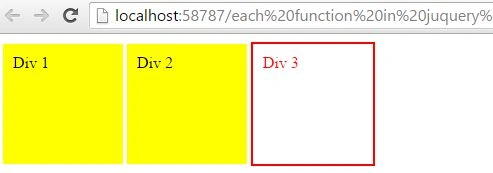
Figure 3: image after last function
next()
Example:
- $(document).ready(function() {
- $("div").next().css({
- "color": "red",
- "border": "2px solid red",
- "background-color": "white"
- });
- });
Output: This function works for all the divs in the body section excluding the first div. When all the elements are from same class then it works after excluding the first element.
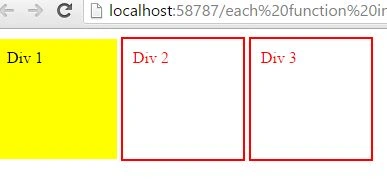
Figure 4: image after next function
prev()
Example
- $(document).ready(function() {
- $("div").next().prev({
- "color": "red",
- "border": "2px solid red",
- "background-color": "white"
- });
- });
Output: This function works for all the divs in the body section previous to the selected div.

Figure 5: image after prev function
parent()
Example
- <style type="text/css">
- .main {
- height: 100px;
- width: 100px;
- padding: 10px;
- background-color: yellow;
- display: inline-block;
- }
- .demo {
- width: 500px;
- }
- </style>
- < script type = "text/javascript" > $(document).ready(function() {
- $(".main").parent().css({
- "color": "red",
- "border": "2px solid red",
- "background-color": "red"
- });
- });
- </script>
Output
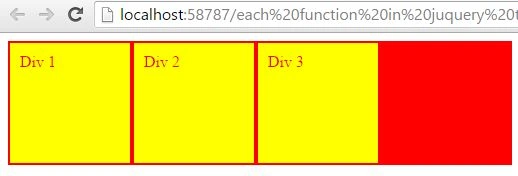
Figure 6: image after parent function
children()
Example
- $(document).ready(function() {
- $(".demo").children().css({
- "color": "red",
- "border": "2px solid red",
- "background-color": "red"
- "color": "white"
- });
- });
Output
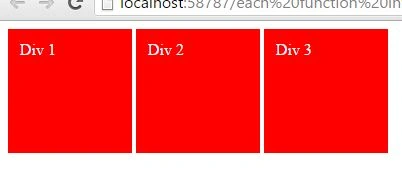
Figure 7: Image after children function
siblings()
Example
- $(document).ready(function() {
- $(".main").siblings().css({
- "color": "red",
- "border": "2px solid red"
- });
- });
Output

Figure 8: Image after sibling function
Summary
In this article I am trying to explain all the commonly used jQuery traversing functions.
Santhakumar MunuswamyPosted Oct 18, 2015, 2:23 AM
Good one
Gowtham KPosted Oct 17, 2015, 1:02 PM
Good ONe
Nilesh JadavPosted Oct 17, 2015, 12:14 AM
Good work !!
Harshad PansuriyaPosted Oct 17, 2015, 12:14 AM
Nice one
RakeshPosted Oct 16, 2015, 2:52 PM
Good share
Mukesh KumarPosted Oct 16, 2015, 2:16 PM
Good One...
Kamlesh BhorPosted Oct 16, 2015, 1:53 PM
Very Nice...