

Introduction
In Build 2018, Microsoft introduced the preview of ML.NET (Machine Learning .NET) which is a cross-platform, open-source machine learning framework. Yes, now it's easy to develop our own Machine Learning application or develop custom modules using a Machine Learning framework. ML.NET is a machine learning framework that was mainly developed for .NET developers. We can use C# or F# to develop ML.NET applications. ML.NET is an open source and can be run on Windows, Linux, and macOS. The ML.NET is still in development, however, we can use the preview version to work and play with ML.NET.
Here are the reference links.
In this article, we will see how to develop our first ML.NET application to predict the item's stock quantity.
Machine Learning for Clustering Model
Machine Learning is nothing but a set of programs that are used to train the computer to predict and display the output for us. Examples of live applications that are using Machine Learning are Windows Cortana, Facebook News Feed, Self-Driving Cars, Future Stock Prediction, Gmail Spam detection, Paypal fraud detection, etc.
In Machine Learning, there are 3 main types,
- Supervised learning
Machine gets labeled inputs and their desired outputs. For example, Taxi Fare detection.
- Unsupervised learning
Machine gets inputs without desired outputs. Example - Customer Segmentations.
- Reinforcement learning
In this kind of algorithm, we will interact with the dynamic interaction. For example - Self-Driving Cars.
In each type, we will be using an algorithm to train the machine for producing results. We can see the algorithm for each machine learning type.
- Supervised learning has Regression and Classification Algorithms
- Unsupervised learning has Clustering and Association Algorithms
- Reinforcement learning has Classification and Control Algorithms
In my previous article, I have explained about predicting future stock for an item using ML.NET for the regression model for supervised learning.
In this article and sample program, we will see how to work on a clustering model for predicting mobile sales by model, gender, before 2010 and after 2010 using the clustering model with ML.NET.
Ref link,
Things to know before starting ML.NET
Initialize the Model
For working with Machine Learning first we need to pick our best-fit machine learning algorithm. Machine learning has clustering, regression, classification and anomaly detection modules. Here in this article, we will be using the Clustering model for predicting the Customer Segmentation of mobile phone usage.
Train
We need to train the machine learning model. Training is the process of analyzing input data by model. The training is mainly used for the model to learn the pattern and save it as a trained model. For example, we will be creating a CSV file in our application and in the CSV file we will be giving the Customer details as Male, Female, Before2010 and After2010 and MobilePhone type for the Input. We give more than 100 records in the CSV file as samples with all the necessary details. We need to give this CSV file as input to our model. Our model needs to be trained and using this data, our model needs to be analyzed to predict the result. The predicted result will be displayed as Cluster ID and scored as the distance to us in our console application.
Score
The score here is not the same as our regression model, wherein Regression we will be having the labeled input as well as labeled output, but for the Clustering model we don’t have the desired output here in score will contain the array with squared Euclidean distances to the cluster centroids. Ref link - ML.NET to the cluster.
Prerequisites
Make sure you have installed all the prerequisites on your computer. If not, then download and install Visual Studio 2017 15.6 or later with the ".NET Core cross-platform development" workload installed.
Code part
Step 1 - Create a C# Console Application
After installing the prerequisites, click Start >> Programs >> Visual Studio 2017 >> Visual Studio 2017 on your desktop. Click New >> Project. Select Visual C# >> Windows Desktop >> Console APP (.Net Framework). Enter your project name and click OK.
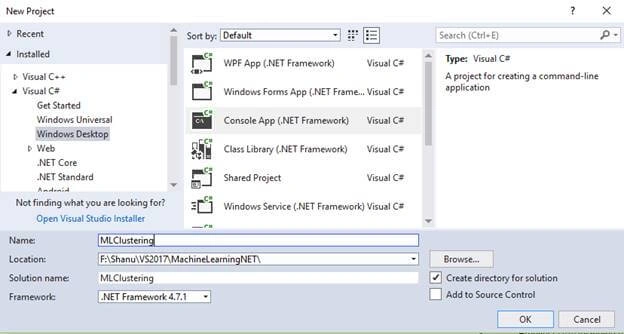
Step 2 - Add Microsoft ML package
Right-click on your project and click on Manage NuGet Packages.
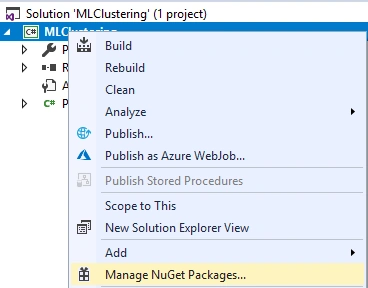
Select the Browse tab and search for Microsoft.ML
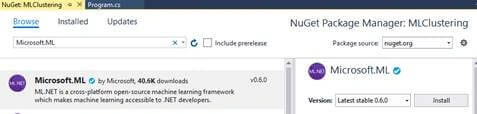
Click on Install, I Accept and wait until the installation is complete.
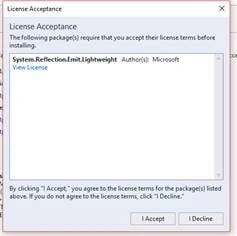
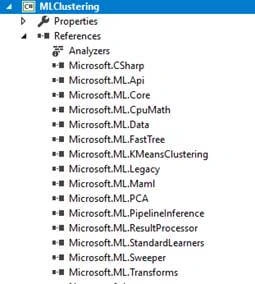
We can see Microsoft.ML package has been installed and all the references for Microsoft.ML has been added to our project references.
Step 3 - Creating Train Data
Now we need to create a Model training dataset. For creating this we will add CSV file for training the model. We will create a new folder called Data in our project to add to our CSV files.
Add Data Folder
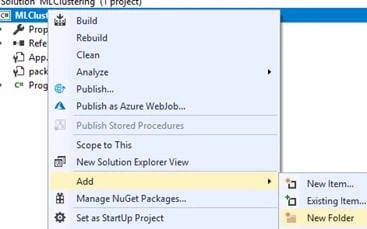
Right-click the project and Add New Folder and name the folder as “Data”.
Creating a Train CSV file
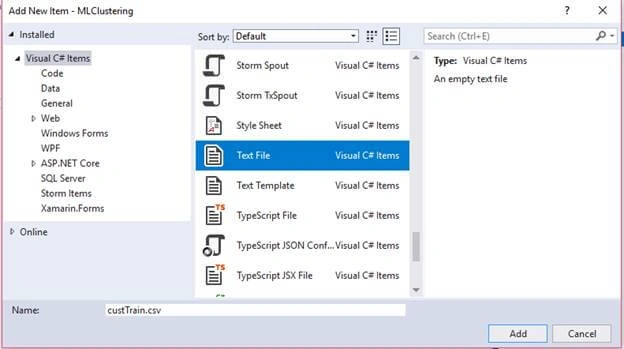
Right-click the Data folder click on Add >> New Item >> select the text file and name it as “custTrain.csv”.
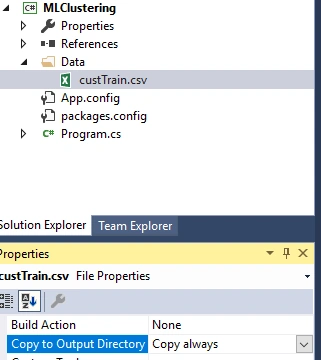
Select the properties of the “StockTrain.csv” change the Copy in Output Directory to “Copy always”.
Add your CSV file data like below.
Here we have added the data with the following fields.
(Feature)
- Male - Total number of phones (Feature)
- Female – Total number of phones (Feature)
- Before2010 – Total number of phones (Feature)
- After2010 – Total number of phones (Feature)
- MobilePhone – Mobile Phone Type.
Note
We need a minimum of 100 records of data to be added to train our Model
We need a minimum of 100 records of data to be added to train our Model
Step 4 - Creating Class for Input Data and Prediction
Now we need to create a class for Input Data and prediction; for doing this right-click our project and add a new class and name it as “CustData.cs”
In our class, first, we need to import the Microsoft.ML.Runtime.Api for column and ClusterPrediction Class creation.
- using Microsoft.ML.Runtime.Api;
Next, we need to add all our columns, like our CSV file, in the same order in our class and set the column from 0 to 3.
- class CustData
- {
- [Column("0")]
- public float Male;
- [Column("1")]
- public float Female;
- [Column("2")]
- public float Before2010;
- [Column("3")]
- public float After2010;
- }
Creating prediction class. Now we need to create a prediction class and, in this class, we need to add our Prediction column. Here we add PredictedLabel and Score column as PredictedCustId and Distances. Predicted Labels will contain the ID of the predicted cluster. The score column contains an array with squared Euclidean distances to the cluster centroids. The array length is equal to the number of clusters. For more details refer to this link - ML.NET to cluster


Aktham MahmoudPosted Nov 9, 2018, 4:19 AM
Thanks. But I would ask question ,what is a difference between ML and data mining in Association Rule Learning. ...Clustering Analysis. ... Classification Analysis. ... Regression Analysis....