

Introduction
Hello everyone. My last article demonstrated how to interact with MongoDB database server from a simple C# console application. Now, when you build enterprise applications using MongoDB, your local database server should always be up and running for 365 days or more. This is not appropriate for enterprise applications. Also maintaining your local server in the running state for such a long time is quite a difficult task. So what is the solution to this problem? Simple, you put your database server in the cloud - Azure cloud. More specifically Azure Cosmos DB. This article will revolve around how to create a MongoDB database server in Azure cloud and then connect it with your application.
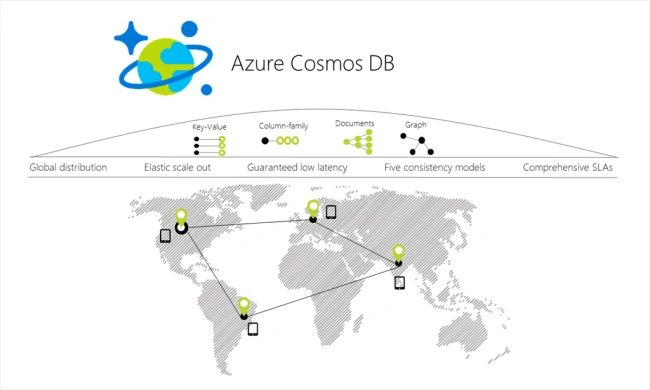
Before getting started, let us know what is Azure Cosmos DB in brief.
To get started, you need to have an Azure subscription. If you don't, then you can try out 30 days trial version or you can check out the Visual Studio Dev Essentials program.
Let's see how to work with MongoDB in Azure Cosmos DB.

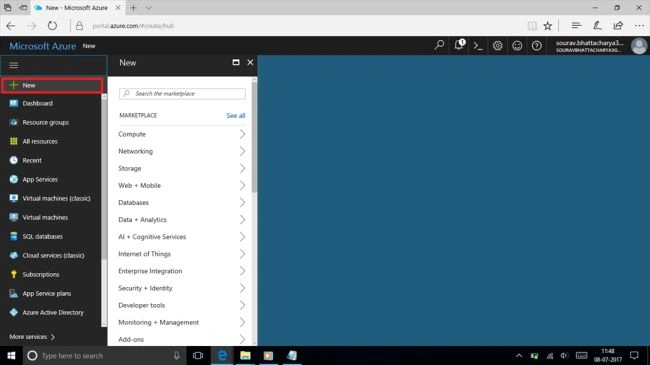
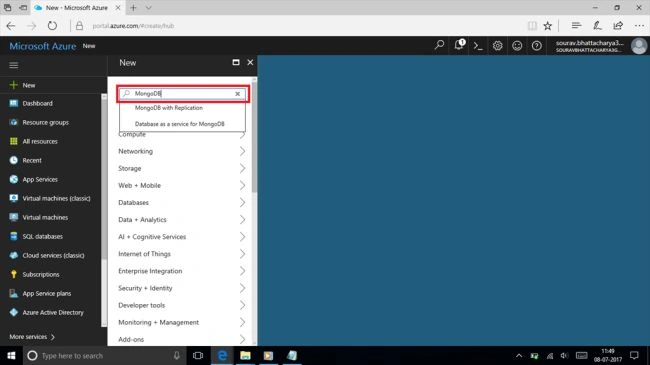
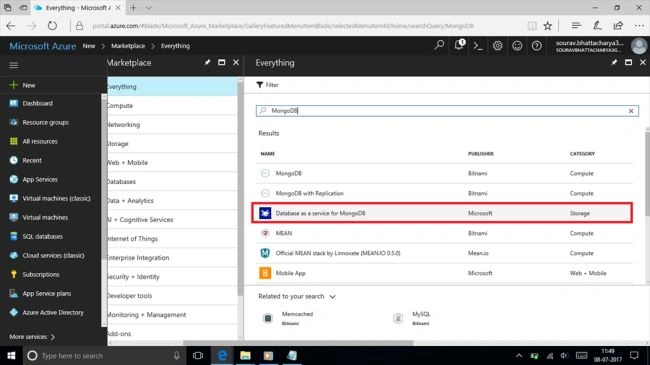
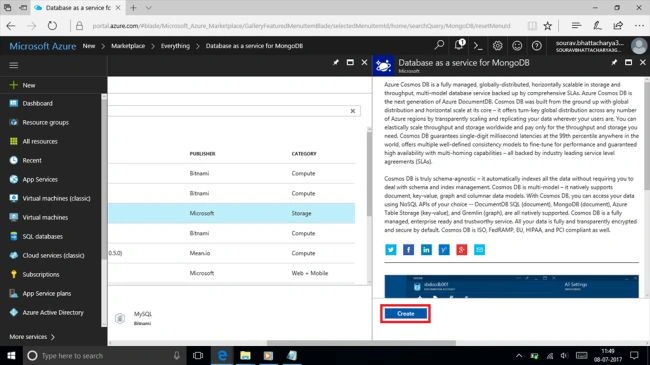
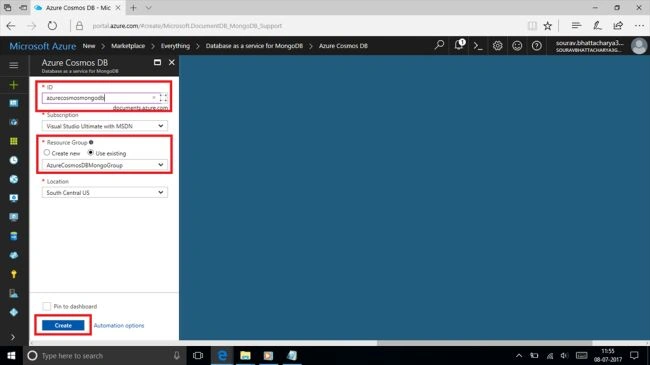
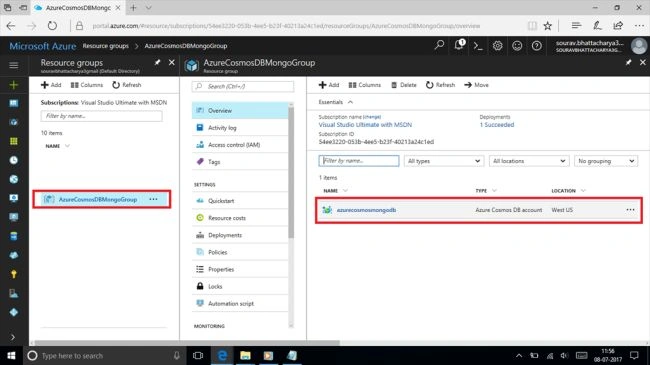
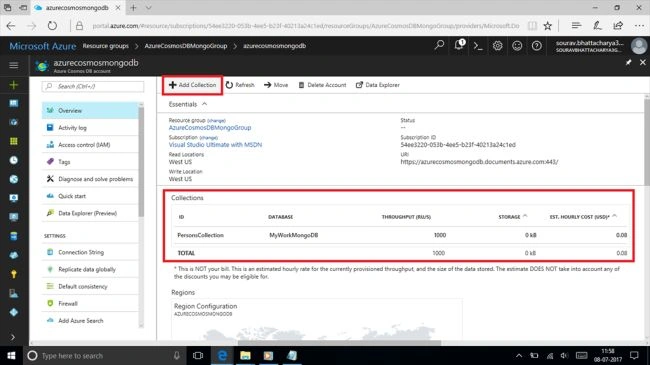

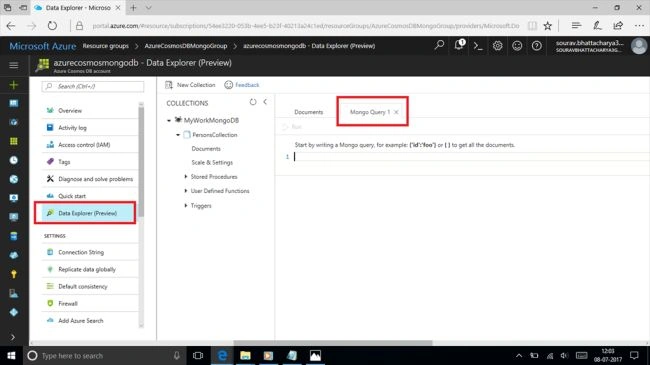
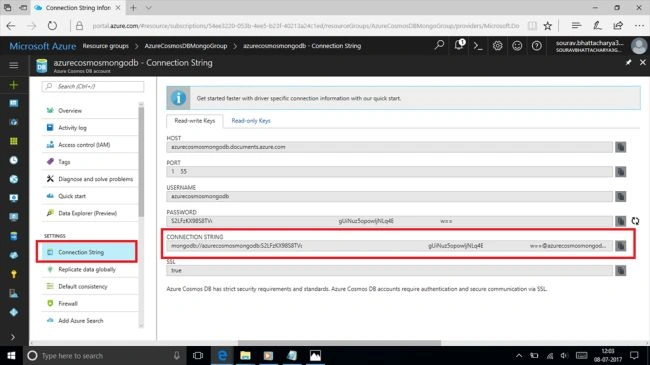
Here is the C# source code,
- using System;
- using System.Collections.Generic;
- using System.Linq;
- using System.Text;
- using System.Threading.Tasks;
- using MongoDB.Driver;
- using MongoDB.Bson;
- namespace ConsAppMongoDBCRUD
- {
- class Program
- {
- static void Main(string[] args)
- {
- try
- {
- MongoClient dbClient = new MongoClient("<your connection string>");
- //Database List
- var dbList = dbClient.ListDatabases().ToList();
- Console.WriteLine("The list of databases are :");
- foreach (var item in dbList)
- {
- Console.WriteLine(item);
- }
- Console.WriteLine("\n\n");
- //Get Database and Collection
- IMongoDatabase db = dbClient.GetDatabase("MyWorkMongoDB");
- var collList = db.ListCollections().ToList();
- Console.WriteLine("The list of collections are :");
- foreach (var item in collList)
- {
- Console.WriteLine(item);
- }
- var personColl = db.GetCollection<BsonDocument>("PersonsCollection");
- //CREATE
- BsonElement personFirstNameElement = new BsonElement("PersonFirstName", "Sankhojjal");
- BsonDocument personDoc = new BsonDocument();
- personDoc.Add(personFirstNameElement);
- personDoc.Add(new BsonElement("PersonAge", 23));
- personColl.InsertOne(personDoc);
- //UPDATE
- BsonElement updatePersonFirstNameElement = new BsonElement("PersonFirstName", "Souvik");
- BsonDocument updatePersonDoc = new BsonDocument();
- updatePersonDoc.Add(updatePersonFirstNameElement);
- updatePersonDoc.Add(new BsonElement("PersonAge", 24));
- BsonDocument findPersonDoc = new BsonDocument(new BsonElement("PersonFirstName", "Sankhojjal"));
- var updateDoc = personColl.FindOneAndReplace(findPersonDoc, updatePersonDoc);
- Console.WriteLine(updateDoc);
- //DELETE
- BsonDocument findAnotherPersonDoc = new BsonDocument(new BsonElement("PersonFirstName", "Sourav"));
- personColl.FindOneAndDelete(findAnotherPersonDoc);
- //READ
- var resultDoc = personColl.Find(new BsonDocument()).ToList();
- foreach (var item in resultDoc)
- {
- Console.WriteLine(item.ToString());
- }
- }
- catch (Exception ex)
- {
- Console.WriteLine(ex.Message);
- }
- Console.ReadKey();
- }
- }
- }
That's all. I hope you find it useful. Until then stay tuned and keep coding!!!
sumon kunduPosted Dec 13, 2019, 1:16 AM
i am facing a issue while running creating a document Command it shows an exception insert failed: Retryable writes are not supported. Please disable retryable writes by specifying "retrywrites=false" in the connection string or an equivalent driver specific config. if any one resolve this issue please share or put some light on it.
Bharat ReddyPosted Jan 11, 2019, 2:50 PM
I have couple questions once we get the collection will it be holding all the data ? If i do this will it be getting the matched one or will get all reacords from DB and then filter by user name ? var collection = GetTasksCollection(); return collection.Find(x=>x.abc==userName).SortByDescending(i=>i.CreatedDate).FirstOrDefault();
Hadshana KamalanathanPosted Jul 14, 2018, 2:51 AM
Thanks for sharing
RameshPosted Jul 24, 2017, 7:16 AM
Nice article with good explanation...
Saravanakumar SekaranPosted Jul 11, 2017, 6:12 AM
Simply awesome article !!!
Manas MohapatraPosted Jul 11, 2017, 1:52 AM
Thank you...It is informative one..One question: if I want to create a NoSQL database as Aerospike(Key-Value) then what I will search portal...