

Introduction
In this article, I am going to explain what’s new in .NET 6.0, what .NET Core is, .Net Core features and benefits, .Net Core Versions, why we use .Net Core. The latest version of .Net Core is .NET 6.0 and it was released on November 8, 2021.
Read my previous articles, using the below links,
What’s New in .NET 6.0?
Microsoft was released .NET 6.0 on November 8, 2021. Visual studio 2022 version 17.0 required for develop .Net 6.0 console application. Visual Studio 2022 support .NET 6.0.
.NET 6.0 is a long-term support release; it will be supported for three years. Microsoft recommends developers start to migrate their applications to this new version, the upgrade process is fairly simple from both .NET Core 3.1 and .NET 5.
This release marks the first time that .NET will be supported on macOS Apple Silicon. It will be supported on Windows Arm64.
New features in .NET 6
- Hot Reload, which allows code changes to be viewed without needing to restart the app.
- Open Telemetry and dotnet monitor support.
- Improvements of Visual Basic in the Visual Studio experience and Windows from project experience.
- The ability to render Blazor components from JavaScript.
- WebAssembly AOT compilation for Blazor WebAssembly apps.
- HTTP/3 support
- Support for symbolic links in Fie IO
- Support for OpenSSL, the ChaCha20Poly1305 encryption scheme, and runtime defense-in-depth mitigations
- Source generators and analyzers
- Performance is greatly improved across the board.
- C# 10 offers language improvements, F# 6 adds new features.
To get more detailed about .NET 6.0 Click here.
Support
.Net 6.0 is a long-term Support (LTS) that will be supported for three years. It is supported on multiple operating systems (Windows, Linux, macOS, Android, iOS/tvOS) including macOS Apple Silicon, and Windows Arm64.
.NET 6 is supported with Visual Studio 2022 and Visual Studio 2022 for Mac. It is not supported in Visual Studio 2019
Azure App Service
Azure functions now support running serverless function in .NET 6.0. Azure Functions 4.0 supports .NET 6.0, Node.js 14, Python 3.7-3.9, Java 8 & 11, powerShell 7.0.
Azure static web apps now support full-stack .NET 6.0 applications with Blazor WebAssembly frontends and Azure Function APIs.
Unified and extended platform
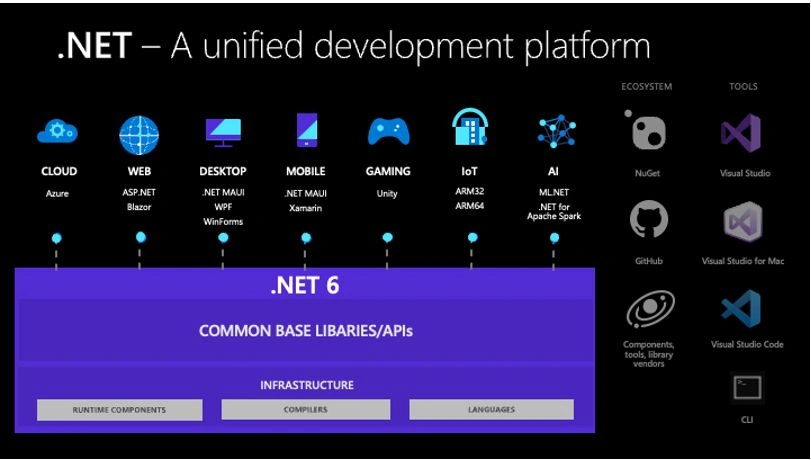
.NET 6.0 delivers a unified platform, for browser, cloud, desktop, IoT, and mobile applications.
One of the most exciting is .NET Multi-platform App UI (.NET MAUI). It is a cross platform framework for creating native mobile and desktop apps with C# and XAML. Using .NET MAUI you can develop applications that can run on Android, iOS, iPadOS, macOS, and windows.
What is .NET Core?
.NET Core is a new version of .Net framework, developed by Microsoft. It is an open-source framework for developing windows, web applications, services, and mobile applications and it can be run on Windows, Mac, or Linux. .Net Core application can run on both .NET CORE and traditional .NET Framework (.NET framework 4.x). It is completely rewritten from scratch and it was initially launched as .Net 5 but then it was renamed to .NET CORE 1.0.
In simple words, .Net Core is a Cross platform, High-performance, unified, fast, lightweight, Open-source framework for building modern, Mobile, web, windows applications and services.
.NET Core Versions
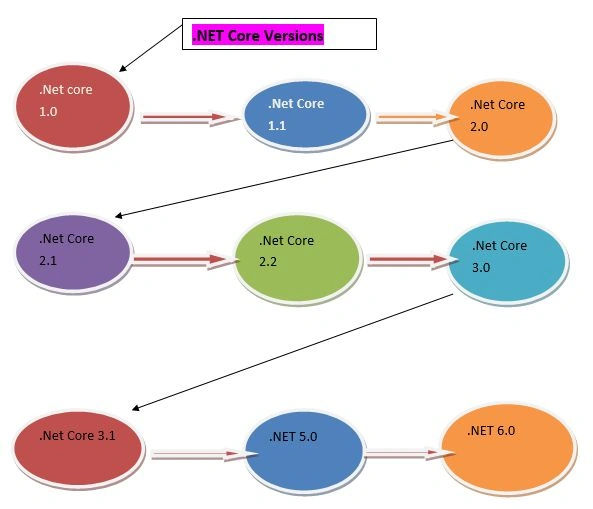
History of .NET Core Versions
The below table shows the details of .Net Core Versions.
| Version | Release Date | Development/Editor Tool | Support |
| .Net Core 1.0 | Jun-27-2016 | Visual Studio 2015 updated version 3 | 1.0 |
| .Net Core 1.1 | Nov-18-2016 | Visual Studio 2015,2017 | 1.0,1.1 |
| .Net Core 2.0 | Aug-14-2017 | Visual Studio 2017 Version 15.3 | 1.0,1.1,2.0 |
| .Net Core 2.1 Long Term Support | May-30-2018 | Visual Studio 2017 Version 15.7 | 1.0,1.1,2.0,2.1 |
| .Net Core 2.2 | Dec-04-2018 | Visual Studio 2017 Version15.9 | 1.0,1.1,2.0,2.1,2.2 |
| .Net Core 3.0 | Sep-23-2019 | Visual Studio 2019 Version 16.3 |
1.0,1.1,2.0,2.1,2.2,3.0 |
| .Net Core 3.1 (3 yr Long-term support) | Dec-03-2019 | Visual Studio 2019 Version 16.4 |
1.0,1.1,2.0,2.1,2.2,3.0, 3.1 |
| .NET 5.0 | Nov-10-2020 | Visual Studio 2019 Version 16.8 |
1.0,1.1,2.0,2.1,2.2,3.0, 3.1,5.0 |
| .NET 6.0 1 (3 yr Long-term support) | Nov-08-2021 | Visual Studio 2022 Version 17.0 |
6.0 |
| .NET 7.0 | 2022-11(projected) | - | |
| .NET 8.0 | 2023-11(projected) | - |
Note
Asp.Net Core and .Net Core Both are different, just like Asp.Net and .Net Framework.
Why Use .Net Core?
- Cross platform - It can run on Windows, Linux and Mac.
- Unified - It offers a single unified component like .NET Standard library for all platforms with the same code, same languages, and same tools.
- Better performance - .Net core does not depend on system.web.dll for communication between Browser-server. In .Net core everything is packages which we need for our application. Packages reduce the request pipeline and improve the application performance.
- Lightweight - It is a lightweight framework. It allows developers to deploy libraries and components that are needed in a set of packages.
- Dependency Injection - Dependency Injection is in-built in .Net Core.
- Hosting - .Net Core application can be hosted on multiple Web server such as IIS, Apache, Docker, etc. It is not dependent on IIS.
- Open Source - It is a fully open-source framework. That means, it is free of cost and its source code is available.
- Testability - Unit testing is very easy in .Net core application.
- Side-by-side App Versioning - .Net Core runs on .NET Core, which supports simultaneously running in multiple versions of applications.
Connect To Visual Studio 2022 Community Edition and Create Your First Project
Step 1
First, install Visual Studio 2022 in your system.
Step 2
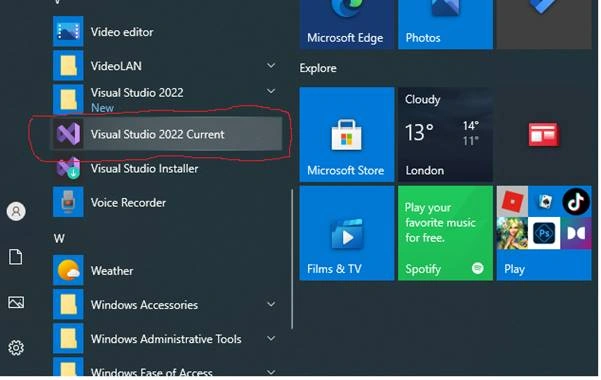
Go to all programs in your systems, we can see Visual Studio 2022 current and Visual Studio Installer.
Step 3
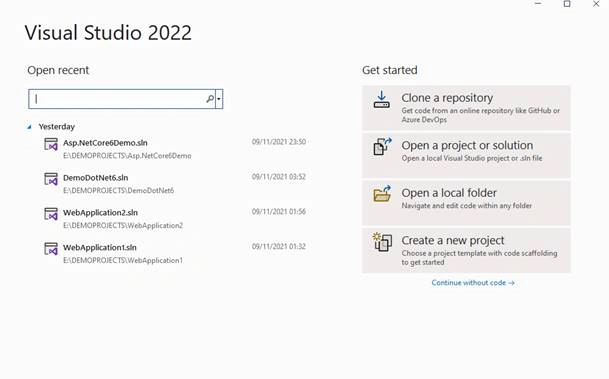
Double-click on Visual Studio 2022 Current and it will open. It looks like the below screenshot. Opening it the first time it will take few time.
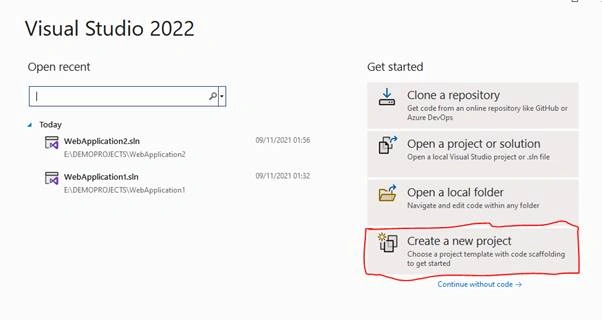
Creating Your First Project
Click on Create a new Project to create a new project.
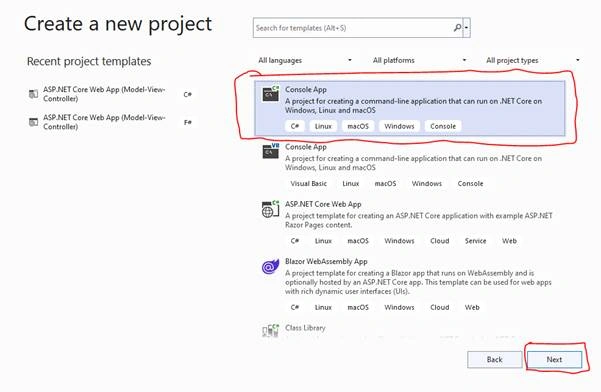
You can see various project types there. Choose “Console Application” project type for now.
Select console Application and click Next.
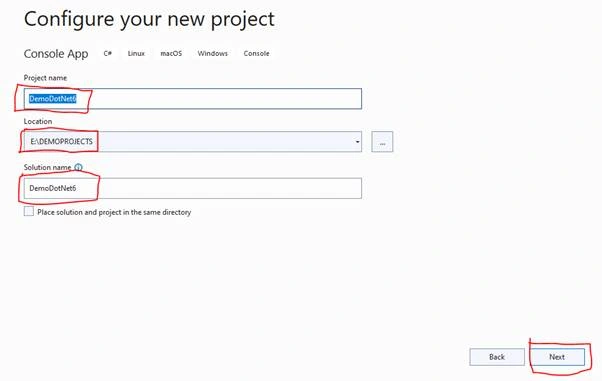
Give a valid name to your project and select a path for it. Then click Next button.
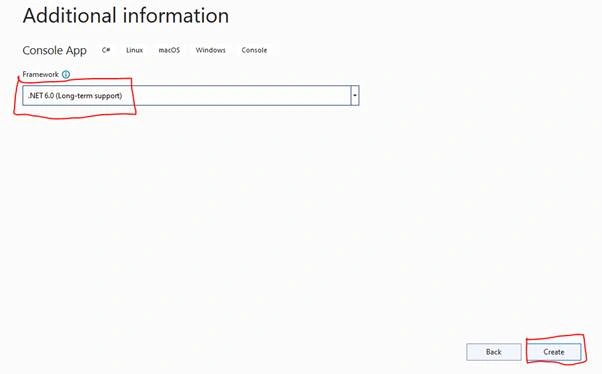
Now, choose framework .NET 6.0.Then click the create button.
The Console application project structure is shown below,
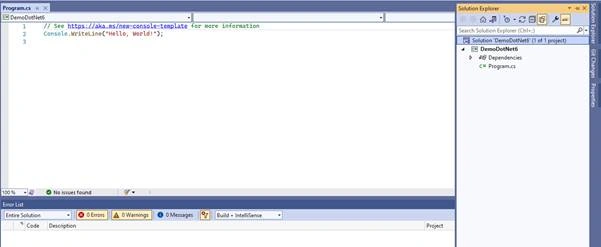
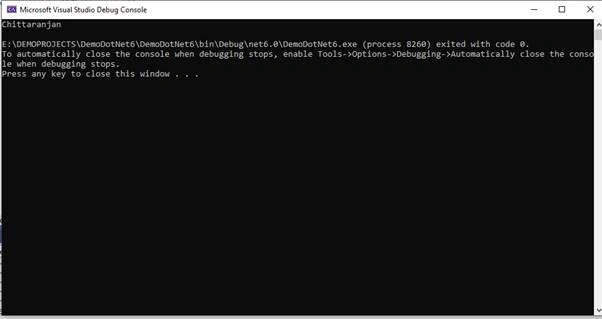
Now, build and run the application.
Output
Conclusion
In this article, we explained the basics of .NET 6.0 and what’s new in .NET 6.0.
Join the conversation! Your thoughts help the community grow.