

What is QnA Maker service?
In simple language, it is a service to educate a bot with static answers for a specified set of questions. Let’s take an example of FAQs. FAQs are sets of questions and answers which are going to remain the same irrespective of the user.
Now, we will jump into the configuration part of service.
- To start with QnA Maker service, go to qnamaker.ai
- Click on sign in and log in with your Microsoft account. You can see 'My Services' and 'Create new service' tab. 'My services' tab will list down all QnA services you have created earlier.

To create new instance of service, click on 'Create new service' tab. It will redirect you to following page.
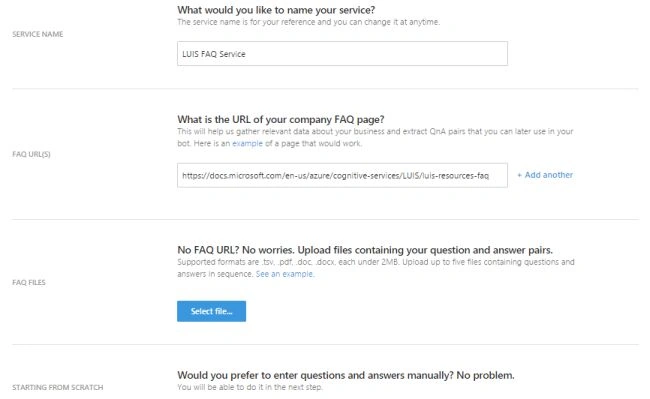
Here you can specify name for service. I have named it as LUIS FAQs Service. As I am going to use this for FAQs related to LUIS.
There are three options to educate QnA maker for your set of questions and answers.
Option 1
If you have a webpage with FAQs content, you can specify URL of that page here. QnA maker will consume all QnAs from specified resources. I have specified URL of LUIS resources FAQ.
Option 2
You can also upload a file with questions and answers with specified format. You can download example file by clicking on 'See an example link'.
Option 3
You can specify your QnAs from scratch by adding them one by one. But before that you need to click on Create link.
When you click on Create link, it will redirect to Knowledge Base page. Here you can see QnAs you have specified on last page of configuration with the help of option 1 or option 2.
For option 3, you can click on 'Add new QnA pair' link in right upper corner.
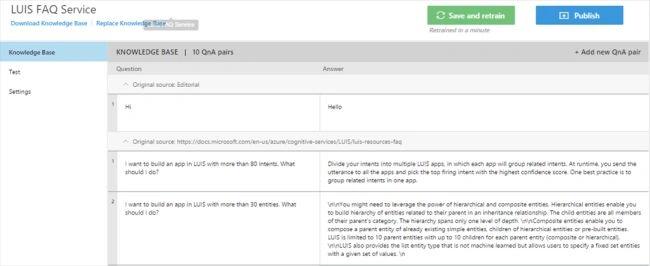
After specifying QnA pairs, now its time to test our service. Click on Test link below Knowledge Base link.
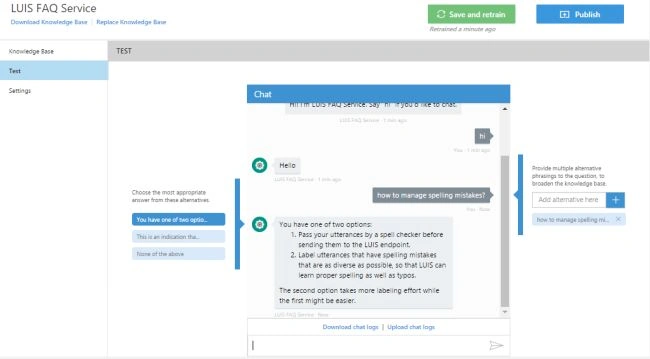
QnA maker provide us chat emulator to test our service. I have asked question regarding 'managing spelling mistakes' in LUIS.
QnA maker does following steps while searching for answer,
- NLP (natural language processing) for a question I have asked.
- Match with existing set of questions and rank them as per relevance.
- Answer of question with highest rank will be returned by service.
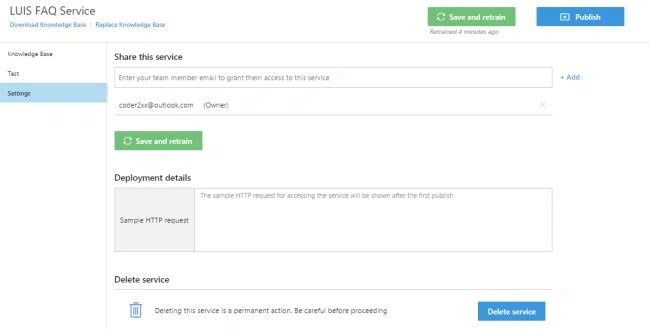
Click on 'Settings' link for more options. Under settings you can share the service with other Microsoft accounts by specifying their email ids.
Join the conversation! Your thoughts help the community grow.