

Introduction
This article is a sequence of real world examples of using PowerShell in SharePoint 2016. In this article, we will discuss how we will use PowerShell cmdlets to manage Help Collections SharePoint. We will try to cover all the available cmdlets i.e get, Install and Uninstall.
SharePoint help collection is not configured with SharePoint Configuration. We have to manually configure it. SharePoint Help Files (. Cab) are installed on the hive folder with SharePoint Installation but not configured by default.
In order to configure it, we have to run PowerShell commands.
Scenario
Krossfarm is having an issue with help file, when the users click on the Help button on their site collection and they get an error, as shown below.
” Unfortunately, help seems to be broken.
There aren't any help collections in the current language for the site you’re using.”
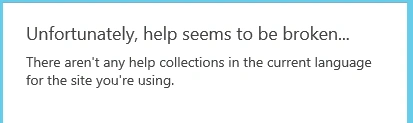
Even if he goes to Site settings > Site administration > Help Settings, he will get the error, as shown below. 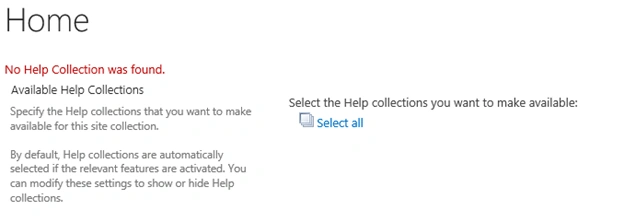
Clearly, Help collection is broken and now it is the SharePoint admins responsibility to fix the broken Help Collection.
Steps
In order to fix the broken help collection, we will do the activities, as shown below.
- Check if the CAB files exist or not.
- Get the Current Help File Status.
- Install the Help File(s).
- Testing.
Checking the Help Files
Logon to the SharePoint Server and browse to the Hive folder.
- Go to C:\program Files\Common Files\microsoft shared\web server extensions\16\HCCab.
- In this folder, make sure that you see cab files for 14 & 15.
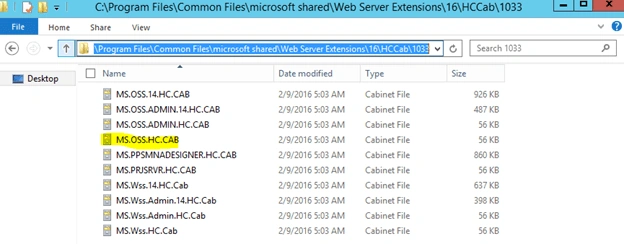
- If you have multiple language packs, then check each language folder; i.e, English is 1033.
Current Status of Help files
Log on to the Server with farm admin account.
- Open PowerShell Windows (Run as an administrator).
- Run the Get-sphelpcollection command.

- In the picture shown above, you can see nothing in return and even the command is completed successfully.
Install Help files
We want to install all the available help, so we will run the command with all the options.
- Log on to the Server with farm admin account.
- Open PowerShell (Run as Administrator) and run Install-SPHelpCollection - All these commands will install the help files, which are available in Hive folder.

- You have to wait for 5 minutes to completely install it, if you have multiple language packs.
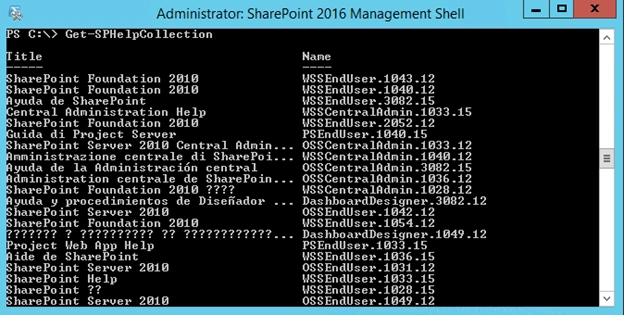
- Now, if you run Get-SpHelpCollection and you will get something, as shown below.
Test
We can test it at both the locations via site settings as well as from browsing the Site collection.
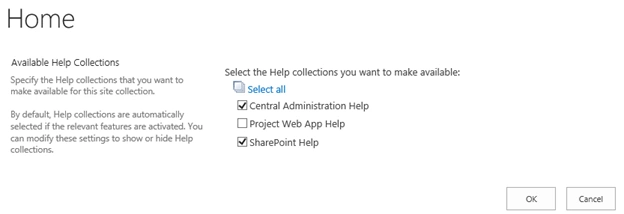
- Go to the Site collection > Site settings > help Settings and you will see the option.
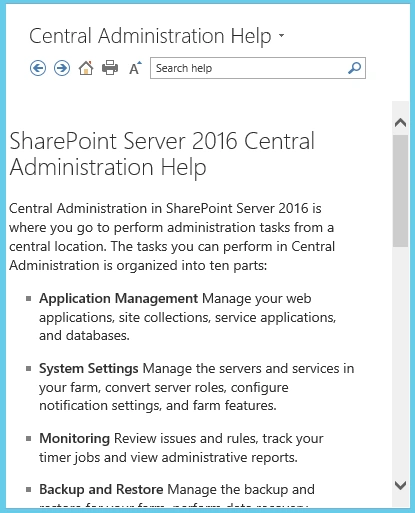
- Now, if you click on the “?” (help button) on the top suite bar and you will get this pop Window.
Uninstall
As we noticed, we have 2010 help files, which are also installed, but the Krossfarm team doesn't want that, so we have to uninstall it one by one. There is no way, which helps us to remove all 2010 help files, so we have to uninstall one by one.
- Log on the Server with farm admin account.
- Open PowerShell (Run as an administrator) and run this command.
Uninstall-SpHelpCollection –Name “OSSEndUser.1033.12”
Conclusion
In this session, we learned how to fix the broken Help Collection. We also learned about three more PowerShell commands.
Keep reading and learning.
Join the conversation! Your thoughts help the community grow.