

Introduction
In this article, we'll learn how to use message pack protocol with SignalR using ASP.NET Core and Angular. The message pack is used for binary data transmission over the protocol and binary data is lightweight in comparison to text data.
"MessagePack is an efficient binary serialization format. It allows you to exchange data among multiple languages like JSON. But it is faster and smaller. Small integers are encoded into a single byte, and typical short strings require only one extra byte in addition to the strings themselves."
The binary data transmission has a significant performance benefit over the protocol. It is like a JSON but small and fast.
In this article, we'll see how to enable message pack on both Server and client side. It is mandatory to enable on both sides to get it to work because while negotiating between the client and server this feature must be enabled.
This article is part of a series of posts on SignalR using ASP.NET Core.
- Overview of New stack SIgnalR on ASP.NET Core here
- Getting Started With SignalR Using ASP.NET Core And Angular 5 here
- Getting started with SignalR using ASP.NET Core: Dynamic Hub here
- Getting started with SignalR using ASP.NET Core: Streaming Data using Angular 5 here
- Getting started with SignalR using ASP.NET Core: Azure SignalR Service here
This article demonstrates the following things:
- Why Message Pack?
- Configuring message pack on the server
- Configuring message pack on Typescript client
- Configuring message pack on .NET Client
- Demo
The source code is available at GitHub,
- https://github.com/nemi-chand/ASPNETCore-SignalR-Angular-TypeScript
- https://github.com/nemi-chand/ASPNETCore-SignalR-AzureService
WhyMessagePack?
- It is small in size, compact and efficient.
- What you can do with JSON, you can do with Message Pack.
- Creates an application of a specific type.
- It is supported by over 50 programming languages.
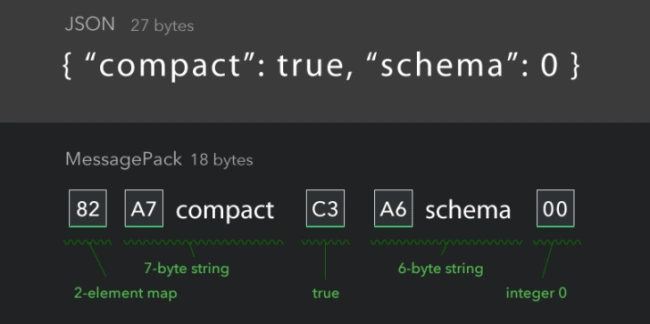
In the above picture, you can see the difference between JSON and MessagePack. It is smaller than JSON so it has better performance over the transmission.
You can read more about MessagePack at the official website.
Configure Message pack on Server
You are ready to use MessagePack (binary data) with SignalR just by changing one line of code on the server side. We are going to use SignalR Protocol MessagePack client in order to use server side. We need to install MessagePack signalr client sdk "Microsoft.AspNetCore.SignalR.Protocols.MessagePack".
CLI Command
dotnet add package Microsoft.AspNetCore.SignalR.Protocols.MessagePack --version 1.0.0
Nuget Package
Install-Package Microsoft.AspNetCore.SignalR.Protocols.MessagePack
After installing this SDK , we have to add SDK in start up services to use MessagePack. Add AddMessagePackProtocol method after AddSignalR method in configure services in startup class.
- services.AddSignalR().AddMessagePackProtocol();
AddMessagePackProtocol allows you to configure the options to add formatter resolvers so you can create your custom IFormatterResolver in order to add custom resolver. There are plenty of prebuilt formatter resolvers available like standard resolver and unself binary resolver.
- services.AddSignalR().AddMessagePackProtocol(configure =>
- {
- configure.FormatterResolvers = new List<IFormatterResolver>()
- {
- MessagePack.Resolvers.UnsafeBinaryResolver.Instance
- };
- });
Configure message pack on Client
We have successfully added MessagePack to the server side, now we have to add on the client side as well. In this article, we will see two types of client implementations.
- TypeScript/Angular Client
- .Net Client
Typescript/Angular Client
Need to install NPM Package for a messagepack protocol.
NPM Command
npm install @aspnet/signalr-protocol-msgpack
After installing this pack , we are going to use MessagePackHubProtocol class. HubConnectionBuilder class has a method called "withHubProtocol". It takes IHubProtocol implementation so we are passing MessagePackHubProtocol instance to it. HubConnectionBuilder will configure it to use the Message Pack protocol.
- import { MessagePackHubProtocol } from '@aspnet/signalr-protocol-msgpack';
- const hubConnection = new HubConnectionBuilder()
- .withUrl('/chat')
- .withHubProtocol(new MessagePackHubProtocol())
- .build();
We have successfully added Messagepack protocol to TypeScript client. Now it's sending and receiving the Binary data over the protocol.
.NET Client
This is .NET standard 2.0 client so the purpose of this client to consume SIgnalR hub which is must be built on or above 2.1 ASP.NET Core SignalR. To enable Message Pack on .NET Client , install the NuGet Pack "Microsoft.AspNetCore.SignalR.Protocols.MessagePack".
CLI Command
dotnet add package Microsoft.AspNetCore.SignalR.Protocols.MessagePack --version 1.0.0
Nuget Package
Install-Package Microsoft.AspNetCore.SignalR.Protocols.MessagePack
Add method AddMessagePackProtocol to HubConnectionBuilder class while creating hub connection.
- var hubConnection = new HubConnectionBuilder()
- .WithUrl("/chat")
- .AddMessagePackProtocol()
- .Build();
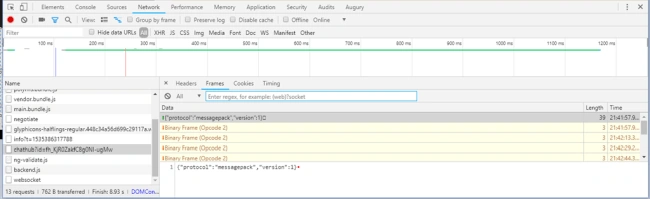
The hub connection is started with messagepack protocol with binary frame in the above image.
Summary
In this article, we have seen MessagePack protocol implementation with SignalR using ASP.NET Core and Angular 5. We have learned the following things:
- Why message pack gives better performance.
- Enabling MessagePack on the server side.
- Enabling MessagePack on multiple clients (Typescript/Angular and .NET client).
References
- https://docs.microsoft.com/en-us/aspnet/core/signalr
- https://github.com/aspnet/SignalR
- https://github.com/nemi-chand/ASPNETCore-SignalR-Angular-TypeScript
- https://github.com/nemi-chand/ASPNETCore-SignalR-AzureService
- Getting Started With SignalR Using ASP.NET Core
- Getting Started With SignalR Using ASP.NET Core And Angular
- Getting Started With SignalR Using ASP.NET Core - Streaming Data Using Angular
- Getting Started With SignalR Using ASP.NET Core - Dynamic Hub
- Getting Started With SignalR Using ASP.NET Core And Azure SignalR Service
Roger VanderPosted Oct 1, 2018, 6:10 PM
Hello, do you have a complete example published? I have put in practice the instructions and the object always arrives null to the Hub.