

Introduction
There was a time when programmers would work with bits and assembly language and you must agree that it was quite difficult to convert those bits and assembly in working pieces of software or programs. But it was all in the mid 19th Century. Today I don’t think any programmer software developer must work on it and they need not to.
A glimpse of Programming Languages Evolution
Bits => Assembly => High Level Languages => Object Oriented Programming => And Now Frameworks.
In this article, I will focus on ASP.NET MVC. I have worked with ASP.NET earlier and I would recommend it for RAD (Rapid Application Development) and if you are new to Web Development. I will highly recommend ASP.NET MVC for major Web Project Development.
It provides a great feature called separation of concerns; which means you need not to stick with its default behavior and architecture. In MVC views play an important role because views are all about how to represent your data to the end user and it’s also responsible for communicating with a controller and a model. By default MVC provides a great developer-friendly view engine called Razor. But this article is for those who don’t like to work with Razor or who want to work with Razor.
Spark View Engine
The Spark View Engine is another view engine for ASP.NET MVC, I would personally suggest that you don’t use any other view engine unless and until you really need to.
Now the question comes to our mind, "Why Spark view engine?".
If you search on the web you will find many discussions like Spark has gone or Spark is dead.
Actually it always depends on you how you grab new or different things and what encourages you to do so.
The important part of Spark is the integration of the HTML and code is very clean and easy to read. If you love HTML scripting then you will love its syntax because it’s quite similar to HTML that will keep your view clean.
Let’s compare it to ASP.NET Razor, WebForms and JSP.
The following is the ASP.NET Web form or JSP (both are quite similar) syntax :
- <ul>
- <% foreach(var p in ViewData.Model.Products) { %>
- <li><%= p.Name %></li>
- <% } %>
- </ul>
Razor Syntax
- <ul>
- @foreach(var p in Model.Products) {
- <li>@p.Name</li>
- }
- </ul>
And the beautiful Spark syntax is here:
- <ul>
- <li each=”var p in Model.Products”>${p.Name} </li>
- </ul>
As you can see it maintains a foreach loop inside the <li> tag. Unlike ASP.NET web controls it’s not fighting against the HTML tags.
Not only that but also it is flexible and has a rich features like model binding and intelligence (go to SparkSence ) and download SparkSence for VS2010.
Since this article is for beginners I am not digging into it.
Please note: Spark has vast features that I am not covering here but I have attached a sample project for “Getting Started with Spark”; I hope it will help you as a beginner.
Configure Spark For ASP.NET MVC
Step 1: Create a new ASP.NET MVC 3 or 4 application, it will ask you to select View Engine for your project, try to select Razor for this time.
1. Reference the following 2 important DLLs in your project:
- Spark.dll
- Spark.Web.Mvc.dll
You can download them from Spark View Engine
2. Add a section to the project Web.config file as in the following:
- <sectionGroup>
- <section name="spark" type="Spark.Configuration.SparkSectionHandler, Spark" />
- </configSections> And add handlers in View’s configuration file
- <httphandlers>
- <remove verb="*" path="*.aspx"/>
- <add path="*.aspx" verb="*"
- type="System.Web.HttpNotFoundHandler"/>
- <add path="*.spark" verb="*"
- type="System.Web.HttpNotFoundHandler"/>
- </httphandlers>
3. Now you need to add a Spark View Engine as the default for the Framework. There are many various ways to add Spark or another view engine as the default view engine. I want to keep it simple so here is the following is the code.
Go to the Global.asax.cs file and add the following line under the Application_Start() method.
- protected void Application_Start()
- {
- ViewEngines.Engines.Insert(0,new SparkViewFactory());
- // your rest of code like register route etc..
- }
It will make the Spark View Engine as the default.
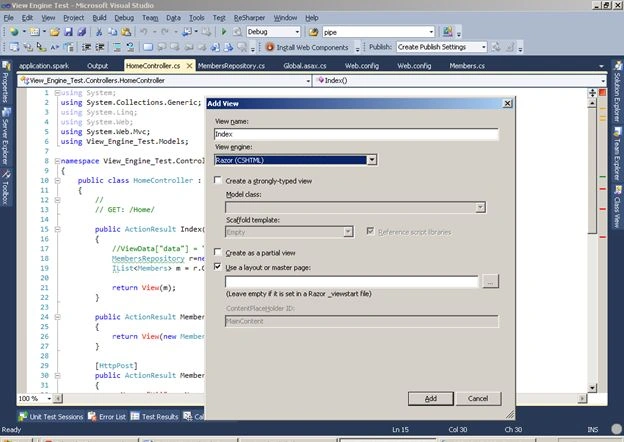
Now you are free to use Spark as the default view engine. Try to add a view for your default controller.
By default it will add a view with an extension .cshtml (for C#) but you must change its extension to .spark.
Find the visuals here :
Add view:
Change Extension:
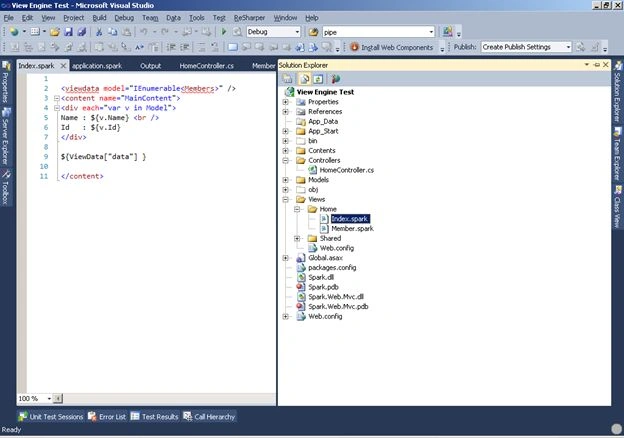
Remove all contents and add the following tags:

Now you are done.
The screenshots that I mentioned here are in the sample project; you can download it for reference.
References
Your comments and suggestions will be greatly appreciated.
Join the conversation! Your thoughts help the community grow.