
The project I was working on required a Silverlight Out-Of-Browser application that is able to run on both Windows and Mac. We used a Sterling database instead of SQL Server. No other software such as Mono was required for the application to run on the Mac except Silverlight. The Sterling database project is a Silverlight project which can run on any OS with Silverlight installed.
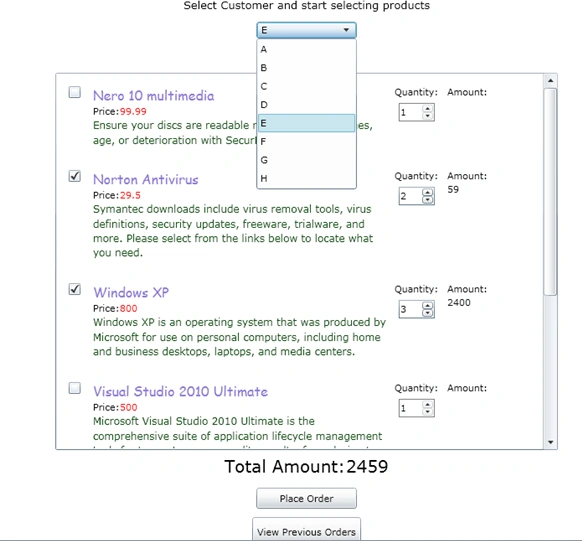
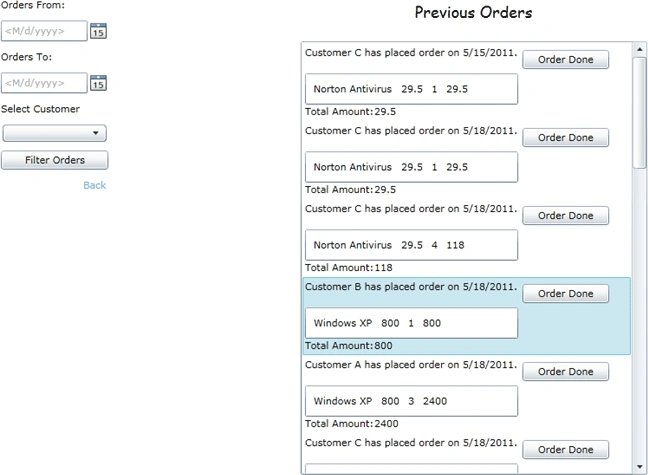
Objective: A simple demonstration Silverlight project to save, retrieve and delete data from a Sterling database. This application just stores, retrieves and deletes the information of a customer who has placed an order for a list of products.
Open VS 2010 and create a new Silverlight Application and name it "SterlingDemoProject".
We have to add a project called Wintellect.Sterling to our solution. Wintellect.Sterling is a project by Jeremy for Silverlight applications which manage database functions. The Wintellect.Sterling project is available with this sample project. To add the project File->Add->Existing Project and select the location of Wintellect.Sterling.csproj. Then make the SterlingDemoProject refer to the Wintellect.Sterling project.
Now we have to create the database. For using a Sterling database we have to create a class which defines the tables and implements the interface BaseDatabaseInstance.
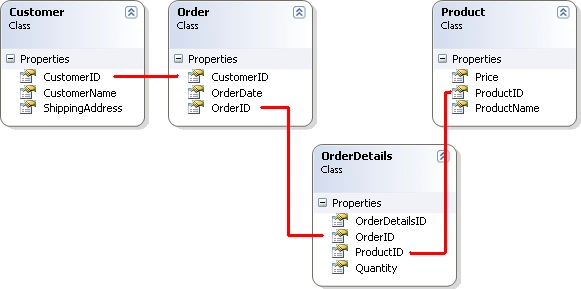
Let's create the table definitions. Tables are nothing but class definitions for Sterling databases. Add a folder called Tables to the SterlingDemoProject. The class definitions are as shown. There are 4 classes Customer, Product, Order and OrderDetails.
Add a folder named Database to the SterlingDemoProject. Add a class called "DemoDB" to the Database folder. Inherit and implement the abstract class "BaseDatabaseInstance" from Wintellect.Sterling.Database. The _RegisterTables method returns a list of Tables (class definitions) for the Database DemoDB.
using System;
using System.Net;
using System.Windows;
using System.Windows.Controls;
using System.Windows.Documents;
using System.Windows.Ink;
using System.Windows.Input;
using System.Windows.Media;
using System.Windows.Media.Animation;
using System.Windows.Shapes;
using Wintellect.Sterling.Database;
using System.Collections.Generic;
using SterlingDemoProject.Tables;
namespace SterlingDemoProject.Database
{
public class DemoDB : BaseDatabaseInstance
{
public override string Name
{
get { return "Purchase Database"; }
}
protected override System.Collections.Generic.List<ITableDefinition> _RegisterTables()
{
return new List<ITableDefinition>
{
CreateTableDefinition<Customer,int>(c=>c.CustomerID),
CreateTableDefinition<Order,int>(c=>c.OrderID),
CreateTableDefinition<OrderDetails,int>(c=>c.OrderDetailsID),
CreateTableDefinition<Product,int>(c=>c.ProductID)
};
}
}
}
In Sterling a database class can be equated to a table of a normal database and properties in the class can be equated to columns in a table of a normal database.
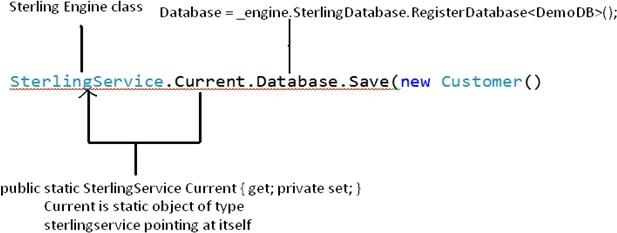
A Sterling database is managed by the SterlingEngine. It is an engine which exists throughout the application lifecycle. Add the class named "SterlingService". It's functionality is to activate the Sterling engine, register serializers, register databases and dispose the engine when the application is closed.
using System;
using System.Net;
using System.Windows;
using System.Windows.Controls;
using System.Windows.Documents;
using System.Windows.Ink;
using System.Windows.Input;
using System.Windows.Media;
using System.Windows.Media.Animation;
using System.Windows.Shapes;
using Wintellect.Sterling;
using System.ComponentModel;
using System.Diagnostics;
using SterlingDemoProject.Database;
namespace SterlingDemoProject
{
public sealed class SterlingService : IApplicationService, IApplicationLifetimeAware, IDisposable
{
private SterlingEngine _engine;
public static SterlingService Current { get; private set; }
public ISterlingDatabaseInstance Database { get; private set; }
private SterlingDefaultLogger _logger;
public void StartService(ApplicationServiceContext context)
{
if (DesignerProperties.IsInDesignTool) return;
_engine = new SterlingEngine();
Current = this;
}
public void StopService()
{ return; }
public void Starting()
{
if (DesignerProperties.IsInDesignTool) return;
_engine.Activate();
Database = _engine.SterlingDatabase.RegisterDatabase<DemoDB>();
}
public void Started()
{ return; }
public void Exiting()
{
if (DesignerProperties.IsInDesignTool) return;
if (Debugger.IsAttached && _logger != null)
{
_logger.Detach();
}
}
public void Exited()
{
Dispose();
_engine = null;
return;
}
public void Dispose()
{
if (_engine != null)
{
_engine.Dispose();
}
GC.SuppressFinalize(this);
}
}
}
In the Starting() method of the SterlingService class the Sterling engine is activated and the database DemoDB is registered. We can define more than one database and register it in this method.
Now we have to add this class in the app.xaml's application lifetime objects section. Create a namespace Sterling which refers to the project and add the SterlingService class in <Application.ApplicationLifetimeObjects>.
<Application xmlns="http://schemas.microsoft.com/winfx/2006/xaml/presentation"
xmlns:x="http://schemas.microsoft.com/winfx/2006/xaml"
x:Class="SterlingDemoProject.App"
xmlns:Sterling="clr-namespace:SterlingDemoProject"
>
<Application.Resources>
Manas PatnaikPosted May 26, 2011, 3:50 PM
Nice explanation,complete and informative article .This might be the one of the best article i came across in last few days.Of course while going through your article i didn't feel that this is your first article what so ever. good piece of work , 5 from me :). Thanks
Dinesh BeniwalPosted May 25, 2011, 2:47 AM
Kavitha we are expect some more good articles from you on Sterling database in Silverlight.
Suthish NairPosted May 23, 2011, 5:37 AM
good start...
Karthik CSPosted May 23, 2011, 5:19 AM
Good Work Kavitha, all the best, great article.
Shirsendu NandiPosted May 23, 2011, 5:14 AM
g8 and good article kavita..cong8s fr ur 1st article
Jaganathan BantheswaranPosted May 23, 2011, 4:51 AM
Keep it up.
Dinesh BeniwalPosted May 23, 2011, 3:25 AM
Very Useful article, thanks for sharing......