

Abstract: If you have a config file like web.config that needs to be TRACKED by Git but want LOCAL CHANGES IGNORED, that situation can not be solved with .gitignore. We show alternative ways to achieve that.
Problem
During work with version management tools like Git, there are typically 2 situations in which you want your version management tool GIT to IGNORE CHANGES to your work directory or files themselves:
- Spam files
- Local version files
Case 1: typically, you have an output of the build process, intermediary files, or the final result of the build. These are files you want UNTRACKED; that is, Git should not track those files at all. So, you want them UNTRACKED.
Case 2: typically, you have files that have a local version different than the tracked version, but you do not want your local changes to be committed to Git. An example is if you use a config file like web.config which contains your database connection string.
You want that file TRACKED since that is an important part of your application, but you want changes to your local system to be ignored since your local version will contain your local settings that are different for each developer on the project. So, you want them TRACKED, LOCAL CHANGES IGNORED.
There 4 ways to ignore files in Git
Here are 4 methods to ignore files in Git:
- Usage of .gitignore (GLOBALLY UNTRACKED)
- Usage of .git/info/exclude (LOCALY UNTRACKED)
- Usage of assume-unchanged (TRACKED, LOCAL CHANGES IGNORED)
- Usage of skip-worktree (TRACKED, LOCAL CHANGES IGNORED)
Sample project
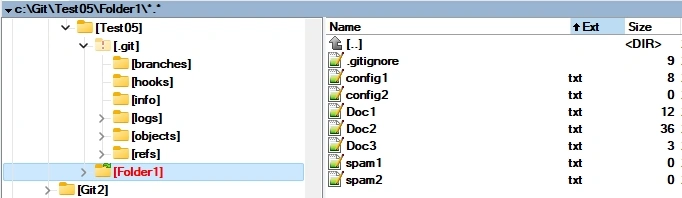
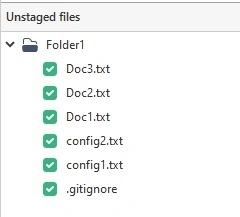
We have set up a small project to demo this article:
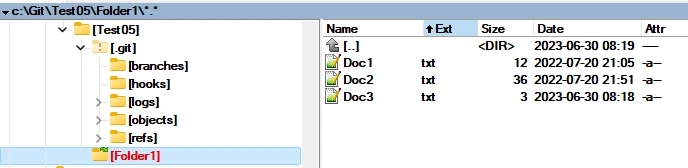
We used the Gui tool SourceTree to add and commit files.
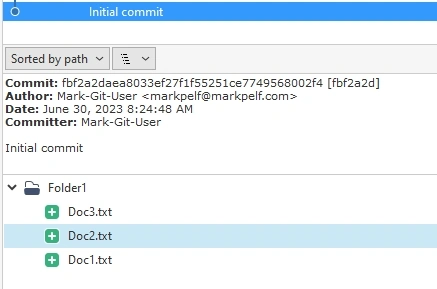
Method A - Usage of .gitignore
4.1 Overview
The usage of the .gitignore file is very popular and well-described elsewhere, so I will not go into details. Just to mention, this method is planned to be applied to files that you want GLOBALY UNTRACKED. File in .gitignore is completely ignored by Git on all systems using that repository.
You need to add a .gitignore file and add to that file files you want to be ignored. You will need to add and commit .gitignore to Git.
This method can be applied to files that are untracked, and you want them to be ignored. It is inappropriate to try this method on files already tracked by Git. Adding a file tracked by Git to .gitignore will not provide any result. One might think if I add the tracked file to .gitignore, it will not be tracked from that point on, but it does not work that way.
4.2 Example
Let us assume we have a spam1.txt file; we do not want to track. SourceTree will report it is there:
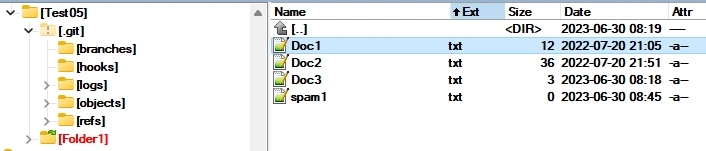
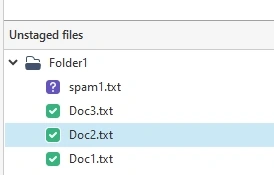
You need to add a .gitignore file and add to that file files you want to be ignored. You will need to add and commit .gitignore to Git. Here is how the situation looks now:
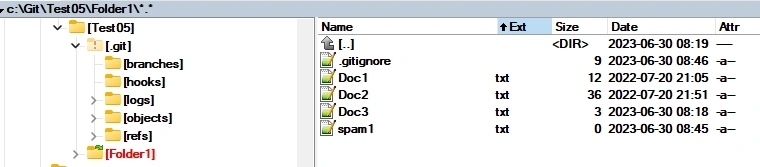
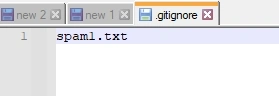
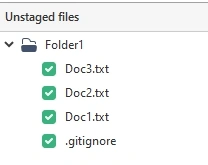
So, SourceTree no longer sees spam1.txt. It does see an additional file .gitignore. So file spam1.txt is GLOBALY UNTRACKED.
Method B - Usage of .git/info/exclude
5.1 Overview
You need to add a .git/info/exclude file and add to that file files you want to be ignored. The format is the same as the format of the .gitignore file.
This method is very similar to the .gitignore method; just file .git/info/exclude is not itself part of the repository, so its influence is local. This method is planned to be applied to files that you want LOCALY UNTRACKED.
5.2 Example
Let us assume, we have a spam2.txt file we do not want to track. SourceTree will report it is there:
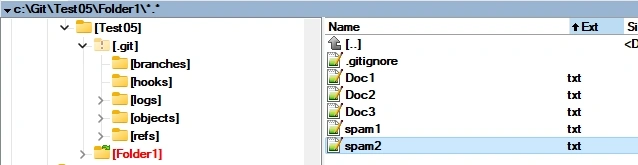

You need to add a .git/info/exclude file and add to that file files you want to be ignored. The format is the same as the format of the .gitignore file. Here is how the situation looks now:
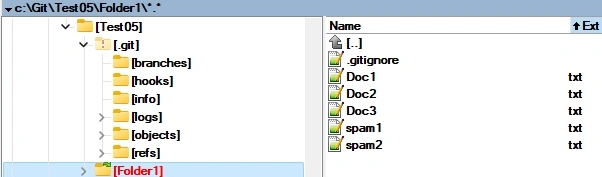
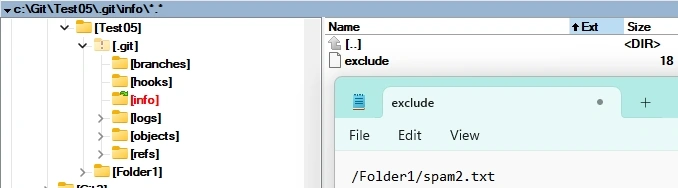
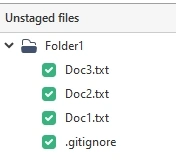
The SourceTree no longer sees the spam2.txt file. So file spam2.txt is LOCALY UNTRACKED.
Method C - Usage of assume-unchanged
6.1 Overview
The “assume-unchanged” option was envisioned as a performance aid but is often mentioned in the context of workarounds to ignore files. You explicitly tell Git not to check if the file has been changed. This method is planned to be applied to files that you want TRACKED, LOCAL CHANGES IGNORED.
Here are the commands you will need for this method:
To ignore local changes to tracked files:
git update-index --assume-unchanged [<file>...]

To track local changes again:
git update-index --no-assume-unchanged [<file>...]

To list all files assumed unchanged:
git ls-files -v | grep '^[[:lower:]]'
Just to mention that some articles on the internet [3] strongly discourage the usage of this method.
6.2 Example
Let us add the config1.txt file and commit it to the repository.
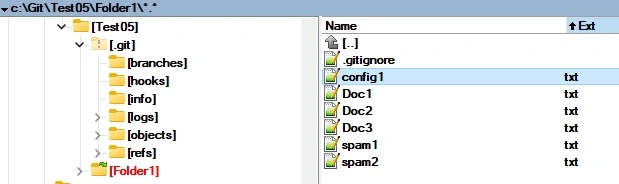
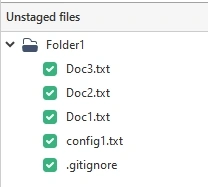
Then do some changes to the file config1.txt, and SourceTree will report that the file has been edited:
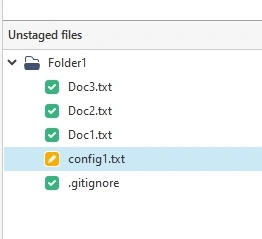
On the command prompt, you need to add a command to assume that the file is unchanged. The source tree will no longer report that the file was edited.
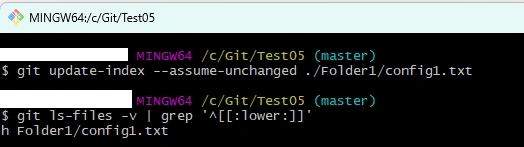
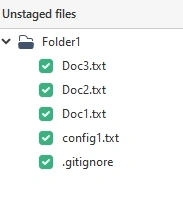
The SourceTree no longer sees the config1.txt file as modified, although that file has actually been locally modified, So, file config1.txt is TRACKED, LOCAL CHANGES IGNORED.
7 Method D - Usage of skip-worktree
7.1 Overview
The “skip-worktree” option is recommended by many on the internet as the right way to ignore files. You explicitly tell Git not to check if the file has been changed. This method is planned to be applied to files that you want TRACKED, LOCAL CHANGES IGNORED.
Here are the commands you will need for this method.
To ignore local changes to tracked files:
git update-index --skip-worktree  [<file>...]

To track local changes again:
git update-index --no-skip-worktree [<file>...]

To list all files marked with skip-worktree:
git ls-files -v | grep ^S
7.2 Example
Let us add the config2.txt file and commit it to the repository.
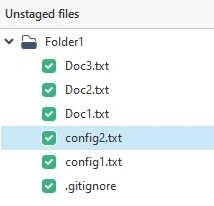
Then do some changes to the file config3.txt, and SourceTree will report that the file has been edited:
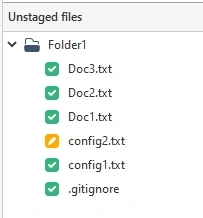
On the command prompt, you need to add the command “skip-worktree”. The source tree will no longer report that the file was edited.
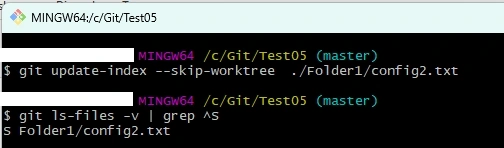
The SourceTree no longer sees the config2.txt file as modified, although that file has actually been locally modified, So, file config2.txt is TRACKED, LOCAL CHANGES IGNORED.
Conclusion
Use case for having files TRACKED, LOCAL CHANGES IGNORED is very strong. The web.config file that every developer ASP.NET will have locally modified with at least a database connection string. Usage of .gitignore.In this case, it will not solve the problem. The appropriate method is the usage of the “skip-worktree” option in Git.
Git has many options, but the command line interface is not user-friendly. It is a big disappointment that even GUI SourceTree does not offer, for example, context menu options to set the file “local changes untracked” flag.
References
- https://stackoverflow.com/questions/1753070/how-do-i-configure-git-to-ignore-some-files-locally
- https://gitready.com/intermediate/2009/02/18/temporarily-ignoring-files.html
- https://stackoverflow.com/questions/23097368/git-ignore-vs-exclude-vs-assume-unchanged
- https://avdi.codes/keep-local-modifications-in-git-tracked-files/
Join the conversation! Your thoughts help the community grow.