

Introduction
In this article I will tell you how to encrypt a Query String globally in your application.
This article will help you to encrypt a Query String in a very convenient and easy manner, you don't need to write code again and again, you just need to add a class and only a few modifications in the Web.config file are needed.
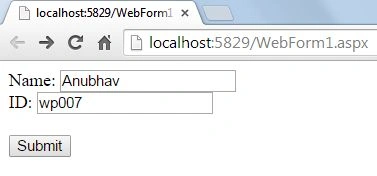
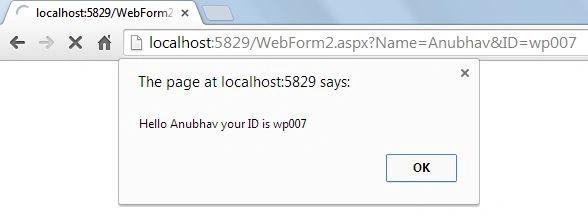
In my last article I told you how to Get Values From Query String Using jQuery. I am working on the same application and will show you how encryption can save our data from being changed and/or read by an unauthorized user or attacker.
Step 1
First of all you need to add a class named "QueryStringModule". You can get this class from my code that is available in Zip/RAR format at the start of this article.
In this class first of all the Init function is called that will be called on each initiated request. In this function "Beginrequest" is called:
- public void Init(HttpApplication context)
- {
- context.BeginRequest += context_BeginRequest;
- }
In the Beginrequest our URL is checked for two thingsthe , first is .aspx and the second is "?". Both of these things confirm that it is an aspx page and has a query string associated with it.
After checking the URL two strings are declared, the first has "RawURL", in other words a real and complete URL that is to be seen when the page is loaded and the second string gets only the name of the page that is to be loaded, this is done by sending the URL as the parameter to another function "GetVirtualPath" that splits the URL from "?" and returns the first part of the URL.
Now if the URL contains a specified text that will be appended after the encryption is done then it's sent for decryption otherwise it goes for encryption.
- private const string PARAMETER_NAME = "encrypt=1&";
- private const string ENCRYPTION_KEY = "key";
- void context_BeginRequest(object sender, EventArgs e)
- {
- HttpContext context = HttpContext.Current;
- if (context.Request.Url.OriginalString.Contains("aspx") &&
- context.Request.RawUrl.Contains("?"))
- {
- string query = context.Request.RawUrl;
- string path = GetVirtualPath();
- if (query.Contains(PARAMETER_NAME))
- {
- // Decrypts the query string and rewrites the path.
- //string rawQuery = query.Replace(PARAMETER_NAME, string.Empty);
- string decryptedQuery = Decrypt(query);
- context.RewritePath(path, string.Empty, decryptedQuery);
- }
- else if (context.Request.HttpMethod == "GET")
- {
- // Encrypt the query string and redirects to the encrypted URL.
- // Remove if you don't want all query strings to be encrypted automatically.
- if (query != "")
- {
- string encryptedQuery = Encrypt(query);
- context.Response.Redirect(encryptedQuery);
- }
- }
- }
- }
Step 2
In the Encrypt function the URL is sliced at various levels and from different positions.
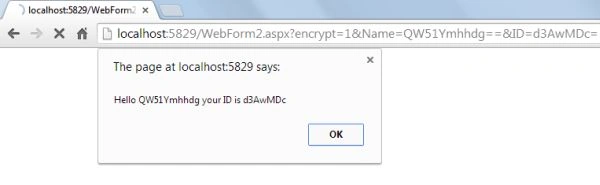
First it's sliced from "&" that will come after the "?" mark in URL. After breaking it from "&", the sliced part is again sliced from the "=" mark, this means we will get two values for each "&" mark, first as the name of the parameter and the second as the value of the parameter. This code will encrypt the value of the parameter and will then again concatenate it to the URL, this will go on until all the "&" marks are not covered. So, this means that now you will see a different URL whose parameter names are unchanged but the values they are now having are totally different.
Adil DeveciPosted May 28, 2018, 8:28 AM
When using with Server.Transfer method, encryption is disabled and the address bar is shown clear text. Can you help me for this problem?
Renuka RamrakhianiPosted Dec 20, 2017, 2:27 AM
This code is working on my local system. However when deployed on production server , url is not encrypted
Nikhil MahajanPosted May 15, 2015, 7:02 AM
this solution output will like query string is encrypted but actually its not.If you using chrome then you can see in network tab it will make a request with query string (with data visible) then it will redirect to encrypted URL. So actual problem is not solved with this solution.