
Introduction
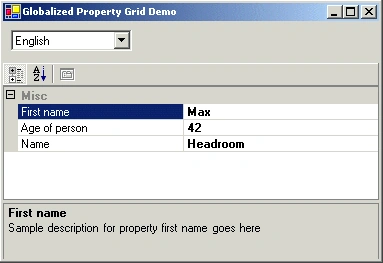
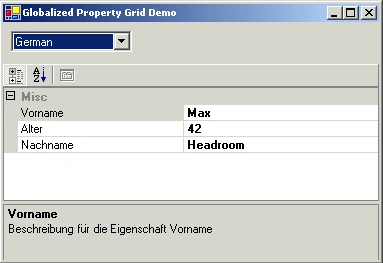
The property grid is a nice control to display properties and values. You create an instance of your class and assign it to the property grid. By using reflection a property grid extracts the properties of the class and displays its values. Usually you meet some more requirements: It would be nice if there is a user friendly name displayed which may differ from the property member names used for the class. Or the property name needs to be displayed in a different language. Or if international software is required at all we need to display property names in more than one language. Maybe with switching between the languages at runtime.
So how to handle these requirements?
Fortunately there is a real good support for international software in .NET integrated. Even so it is possible to customize the displaying of the property names and descriptions. Let us see how to apply this.
Globalization and Localization
First, let's have a short look on developing international software with .NET. It is a process that mainly takes two steps: Globalization and Localization.
Simply defined:
Globalization means the process of preparing your code to be able to support different languages. This is done by eliminating language or culture dependencies from your code to become culture-neutral. That is to avoid using hardcoded strings or message to be displayed to the user.
Localization means the process of separation of regional settings from the application code. Instead provide them separately as resources.
.NET has a bunch of classes integrated to support the development of international software. These classes are located in the namespaces System.Globalization and System.Ressources. CultureInfo is the class that holds information about a certain language, as formatting of numbers and dates, calendar to use, decimal character... . the current language is set by assigning an instance of CultureInfo to the property CurrentUICulture of the Thread instance representing the current thread:
Thread.CurrentThread.CurrentUICulture = new CultureInfo("de");
The example sets German as the current language. The languages identifiers are standard by ISO 639-1.
The application resources are requested by using an instance of ResourceManager. The resource manager uses the currently set CultureInfo object to access the correct local resources.
ResourceManager rm = new ResourceManager("MyStringTable",this.GetType().Assembly);
string message = rm.GetString ("MyMessage");
The example accesses the string named 'MyMessage' from the stringtable named 'MyStringTable'.
We will use this support later on when we are localizing the property names to be displayed by the property grid. But before let us define a sample project for demonstration purpose.
Creating a sample project
For demonstration purpose select a windows application as a new project type. Use the main form of type Form1 as a host for a property grid control. Select a property grid control from toolbox and drag it to the form.
Additionally define a test class that provides some properties to be displayed in the property grid. Select "Add class..." and add a c# class named Person.cs to the project.
The test class models a person and should look like this:
// Person is the test class defining three properties: first name, last name and age.
public class Person : GlobalizedObject
{
private string firstName = "";
private string lastName = "";
private int age = 0;
public Person() {}
public string FirstName
{
get { return firstName; }
set { firstName = value; }
}
public string LastName
{
get { return lastName; }
set { lastName = value; }
}
public int Age
{
get { return age; }
set { age = value; }
}
}
Now we are prepared for an initial version.
Initial version
An instance of Person is created and assigned to the property grid in the Form1_Load event handler.
private void Form1_Load(object sender, System.EventArgs e)
{
// Instantiate test class and set some data
person = new Person();
person.FirstName = "Max";
person.LastName = "Headroom";
person.Age = 42;
// Assign to property grid
PropertyGrid1.SelectedObject = person;
}
After compiling the initial version displays the public properties of the person class in
the property grid with property name and value. The displayed property name matches
exactly the name of the property name of the class.
Join the conversation! Your thoughts help the community grow.