

Introduction
Google Input tools is a very powerful development tool for an Indian language. Input tools are also called transliteration. It can convert English to the Hindi Language. That concept can be used in the Windows OS, website and Android Phone.
I will show a simple example:
English: "Kya kar rhe ho?".
Converted to Hindi: "क्या कर रहे हो?".
Advantage
We can easily type the Hindi language and also the typing speed is greater than from English. Because when we talk to anyone we use the Hinglish Language. For example: "Kya kar rhe ho?".
So that tool helps you to write text in Hindi.
Installation on Windows OS
First go to the link. Then you will see the following:
Now you can select your choice language and then install on the Windows OS. After installing successfully you will see “ENG” in the right side of the Taskbar.
Then press the“Window+Space” key of the keyboard.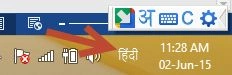
Then open Notepad and start writing, but you will write any text defined in the Hindi language.
It will show 5 helping words but you can change the settings from here:
When you want to again change the language Hindi to English the press again “Windows+Space keys”.
Installation on Android Phones
First go to Google Play Store link for Google Input. After installing the apps in your Android phone, open it.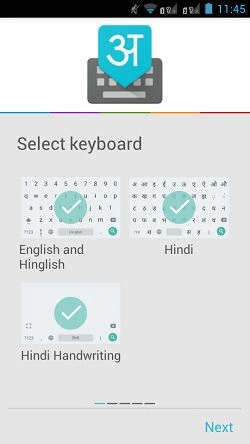
Press Next.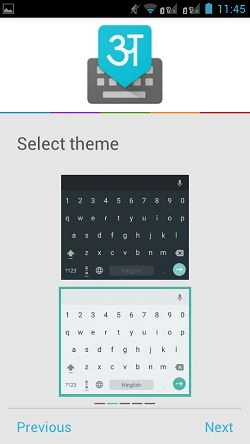
Press Next.
On clicking “Enable Google Hindi Input”, you will see the following:
Check the Checkbox for Google Hindi Input and press the “back” button. Now click “Select Google hindi Input”, in other words the choice of your Android keyboard.
Then you can see the following: 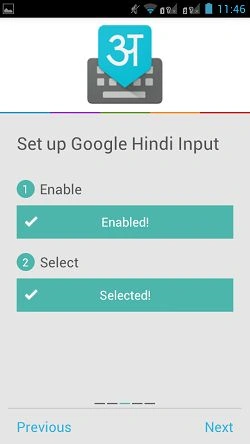
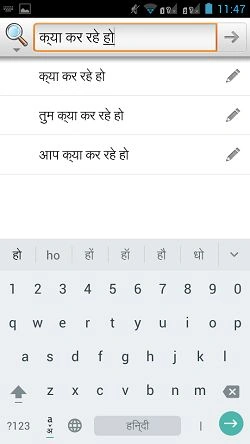
Close the app. Open Google search and see that your keypad GUI has changed now.
The keypad can now work with the following three languages.

Achin BuddhikaPosted May 4, 2019, 1:35 AM
Input tools for windows no longer sup except Japanese :(
akhil saxenaPosted Apr 22, 2016, 1:32 AM
its not working on that pages which is connect with master page
krishna kumarPosted Oct 7, 2015, 8:55 AM
Ok. I found myself that we can convert Unicode to True type using C++, and it works very clear.
Neeraj KumarPosted Oct 5, 2015, 1:23 PM
?•??? ?•? ???‡ ??‹? that text was convert on publish time.but , I know when any person read this full article then they will easily understand that text is mistake...
Neeraj KumarPosted Oct 5, 2015, 1:13 PM
•??? ?•? ???‡ ??‹? this text come because of publisher error.that not my mistake.
krishna kumarPosted Oct 5, 2015, 12:28 PM
Dear niraj, English: "Kya kar rhe ho?".Converted to Hindi: "?•??? ?•? ???‡ ??‹?". as you have shown in the beginning of the article!!! how this happened ???? while we type in google input tool that gives an output in hindi, but how did u get this????
krishna kumarPosted Oct 5, 2015, 12:19 PM
Hi Niraj, Thanks for u'r information. The output from Google input tool is accepted in a textbox in vb.net, but while transferring to a flexgrid it becomes as ??????? . but I have managed to input into sql database using nvarchar and passing with N to the database, and that was successful. But in crystal report the consonants of the language is not correct , means the consonants are being printed two times that is my problem... pls help me.
Neeraj KumarPosted Oct 5, 2015, 12:27 AM
Hi krishna kumar, TrueType and Unicode are two different things. Unicode is not a font format, its is a font encoding standard or a character set standard.TrueType is a font format, it is a standard "container" for your characters.So, taking any non-unicode TrueType font with an editor and saving is again as a unicode TrueType font will only create a non-standard font.For Malayalam Language download font at https://sites.google.com/site/fontpacksite/malayalam-fonts.
krishna kumarPosted Oct 4, 2015, 11:22 PM
Great information, Thank You. I am using VB.Net and Crystal Report 11, Google input tool gives output in Unicode format , crystal report supports only true type font format, how to convert Unicode to true type format. Please help me. (I am using Malayalam Language).
Neeraj KumarPosted Oct 1, 2015, 12:10 AM
hi Murali Gundu , If you want to use for offline Web application then only one solution is that use windows os software.when you want to write Hindi Text in your web Application then use this software for write text.
Murali GunduPosted Sep 30, 2015, 11:28 PM
usefull info neeraj... is there any solution for offline web application?? thanks in advance..
Santhakumar MunuswamyPosted Jun 2, 2015, 3:17 PM
Thanks for good work
Abhishek JaiswalPosted Jun 2, 2015, 3:07 AM
Very informative! :)
Sibeesh VenuPosted Jun 1, 2015, 11:27 AM
Good one.
Mahesh ChandPosted Jun 1, 2015, 10:17 AM
Nice. Good to know. Thanks Neeraj.
NitinPosted Jun 1, 2015, 9:45 AM
nice