

Introduction
In our current world, a user can’t remember all usernames and passwords for all their applications and websites. To simplify that, Google provides OAuth API to authenticate the user with one Google account. Let’s see how to implement this.
Prerequisites
- Google Developer Account
Create a new project in Google API & Services
Step 1
Open the below Google Developer Console in the browser.
Step 2
Create a new project.
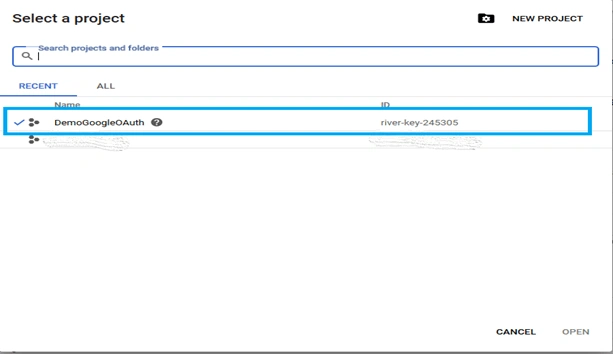
Step 3
Click "Credentials" and create a new OAuth client ID.
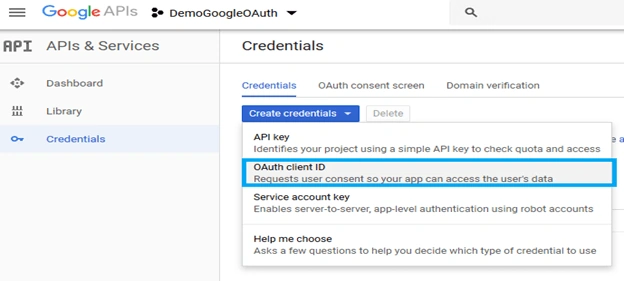
Step 4
Select Web application, then enter the URL which you need show the user after authenticated.

Step 5
Click "Create". You will get the Client Id and Client secret.

Now, we will send the API call for authentication.
Authenticate and Get Access token
The "Authentication and Access Token" part consists of two APIs. The below one is for login. The API consists of parameters which are redirect_uri (uri which is mentioned when creating credentials), client_id.
Login API (GET)
URL
https://accounts.google.com/o/oauth2/v2/auth
Parameters
response_type=code //default
scope=openid //default
redirect_uri=<URL Which is mentioned when creating credentials>
client_id=<client_id>
URL will look like below
https://accounts.google.com/o/oauth2/v2/auth?response_type=code&scope=openid&redirect_uri=<redirect_uri> &client_id=<client_id>
Open the URL in a browser.

After successful authentication, it will redirect to the URI which you mentioned. And the URL will look like this link.
Get Access Token (POST)
Using the above URL code value, we need to send one more post request to get the Access Token. We will see the process below. I am going to use POSTMAN for API calls.
URL
https://www.googleapis.com/oauth2/v4/token
Parameters
code=<from the return URL of Login API>
client_id=<client_id>
client_secret=<client_secret>
redirect_uri=<URL Which is mentioned when creating credentials>
grant_type=authorization_code // default

After getting access_token, we are able to access the Google API services which we enabled for the project in Google Console.
Access to Google API Services
For example, I am going to get the Google Plus user info.
URL
https://www.googleapis.com/plus/v1/people/me
Parameters
access_token=<access_token>

Since I am not using Google Plus much, I didn’t get much information. For more details, please refer to the Google API documentation.
Summary
In this article, I discussed how we can use Google Authentication and Google API services. In the same way, we can use Twitter, Facebook, GitHub, etc. You can try that with the same method and with the help of the API documentation.
Rajanikant HawaldarPosted Jul 18, 2019, 12:10 PM
nice article