Introduction
This article describes how to add a Google search feature in ASP.Net. Here I will describe how to communicate with the Google search API.
Description
Since it is third party software, we require a third-party DLL to be referenced by our application that will communicate with the Google server.
For this we must download the Google Search API:
- GoogleSearchAPI.dll
You can download it from the source code attached in this article.
Design
Now add one TextBox,one Button and one Datalist.
In the Datalist I used one linkbutton to show the search result title with link and label to show the search description.
Design your screen as in the following screen.
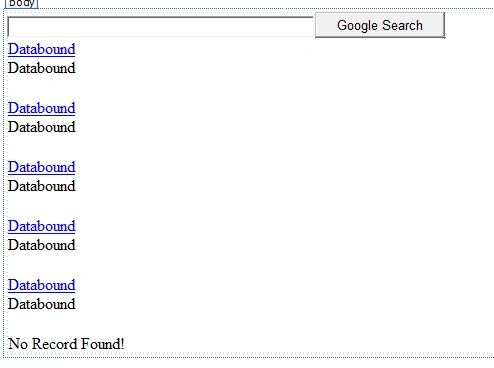
Or you can copy the following source code:
- <body>
- <form id="form1" runat="server">
- <div>
- <asp:TextBox ID="TextBox1" runat="server" Width="300px"></asp:TextBox>
- <asp:Button ID="btnSearch" runat="server" Text="Google Search" OnClick="Button1_Click" /><br />
- <asp:DataList ID="dlSearch" runat="server" Width="600px">
- <ItemTemplate>
- <asp:LinkButton ID="LinkButton1" runat="server" Text='<%#Eval("Title") %>' PostBackUrl='<%#Eval("Url") %>'></asp:LinkButton><br />
- <asp:Label ID="Label1" runat="server" Text='<%#Eval("Content") %>'></asp:Label><br />
- <br />
- </ItemTemplate>
- <FooterTemplate>
- <asp:Label Visible='<%#bool.Parse((dlSearch.Items.Count==0).ToString())%>' runat="server"
- ID="lblNoRecord" Text="No Record Found!"></asp:Label>
- </FooterTemplate>
- </asp:DataList>
- </div>
- </form>
- </body>
Now go to the code view.
Next add a reference of the following Google Search API DLL to your website:
- GoogleSearchAPI.dll
And write the following code in the .cs file:
- using System;
- using System.Collections.Generic;
- using Google.API.Search;
- using System.Data;
- public partial class _Default : System.Web.UI.Page
- {
- protected void Page_Load(object sender, EventArgs e)
- {
- if (!IsPostBack)
- {
- dlSearch.DataSource = null;
- dlSearch.DataBind();
- TextBox1.Text = "";
- }
- }
- protected void Button1_Click(object sender, EventArgs e)
- {
- DataSet ds = new DataSet();
- DataTable dt = new DataTable();
- dt.Columns.Add(new DataColumn("Title", typeof(string)));
- dt.Columns.Add(new DataColumn("Content", typeof(string)));
- dt.Columns.Add(new DataColumn("Url", typeof(string)));
- GwebSearchClient client = new GwebSearchClient("www.c-sharpcorner.com");
- IList<IWebResult> results = client.Search(TextBox1.Text, 30);
- foreach (IWebResult result in results)
- {
- DataRow dr = dt.NewRow();
- dr["Title"] = result.Title.ToString();
- dr["Content"] = result.Content.ToString();
- dr["Url"] = result.Url;
- dt.Rows.Add(dr);
- }
- dlSearch.DataSource = dt;
- dlSearch.DataBind();
- }
- }
In the code above I passed the TextBox value in the button click to Google server.
After getting the result I bound it to the datatable then to the datalist control.
Just check these two lines:
- GwebSearchClient client = new GwebSearchClient("www.c-sharpcorner.com");
- IList<IWebResult> results = client.Search(TextBox1.Text, 30);
In the first line I am passing "www.c-sharpcorner.com" as the Client because it required a hosted site for Security purposes.
If you dodn't pass that then it will show an exception.
In the second line I am passing 30 and a TextBox value. Here 30 means I am getting 30 search results.
So you can increase or decrease this value as needed.
Now build your application. Enter a search query then press the button.
It will show all the Google search results.

Now click on the link to see the corresponding site.
For any modifications or problems please comment.
Thank You.


jagan voodiPosted Feb 13, 2017, 9:24 AM
Hi could please send me GoogleSearchAPI.dll. My email id [email protected]
Suresh MorichauhanPosted May 11, 2016, 3:26 PM
Hey I follow this artical and it give me very helpful..But when i Using thic code it give me exception while searching. exception is like that 'The Google Web Search API is no longer available. Please migrate to the Google Custom Search API'
Satyjeet SainiPosted Nov 24, 2015, 8:36 AM
sure Sanjeeb, take an example Tarak metha ka ulta chashma so just want the latest video of that serial. but this code I'm getting random sequence of serial.
Satyjeet SainiPosted Nov 16, 2015, 5:06 AM
How to pass the sortedby as third parameter into the search function? And can you tell me max value of the search result, and how to identify the duplicate result. In my case I'm getting the serial video from youtube. Please suggest.
Nivas ManePosted Oct 28, 2014, 2:02 AM
thanks......nice
ahmad sawalhaPosted Sep 7, 2014, 4:13 AM
I am using Google Custom Search in c# ,, is this a new method ? is it stronger than Google Custom Search? thanks
Anindya ChatterjeePosted Apr 28, 2014, 9:31 AM
I tried to put, "" instead of www.c-sharpcorner.com at "GwebSearchClient client = new GwebSearchClient("");" its working as it is. Let me know if I miss anything. And how to enable pagination?
deepa ashwiPosted Jun 22, 2013, 10:09 AM
nice
Jack OwensPosted Jun 20, 2013, 1:29 PM
For the code "GwebSearchClient client = new GwebSearchClient("www.c-sharpcorner.com");" if I pass URL as intranet site or a DUMMY site will it make a difference?
Jack OwensPosted Jun 20, 2013, 1:14 PM
FYI - In your sample code you have "32" & "30" as 2nd parameter. Nothing wrong with the code, its just a typo in-consistency
Jack OwensPosted Jun 20, 2013, 1:08 PM
Sanjeeb, nice article but one comment though. In your article you mentioned "You can download it (the DLL) from the source code attached in this article." I doubt people would trust to use that DLL unless they download it from Google Site (just a thought)
sudhir routPosted Jun 20, 2013, 4:34 AM
nice