In modern enterprise architectures, applications rarely operate in isolation. A single business transaction often spans multiple microservices, distributed caches, and third-party APIs. In an ideal environment, every dependency responds within single-digit milliseconds. In reality, networks experience latency spikes, databases hit lock contention, and third-party APIs suffer outages.
When a non-essential service fails, an unhandled exception or hung connection should never bring down the entire application. Graceful degradation is an architectural pattern that detects component failures and falls back to reduced functionality—ensuring core operations remain available and business continuity is preserved.
Why Graceful Degradation Matters in Enterprise Software
Without explicit resilience strategies, systems are vulnerable to cascading failures. If Service A waits synchronously for Service B, and Service B hangs, Service A exhausts its available thread pool. Soon, Service A stops responding, causing Service C to fail, until the entire enterprise platform collapses.
Graceful degradation mitigates this risk by establishing clear boundaries:
Protecting Core Revenue Paths: Critical operations (e.g., executing a payment or saving an order) proceed even if supporting features (e.g., loyalty points or recommendations) are offline.
Failing Fast to Preserve Resources: System resources are freed up immediately by applying aggressive timeouts instead of leaving HTTP connection threads hanging.
Maintaining UX Trust: Users receive partial, cached, or default data accompanied by clear status messaging rather than unhandled HTTP 500 error pages.
Defining Critical vs. Non-Critical Execution Paths
To implement graceful degradation effectively, system features must be classified into two distinct categories:
The Critical Path: Components required to complete the core business transaction. If a critical component fails, the transaction must safely roll back.
The Non-Critical Path: Supplementary features that enrich the response but are not strictly required to complete the main transaction. If a non-critical component fails, the system bypasses it and proceeds with fallback data.
Real-World Scenario: E-Commerce Checkout Pipeline
Consider an e-commerce checkout flow. The customer submits a payment for an order. To complete the transaction, the backend interacts with three systems:
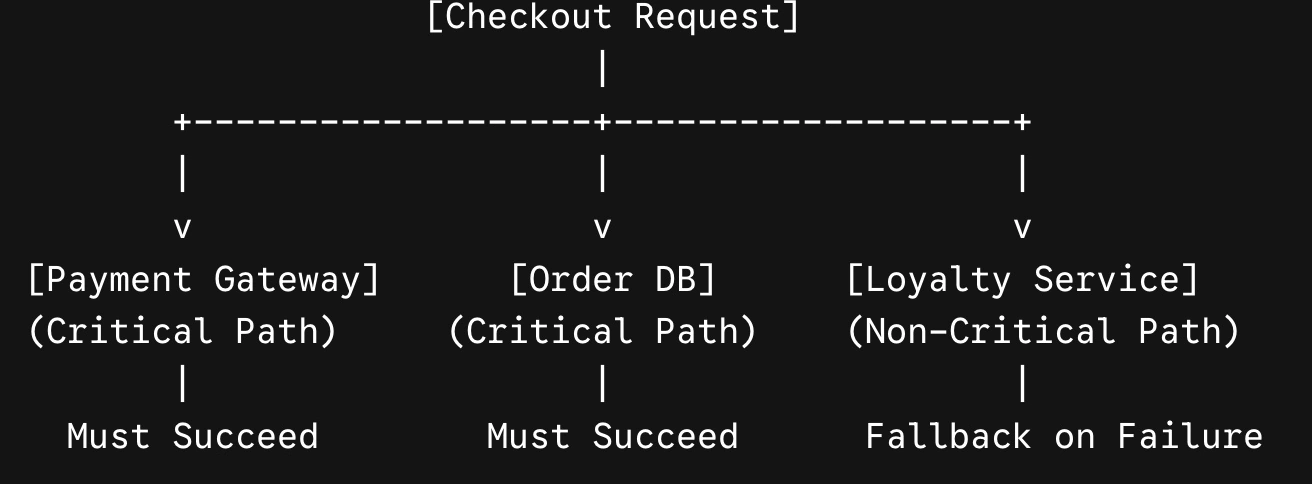
Payment Gateway & Order Database: Critical path. If payment fails or the database cannot persist the order, the transaction aborts.
Loyalty Reward Engine: Non-critical path. Calculates reward points earned on the purchase. If this service fails or times out, the checkout process must still complete successfully.
Implementation in C# with Polly
In .NET 8 and .NET 9, the standard approach for managing resilience patterns is Polly (integrated via Microsoft.Extensions.Resilience).
The following complete C# example demonstrates how to wrap a non-critical downstream call with a fast-failing timeout and fallback mechanism to preserve the checkout process.
using System.Net.Http.Json;
using Microsoft.Extensions.Logging;
using Polly;
using Polly.Timeout;

public class CheckoutService(
    IHttpClientFactory httpClientFactory,
    ILogger<CheckoutService> logger)
{
    private readonly HttpClient _loyaltyClient = httpClientFactory.CreateClient("LoyaltyService");

    public async Task<CheckoutResult> ProcessCheckoutAsync(CheckoutRequest request, CancellationToken ct)
    {
        // 1. Critical Path: Process Payment
        var paymentSuccess = await ExecutePaymentAsync(request.PaymentInfo);
        if (!paymentSuccess)
        {
            return new CheckoutResult
            {
                IsSuccess = false,
                ErrorMessage = "Payment authorization failed."
            };
        }

        // 2. Non-Critical Path: Fetch Loyalty Rewards with Graceful Degradation
        LoyaltyReward rewards = await FetchLoyaltyRewardsWithFallbackAsync(request.UserId, ct);

        // 3. Complete Checkout Flow regardless of Loyalty Service status
        return new CheckoutResult
        {
            IsSuccess = true,
            OrderId = Guid.NewGuid().ToString(),
            EarnedPoints = rewards.PointsEarned,
            IsRewardSystemDegraded = rewards.IsDegraded,
            StatusMessage = rewards.IsDegraded
                ? "Order placed successfully! Loyalty points will update within 24 hours."
                : $"Order placed successfully! You earned {rewards.PointsEarned} points."
        };
    }

    private async Task<LoyaltyReward> FetchLoyaltyRewardsWithFallbackAsync(string userId, CancellationToken ct)
    {
        // Build a resilience pipeline with a fallback strategy
        var resiliencePipeline = new ResiliencePipelineBuilder<LoyaltyReward>()
            .AddFallback(new()
            {
                // Trigger fallback on network failures or execution timeouts
                ShouldHandle = new PredicateBuilder<LoyaltyReward>()
                    .Handle<HttpRequestException>()
                    .Handle<TimeoutRejectedException>(),

                // Fallback action to execute when degradation occurs
                FallbackAction = args =>
                {
                    logger.LogWarning("Loyalty Service unavailable. Executing fallback for User: {UserId}", userId);

                    // Safe fallback state: 0 points and flagged as degraded
                    var fallbackReward = new LoyaltyReward
                    {
                        PointsEarned = 0,
                        IsDegraded = true
                    };

                    return ValueTask.FromResult(Outcome.FromResult(fallbackReward));
                }
            })
            .AddTimeout(TimeSpan.FromMilliseconds(800)) // Cut off downstream calls exceeding 800ms
            .Build();

        // Execute downstream service request within the pipeline
        return await resiliencePipeline.ExecuteAsync(async cancellationToken =>
        {
            var response = await _loyaltyClient.GetFromJsonAsync<LoyaltyReward>(
                $"api/rewards/calculate?userId={userId}", cancellationToken);

            return response ?? new LoyaltyReward { PointsEarned = 0, IsDegraded = false };
        }, ct);
    }

    private static Task<bool> ExecutePaymentAsync(PaymentInfo payment) => Task.FromResult(true);
}

// Data Models
public class CheckoutRequest
{
    public string UserId { get; set; } = string.Empty;
    public PaymentInfo PaymentInfo { get; set; } = new();
}

public class PaymentInfo
{
    public string CardNumber { get; set; } = string.Empty;
}

public class CheckoutResult
{
    public bool IsSuccess { get; set; }
    public string OrderId { get; set; } = string.Empty;
    public int EarnedPoints { get; set; }
    public bool IsRewardSystemDegraded { get; set; }
    public string StatusMessage { get; set; } = string.Empty;
    public string ErrorMessage { get; set; } = string.Empty;
}

public class LoyaltyReward
{
    public int PointsEarned { get; set; }
    public bool IsDegraded { get; set; }
}
Communicating Degradation to Frontend Clients
Graceful degradation extends beyond server-side logic; API contracts should explicitly indicate when degraded states occur. By returning data transfer objects (DTOs) with state indicators such as IsRewardSystemDegraded, frontend applications (Blazor, React, Angular) can render targeted UI notifications rather than generic errors.
{
  "isSuccess": true,
  "orderId": "4f9a2b8e-1234-5678-90ab-cdef12345678",
  "earnedPoints": 0,
  "isRewardSystemDegraded": true,
  "statusMessage": "Order placed successfully! Loyalty points will update within 24 hours."
}
Best Practices for Production Deployment
Pair Fallbacks with Circuit Breakers: Combine fallback logic with a Circuit Breaker pattern using AddCircuitBreaker(). Once a downstream service fails repeatedly, the circuit opens to immediately redirect subsequent traffic to the fallback without making network calls.
Observe and Alert: Log every fallback invocation with structured logging (ILogger) and push telemetry to OpenTelemetry or Application Insights. A elevated volume of fallback executions signals upstream dependencies require attention.
Enforce Aggressive Timeouts: Always combine fallback strategies with fast timeouts. Leaving HTTP clients open while waiting for slow dependencies exhausts server resources and degrades overall system availability.


Join the conversation! Your thoughts help the community grow.