

When you build a machine learning (ML) project, one of the most common questions is:
How do I show this to others without writing a full web app from scratch?
Two of the most popular tools for this are Gradio and Streamlit. Both let you create interactive web apps with just Python — no HTML, CSS, or JavaScript needed. But they are designed with slightly different goals in mind.
In this article, we'll compare Gradio and Streamlit, highlight their strengths, and help you decide which one is right for your application.
What is Gradio?
Gradio is a Python library designed for quickly building demos for ML models.
Just a few lines of code can create an interface where users can enter text, upload images, record audio, or interact with a chatbot.
It is especially popular in the Hugging Face ecosystem, where most demo apps use Gradio.
What is Streamlit?
Streamlit is a more general-purpose tool for building interactive data apps and dashboards.
It offers rich UI components like sliders, dropdowns, charts, maps, and tables.
You can combine ML models with visualizations, data exploration, or even multi-page apps.
Example
Gradio
import gradio as gr

def chatbot(message):
    return f"You said: {message}"

demo = gr.Interface(fn=chatbot, inputs="text", outputs="text")
demo.launch()
Steamlit
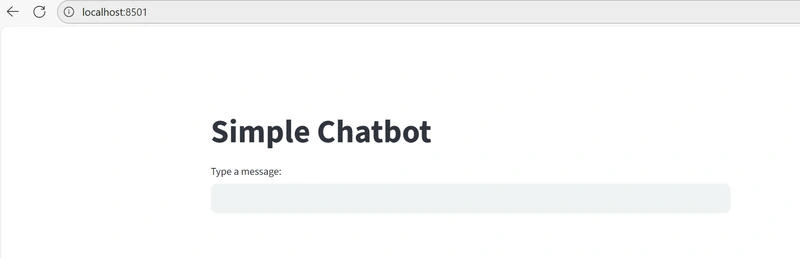
import streamlit as st

st.title("Simple Chatbot")

user_input = st.text_input("Type a message:")

if user_input:
    st.write(f"You said: {user_input}")
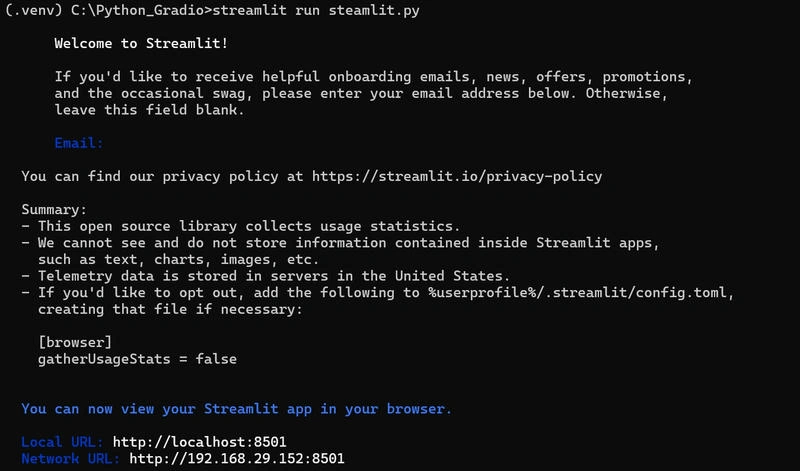
Now, go to the command prompt of the Virtual Environment and enter
Steamlit run <filename.py>
Streamlit automatically starts a local development web server and binds it to port 8501 by default.
Feature Comparision
| Feature | Gradio | Streamlit |
|---|---|---|
| Primary Use | ML model demos | Data apps, dashboards, ML apps |
| Ease of Setup | Very quick, minimal code | Easy but slightly more coding |
| UI Components | Text, image, audio, video, chatbot | Sliders, charts, tables, forms, multi-page apps |
| Customization | Limited styling | Flexible layouts and design |
| Best For | Sharing quick ML demos (e.g., Hugging Face Spaces) | Building interactive data + ML apps |
| Deployment | share=True for instant link | Streamlit Cloud or custom hosting |
| Community | Hugging Face research demos | Startups, enterprise data science apps |
Which Should You Choose?
Choose Gradio if…
You want to showcase an ML model quickly (e.g., image classifier, chatbot).
You don't need complex dashboards or multiple pages.
You like Hugging Face integration
Choose Streamlit if…
You're building a full-fledged app (with charts, multiple interactions, or business dashboards).
You want more UI control and flexibility.
You're moving closer to production-level applications.
Conclusion
The easiest way to think about it:
Gradio = Demo tool for ML models
Streamlit = App builder for data + ML
Join the conversation! Your thoughts help the community grow.