

In this article we will be seeing about the Granular backup in SharePoint 2010.
Go to Central Administration => Backup and Restore => Granular Backup.
You could see
- Perform a site collection backup
- Export a site or list
- Recover data from an unattached content database
- Check granular backup job status
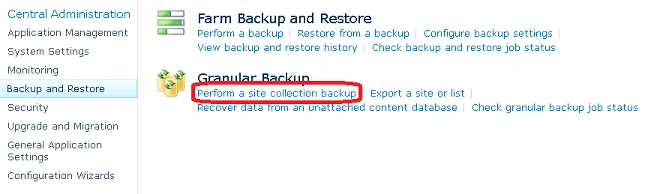
In this article we will be seeing how to do the following
- Perform a site collection backup
- Export a site or list
Perform a site collection backup
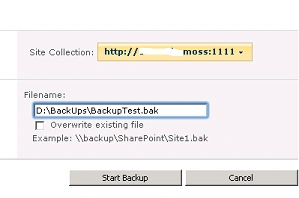
- Select the site collection for which backup has to be performed.
- Enter the destination file name where the backup file for the site collection has to be saved.
- Click on "Start backup".
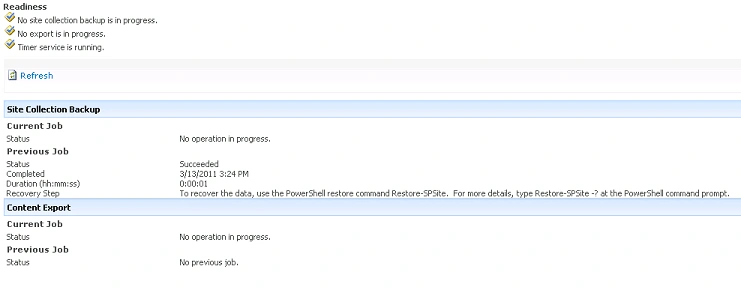
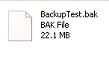
You could see the backup file in the destination file path
Using PowerShell:
BackUp-SPSite "http://servername:1111/" -Path "D:\BackUps\Site\BackUpTest.bak"
Export a site:
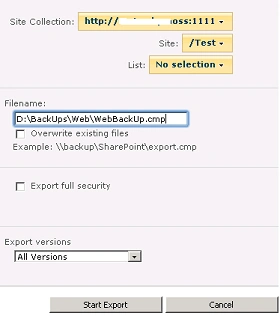

Using PowerShell:
Export-SPWeb -Identity "http://servername:11/web/" -Path "D:\BackUps\Web\WebBackUpTest.cmp"
Export a list from the site:
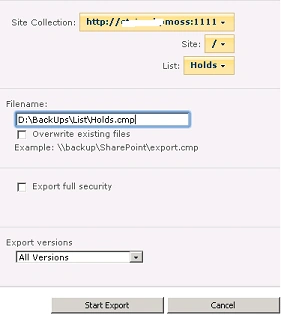

Using PowerShell:
Export-SPWeb -Identity "http://servername:1111/" -ItemUrl "/Lists/Users" -Path
"D:\BackUps\List\ListBackUpTest.cmp"
Export-SPWeb –Identity http://servername:1111/ –ItemUrl "/Shared%20Documents"
-Path "D:\BackUps\List\ListBackUpTest.cmp"
When I was trying to export the list from the site I was getting the following
error

When giving the ItemUrl follow the proper
syntax.
Join the conversation! Your thoughts help the community grow.