

This article has been
excerpted from book "Graphics Programming with GDI+".
Creating a Graphic Container
The BeginContainer method of the Graphics class creates a container. Each
BeginContainer method is paired with an EndContainer method.
You can also create nested containers. The following code snippet creates two
containers:
GraphicsContainer gContrainer1 = g.BeginContainer();
// Do something here
GraphicsContain1er gContrainer2 = g.BeginContainer();
// Do something here
g.EndContainer(gContrainer2);
g.EndContainer(gContrainer1);
Using Graphics Containers to Draw Text
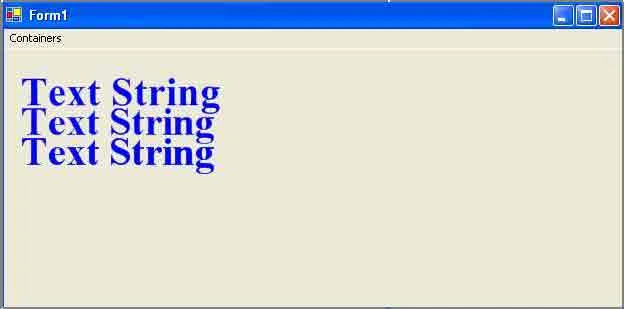
As mentioned earlier, graphics containers are temporary canvases. Let's see how
to set the quality of different text for different containers. Listing 9.15
creates two containers, and each has different properties. The first container
sets the TextRenderingHint property to AntiAlias and the TextContrast property
to 4. The second container sets TextRenderingHint to AntiAliasGridFit and
TextContrast to 12. After creating Font and SolidBrush objects, we set the
TextRenderingHint property of the Graphics object, and then we call DrawString.
Finally we call EndContainer to terminate the container scope.
LISTING 9.15: Using different graphics containers to draw text
private void
DrawTextMenu_Click(object sender, System.EventArgs
e)
{
// Create a Graphics object and set its
background as the form's background
Graphics g =
this.CreateGraphics();
g.Clear(this.BackColor);
// Create font and brushes
Font tnrFont =
new Font("Times
New Roman", 40, FontStyle.Bold,
GraphicsUnit.Pixel);
SolidBrush blueBrush =
new SolidBrush(Color.Blue);
g.TextRenderingHint = TextRenderingHint.SystemDefault;
// First container boundary starts here
GraphicsContainer gContrainer1 = g.BeginContainer();
// Gamma correction value = 0 – 12.
Default is 4.
g.TextContrast = 4;
g.TextRenderingHint = TextRenderingHint.AntiAlias;
g.DrawString("Text String",
tnrFont, blueBrush, new
PointF(10, 20));
// Second container boundary starts here
GraphicsContainer gContrainer2 = g.BeginContainer();
// Gamma correction value = 0 – 12. Default is 4.
g.TextContrast = 12;
g.TextRenderingHint = TextRenderingHint.AntiAliasGridFit;
g.DrawString("Text String",
tnrFont, blueBrush, new
PointF(10, 50));
// Second container boundary finishes here
g.EndContainer(gContrainer2);
// First container boundary finishes here
g.EndContainer(gContrainer1);
//Draw string outside of the container
g.DrawString("Text String",
tnrFont, blueBrush, new
Point(10, 80));
// Dispose of Graphics object
blueBrush.Dispose();
g.Dispose();
}

Join the conversation! Your thoughts help the community grow.