

Introduction
In this article, I will walk through how to use a graphing equation in an HTML5 canvas.
Graphing Equation in HTML5 using Canvas
What is the Graph of an Equation?
It is the set of points where the equation is true.
Features of a Graph
For a graph to be "complete" you need to show all the important features.
- Peaks
- Valleys
- Flat Areas
- Asymptotes
- Any other special feature
Browser Support
It is supported by all major browsers such as Internet Explorer 9, Firefox 3.6+, Safari 4+ and Chrome, etc.
Procedure for creating the graphing equations
Step 1
We first define the element using a "canvas" in HTML5. The height and width attributes set the canvas and graph size.
<canvas id="myCanvas" width="600" height="300" style="border: 1px solid black;"></canvas>
Step 2
In order to interact with this canvas through JavaScript, we will need to first get the element by Id and then create a context.
- <script type="text/javascript">
- var canvas = document.getElementById('mycanvas');
- var ctx = canvas.getContext("2d");
- </script>
Step 3
In the following code we will create a "Graph" function in which we define various methods, variables, constants and properties.
- function Graph(config)
- {
- // user defined properties
- this.canvas = document.getElementById(config.canvasId);
- this.minX = config.minX;
- this.minY = config.minY;
- this.maxX = config.maxX;
- this.maxY = config.maxY;
- this.unitsPerTick = config.unitsPerTick;
- // constants
- this.axisColor = "#aaa";
- this.font = "8pt Calibri";
- this.tickSize = 20;
- // relationships
- this.context = this.canvas.getContext("2d");
- this.rangeX = this.maxX - this.minX;
- this.rangeY = this.maxY - this.minY;
- this.unitX = this.canvas.width / this.rangeX;
- this.unitY = this.canvas.height / this.rangeY;
- this.centerY = Math.round(Math.abs(this.minY / this.rangeY) * this.canvas.height);
- this.centerX = Math.round(Math.abs(this.minX / this.rangeX) * this.canvas.width);
- this.iteration = (this.maxX - this.minX) / 1000;
- this.scaleX = this.canvas.width / this.rangeX;
- this.scaleY = this.canvas.height / this.rangeY;
- // draw x and y axis
- this.drawXAxis();
- this.drawYAxis();
- }
Step 4
In the following code, we will draw the x-axis. On the x-axis, we draw the left tick marks and then draw the right tick marks. For drawing both of the tick marks we apply the loop.
- Graph.prototype.drawXAxis = function ()
- {
- var context = this.context;
- context.save();
- context.beginPath();
- context.moveTo(0, this.centerY);
- context.lineTo(this.canvas.width, this.centerY);
- context.strokeStyle = this.axisColor;
- context.lineWidth = 2;
- context.stroke();
Figure 1
The following figure represents the x-axis:

- // draw tick marks
- var xPosIncrement = this.unitsPerTick * this.unitX;
- var xPos, unit;
- context.font = this.font;
- context.textAlign = "center";
- context.textBaseline = "top";
- // draw left tick marks
- xPos = this.centerX - xPosIncrement;
- unit = -1 * this.unitsPerTick;
- while (xPos > 0)
- {
- context.moveTo(xPos, this.centerY - this.tickSize / 2);
- context.lineTo(xPos, this.centerY + this.tickSize / 2);
- context.stroke();
- context.fillText(unit, xPos, this.centerY + this.tickSize / 2 + 3);
- unit -= this.unitsPerTick;
- xPos = Math.round(xPos - xPosIncrement);
- }
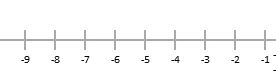
Figure 2
The following figure represents the left side tick mark of the x-axis:
- // draw right tick marks
- xPos = this.centerX + xPosIncrement;
- unit = this.unitsPerTick;
- while (xPos < this.canvas.width)
- {
- context.moveTo(xPos, this.centerY - this.tickSize / 2);
- context.lineTo(xPos, this.centerY + this.tickSize / 2);
- context.stroke();
- context.fillText(unit, xPos, this.centerY + this.tickSize / 2 + 3);
- unit += this.unitsPerTick;
- xPos = Math.round(xPos + xPosIncrement);
- }
- context.restore();
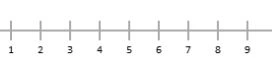
Figure 3
The following figure represents the right side tick mark of the x-axis
Step 5
Similarily, we will draw the y-axis. On the y-axis we will draw the tick marks along the upper side of the y-axis and finally, we draw the tick mark for the bottom side of the y-axis. For drawing both of the tick marks and labels we apply the loop.
- Graph.prototype.drawYAxis = function ()
- {
- var context = this.context;
- context.save();
- context.beginPath();
- context.moveTo(this.centerX, 0);
- context.lineTo(this.centerX, this.canvas.height);
- context.strokeStyle = this.axisColor;
- context.lineWidth = 2;
- context.stroke();
Figure 4
The following figure represents the y-axis

- // draw tick marks
- var yPosIncrement = this.unitsPerTick * this.unitY;
- var yPos, unit;
- context.font = this.font;
- context.textAlign = "right";
- context.textBaseline = "middle";
- // draw top tick marks
- yPos = this.centerY - yPosIncrement;
- unit = this.unitsPerTick;
- while (yPos > 0)
- {
- context.moveTo(this.centerX - this.tickSize / 2, yPos);
- context.lineTo(this.centerX + this.tickSize / 2, yPos);
- context.stroke();
- context.fillText(unit, this.centerX - this.tickSize / 2 - 3, yPos);
- unit += this.unitsPerTick;
- yPos = Math.round(yPos - yPosIncrement);
- }
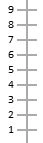
Figure 5
The following figure represents the upper side tick mark on the y-axis
- // draw bottom tick marks
- yPos = this.centerY + yPosIncrement;
- unit = -1 * this.unitsPerTick;
- while (yPos < this.canvas.height)
- {
- context.moveTo(this.centerX - this.tickSize / 2, yPos);
- context.lineTo(this.centerX + this.tickSize / 2, yPos);
- context.stroke();
- context.fillText(unit, this.centerX - this.tickSize / 2 - 3, yPos);
- unit -= this.unitsPerTick;
- yPos = Math.round(yPos + yPosIncrement);
- }
- context.restore();
Figure 6
The following figure represents the lower side of the y-axis
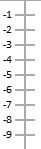
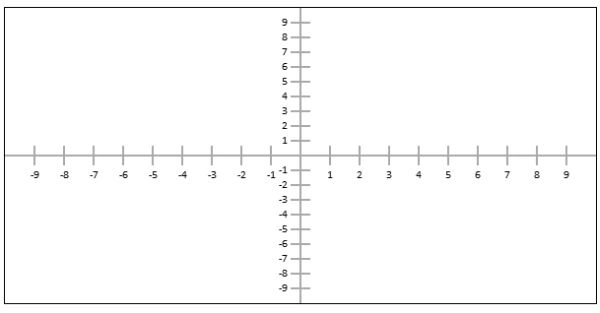
Figure 7
The following figure represents the combination of the x-axis and the y-axis. Both form a graph.
Step 6
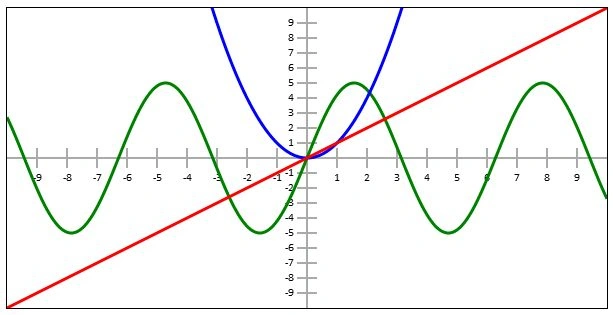
In the following step we will draw the equation on the graph. We will apply the loop for drawing the equation.
- Graph.prototype.drawEquation = function (equation, color, thickness)
- {
- var context = this.context;
- context.save();
- context.save();
- this.transformContext();
- context.beginPath();
- context.moveTo(this.minX, equation(this.minX));
- for (var x = this.minX + this.iteration; x <= this.maxX; x += this.iteration)
- {
- context.lineTo(x, equation(x));
- }
- context.restore();
- context.lineJoin = "round";
- context.lineWidth = thickness;
- context.strokeStyle = color;
- context.stroke();
- context.restore();
- };
Sandeep SharmaPosted Apr 11, 2013, 3:29 AM
nice article..
Ashwani TyagiPosted Apr 10, 2013, 11:16 PM
thanks
BELDE SANTHOSH KUMARPosted Apr 10, 2013, 1:21 PM
good article..
BELDE SANTHOSH KUMARPosted Apr 10, 2013, 1:21 PM
good article..