

In the previous article, we have seen how we can make a GraphQL query on Employees and select the columns in which we would like to have a response. Today, we will see how we can declare a parameter, and with the same parameter value, how we can query and get the result accordingly.
We will use the same application which we have created in our previous article. So, add one more method in the repository called GetEmployeeById which expects employeeId as long.
IEmployeeRepository
using System.Collections.Generic;
using System.Threading.Tasks;

namespace GraphQLInWebApiCore
{
    public interface IEmployeeRepository
    {
        Task<Employee> GetEmployeeById(long id);
    }
}
EmployeeRepository
using Microsoft.EntityFrameworkCore;
using System.Collections.Generic;
using System.Linq;
using System.Threading.Tasks;

namespace GraphQLInWebApiCore
{
    public class EmployeeRepository : IEmployeeRepository
    {
        // Other code...

        public Task<Employee> GetEmployeeById(long id)
        {
            return _context.Employee.SingleAsync(a => a.Id == id);
        }
    }
}
In GraphQL implementation, we need to modify the query part, only as we haven’t changed any field in Employee, the schema will be the same to resolve the EmployeeQuery.
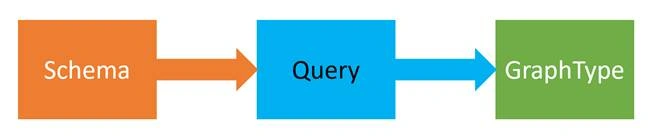
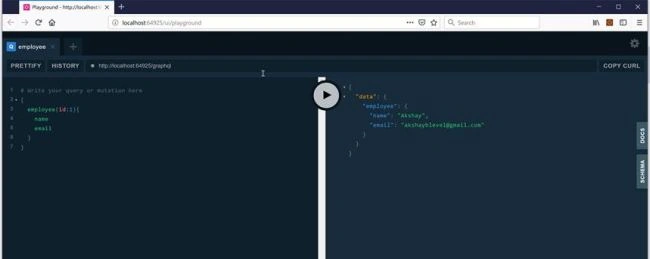
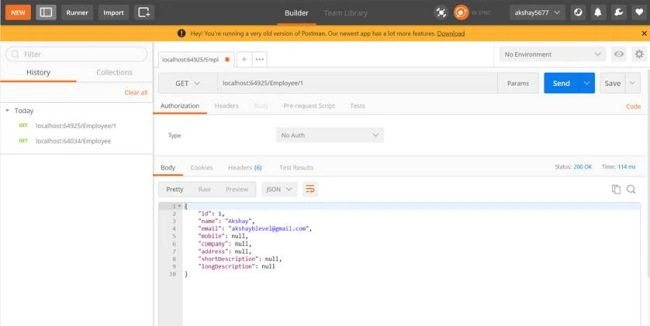
In the query, we need to add one more field of type EmployeeType. We need to add the argument value. For that, we need to initialize QueryArguments which actually expects QueryArgument of type NonNullGraphType of IdGraphType. Then, we provide the argument name as id. Now at the time of resolving the context, pass the same ID to the repository method which actually returns the employee details having that ID.
EmployeeQuery
using GraphQL.Types;

namespace GraphQLInWebApiCore
{
    public class EmployeeQuery : ObjectGraphType
    {
        public EmployeeQuery(IEmployeeRepository employeeRepository)
        {
            Field<EmployeeType>(
                "employee",
                arguments: new QueryArguments(new QueryArgument<NonNullGraphType<IdGraphType>>
                { Name = "id" }),
                resolve: context =>
                {
                    var id = context.GetArgument<int>("id");
                    return employeeRepository.GetEmployeeById(id);
                }
            );
        }
    }
}
Sdy AlorPosted Sep 10, 2019, 2:44 PM
Add links to part 3, nice job
Darryl WolfaardtPosted Jul 2, 2019, 7:20 AM
Hey Akshay, just want to say thanks for the time and effort put in to preparing this walkthrough. It is very useful