

Introduction
This article will discuss GraphQL basics and one example using .NET Core Web API.
Agenda
- Introduction
- Example
- Features
- Basic Concepts
- Implementation using .NET Core 7 API
Prerequisites
- Visual Studio 2022
- .NET Core 7 SDK
What is GraphQL?
- GraphQL is an open-source server-side technology developed by Facebook to optimize RESTful API calls.
- GraphQL is a query language for API and a server-side runtime for executing queries and collecting data from different sources.
- Using GraphQL, we can fetch data from that we want nothing more than that using a single endpoint.

- GraphQL is strongly typed, so we can validate our query within GraphQL before execution, which helps us build stronger APIs.
- GraphQL is fast and stable and always gives us predictable results.
- If you want to learn more about GraphQL, then check the official website of GraphQL.
Example
- Suppose we have one product application service that will return product details like Id, Product Name, Product Description, Product Price, and Product Stock.
- But, one of the users wants to get the product name and stock details, which has an API endpoint like https://localhost:5000/api/v1/getproductdetails; it will return all other fields with over-fetching. So, this problem we can solve this by using GraphQL, as shown below.
query{
  productList {
    id,
    productName,
    productStock
  }
}
{
"data" : {
"productList":[
{
    "id": "26c48bfe-66a1-442d-8795-46c701e8ed02",
    "productName": "IPhone",
    "productStock": 100
},
{
    "id": "bd957f94-dc15-46aa-bbeb-5d59e78e88b8",
    "productName" : "Samsung TV",
    "productStock": 120
},
{
    "id" : "1a560b5e-ccb5-4a94-8bc3-15b287bcbd43",
    "productName" : "Mobile",
    "productStock" : 120
}
What are the Features of GraphQL?
- GraphQL deals with a different database.
- Human readable syntax.
- Using GraphQL doesn’t get over fetching problems.
- Fetch data using a single API call.
What are the components of GraphQL?
GraphQL has the following components, and each one has its purpose.
- Query – The query is the API request sent by the client that we used to fetch the values, and it has fields and arguments using which we can fetch data as per requirement.
- Schema – The schema is used to shape our available data, and GraphQL has Schema Definition Language (SDL) for that to write schema.
- Types – The types are the most important feature of GraphQL that helps us to create a custom object and use it to fetch data.
- Mutation- The mutation is used for operation sent to the server to create, update and delete the data.
To learn more about types, queries, and schemas, visit the official GraphQL website.
How to implement GraphQL in ASP.Net Core 7 Web API?
We use Hot Chocolate for GraphQL in this article.
What is Hot Chocolate GraphQL?
- Hot Chocolate is the open-source GraphQL server for the Microsoft .NET Platform.
- It reduces complexity and focuses on delivering things fast.
- Hot chocolate is compatible with all clients, like Apollo Client, Relay, and many more.
Step 1
Open the visual studio and create the new .NET Core Web API.
Step 2
Install the following NuGet Packages.

Step 3
Create Product Details class.
namespace graphql_demo.Entities
{
    public class ProductDetails
    {
        public Guid Id { get; set; }
        public string ProductName { get; set; }
        public string ProductDescription { get; set; }
        public int ProductPrice { get; set; }
        public int ProductStock { get; set; }

    }
}
Step 4
Next, add DbContextClass inside the data folder.
using graphql_demo.Entities;
using Microsoft.EntityFrameworkCore;

namespace graphql_demo.Data
{
    public class DbContextClass : DbContext
    {

        public DbContextClass(DbContextOptions<DbContextClass>
options) : base(options)
        {

        }

        public DbSet<ProductDetails> Products { get; set; }
    }
}
Step 5
Add seed data class inside data, which initially helps add some records when we run the application.
using graphql_demo.Entities;
using Microsoft.EntityFrameworkCore;

namespace graphql_demo.Data
{
    public class SeedData
    {
        public static void Initialize(IServiceProvider serviceProvider)
        {
            using (var context = new DbContextClass(
                serviceProvider.GetRequiredService<DbContextOptions<DbContextClass>>()))
            {
                if (context.Products.Any())
                {
                    return;
                }

                context.Products.AddRange(
                    new ProductDetails
                    {
                        Id = Guid.NewGuid(),
                        ProductName = "IPhone",
                        ProductDescription = "IPhone 14",
                        ProductPrice = 120000,
                        ProductStock = 100
                    },
                    new ProductDetails
                    {
                        Id = Guid.NewGuid(),
                        ProductName = "Samsung TV",
                        ProductDescription = "Smart TV",
                        ProductPrice = 400000,
                        ProductStock = 120
                    });
                context.SaveChanges();
            }
        }
    }
}
Step 6
Create IProductService and ProductService inside the repositories folder.
IProductService
using graphql_demo.Entities;

namespace graphql_demo.Repositories
{
    public interface IProductService
    {
        public Task<List<ProductDetails>> ProductListAsync();

        public Task<ProductDetails> GetProductDetailByIdAsync(Guid productId);

        public Task<bool> AddProductAsync(ProductDetails productDetails);

        public Task<bool> UpdateProductAsync(ProductDetails productDetails);

        public Task<bool> DeleteProductAsync(Guid productId);
    }
}
ProductService
using graphql_demo.Data;
using graphql_demo.Entities;
using Microsoft.EntityFrameworkCore;

namespace graphql_demo.Repositories
{
    public class ProductService : IProductService
    {
        private readonly DbContextClass dbContextClass;

        public ProductService(DbContextClass dbContextClass)
        {
            this.dbContextClass = dbContextClass;
        }

        public async Task<List<ProductDetails>> ProductListAsync()
        {
            return await dbContextClass.Products.ToListAsync();
        }

        public async Task<ProductDetails> GetProductDetailByIdAsync(Guid productId)
        {
            return await dbContextClass.Products.Where(ele => ele.Id == productId).FirstOrDefaultAsync();
        }

        public async Task<bool> AddProductAsync(ProductDetails productDetails)
        {
            await dbContextClass.Products.AddAsync(productDetails);
            var result = await dbContextClass.SaveChangesAsync();
            if (result > 0)
            {
                return true;
            }
            else
            {
                return false;
            }
        }

        public async Task<bool> UpdateProductAsync(ProductDetails productDetails)
        {
            var isProduct = ProductDetailsExists(productDetails.Id);
            if (isProduct)
            {
                dbContextClass.Products.Update(productDetails);
                var result = await dbContextClass.SaveChangesAsync();
                if (result > 0)
                {
                    return true;
                }
                else
                {
                    return false;
                }
            }
            return false;
        }

        public async Task<bool> DeleteProductAsync(Guid productId)
        {
            var findProductData = dbContextClass.Products.Where(_ => _.Id == productId).FirstOrDefault();
            if (findProductData != null)
            {
                dbContextClass.Products.Remove(findProductData);
                var result = await dbContextClass.SaveChangesAsync();
                if (result > 0)
                {
                    return true;
                }
                else
                {
                    return false;
                }
            }
            return false;
        }

        private bool ProductDetailsExists(Guid productId)
        {
            return dbContextClass.Products.Any(e => e.Id == productId);
        }
    }
}
Step 7
Add a new GraphQL Folder for queries and mutation types.
Step 8
Next, add ProductQueryTypes inside the query types folder that helps us to fetch product data.
using graphql_demo.Entities;
using graphql_demo.Repositories;

namespace graphql_demo.GraphQL.Types
{
    public class ProductQueryTypes
    {
        public async Task<List<ProductDetails>> GetProductListAsync([Service] IProductService productService)
        {
            return await productService.ProductListAsync();
        }

        public async Task<ProductDetails> GetProductDetailsByIdAsync([Service] IProductService productService, Guid productId)
        {
            return await productService.GetProductDetailByIdAsync(productId);
        }
    }
}
Step 9
Create a mutation types folder and add ProductMutations class inside, which helps us add, update and delete product data.
using graphql_demo.Entities;
using graphql_demo.Repositories;

namespace graphql_demo.GraphQL.Mutations
{
    public class ProductMutations
    {
        public async Task<bool> AddProductAsync([Service] IProductService productService,
    ProductDetails productDetails)
        {
            return await productService.AddProductAsync(productDetails);
        }

        public async Task<bool> UpdateProductAsync([Service] IProductService productService,
    ProductDetails productDetails)
        {
            return await productService.UpdateProductAsync(productDetails);
        }

        public async Task<bool> DeleteProductAsync([Service] IProductService productService,
   Guid productId)
        {
            return await productService.DeleteProductAsync(productId);
        }
    }
}
Step 10
Register a few services and middleware inside the Program class related to the repository, seed data, query and mutation type, and many more.
using graphql_demo.Data;
using graphql_demo.GraphQL.Mutations;
using graphql_demo.GraphQL.Types;
using graphql_demo.Repositories;
using Microsoft.EntityFrameworkCore;

var builder = WebApplication.CreateBuilder(args);

//Register Service
builder.Services.AddScoped<IProductService, ProductService>();

//InMemory Database
builder.Services.AddDbContext<DbContextClass>
(o => o.UseInMemoryDatabase("GraphQLDemo"));

//GraphQL Config
builder.Services.AddGraphQLServer()
    .AddQueryType<ProductQueryTypes>()
    .AddMutationType<ProductMutations>();

var app = builder.Build();

//Seed Data
using (var scope = app.Services.CreateScope())
{
    var services = scope.ServiceProvider;
    var context = services.GetRequiredService<DbContextClass>();

    SeedData.Initialize(services);
}

//GraphQL
app.MapGraphQL();

app.UseHttpsRedirection();

app.Run();
Step 11
Run application
- Get a Product List

- Add Product Detail

- Update Product Detail

- Delete Product Detail
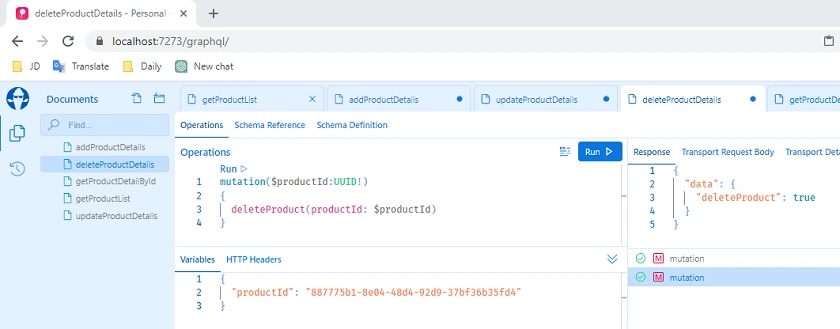
- Get Product Detail by Id

GitHub Link
Conclusion
Here we discussed the basics of GraphQL, features, and step-by-step implementation using .NET Core Web API.
Happy Coding!!!
Shahrzad OssatiPosted Oct 11, 2024, 10:53 AM
Thank you so much for this course. I have learned a lot :)