

A GridView is a very important and useful control of ASP.Net. In this article a grid is exported into an .xls file using HtmlTextWriter and StringWriter ASP.Net controls.
Now we will see one by one how to fill a GridView from a database and then get the GridView data saved as an Excel file from the GridView.
Step 1
Go to the SQL Database side.
Create an Employee Information table.
- create table EmployeeDB
- (
- EmpID int primary key identity(1,1),
- EmpName varchar(20),
- EmpGender varchar(10),
- EmpDOB date null,
- EmpDepartment varchar(20)
- )
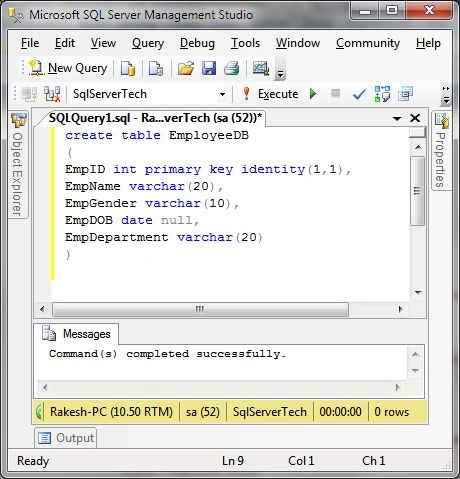
Some data is inserted into the database as in the following screen.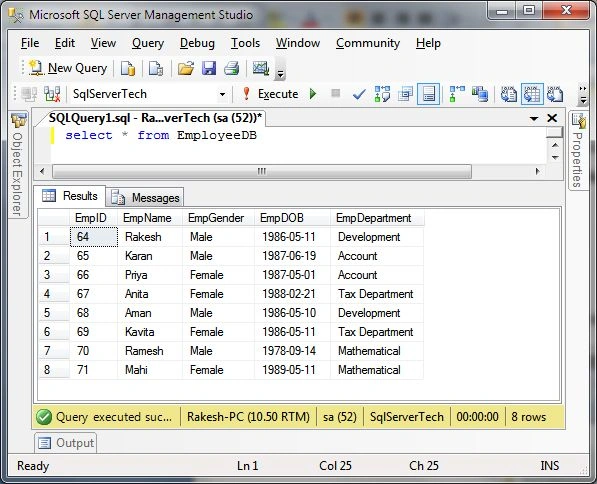
Now we will do something with all this selected data filled into the GridView.
Step 2
Go to the Visual Studio side as in the following.
Now go to your project design (.aspx) page.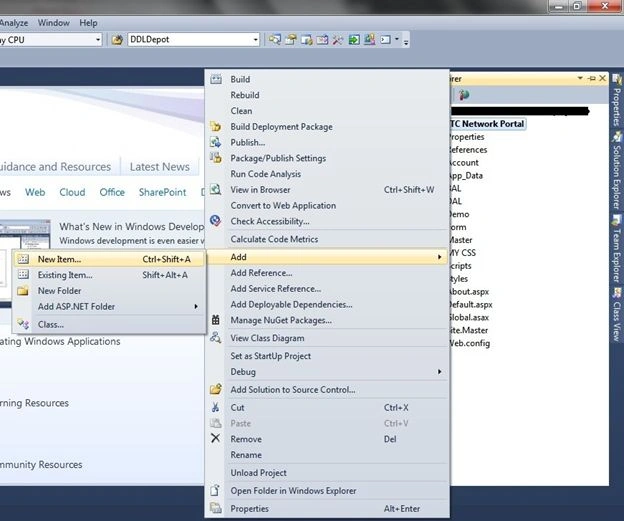
Add a page using Master page.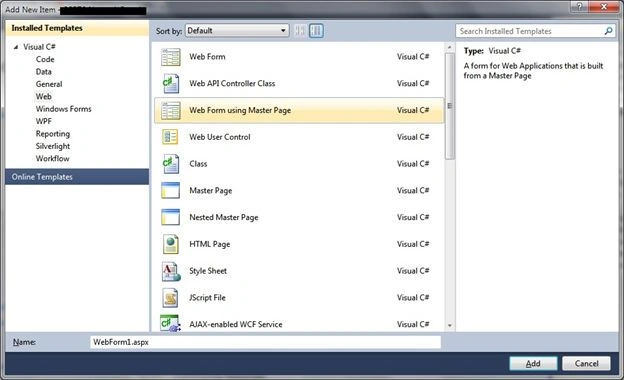
Provide a specific name for the page and click the Add button.
Next add a GridView control and button control on the design page.
Configure your database connection string in your project's web.config file.
- <connectionStrings>
- <add name="connstr" connectionString="Data Source=RAKESH-PC;Initial Catalog=SqlServerTech;User ID=sa;Password=your SQL DB Password" providerName="System.Data.SqlClient"/>
- <add name="Pratical_testConnectionString" connectionString="Data Source=RAKESH-PC;Initial Catalog=Pratical_test;User ID=sa password=****" providerName="System.Data.SqlClient"/>
- </connectionStrings>
Go to the Page Code side and write code to fill in the GridView and the GridView data is exported into Excel file format.
- using System;
- using System.Collections.Generic;
- using System.Linq;
- using System.Web;
- using System.Web.UI;
- using System.Web.UI.WebControls;
- using System.Configuration;
- using System.Data;
- using System.Data.SqlClient;
- using System.IO;
- using System.Text;
- using System.Web.UI.HtmlControls;
- namespace Test_WebApplication.UI
- {
- public partial class GridToExcel : System.Web.UI.Page
- {
- string conString = ConfigurationManager.ConnectionStrings["connstr"].ConnectionString;
- protected void Page_Load(object sender, EventArgs e)
- {
- if (!Page.IsPostBack)
- {
- EmployeeDataGrid();
- }
- }
- private void EmployeeDataGrid()
- {
- using (SqlConnection con = new SqlConnection(conString))
- {
- using (SqlCommand cmd = new SqlCommand("select * from EmployeeDB"))
- {
- SqlDataAdapter dt = new SqlDataAdapter();
- try
- {
- cmd.Connection = con;
- con.Open();
- dt.SelectCommand = cmd;
- DataTable dTable = new DataTable();
- dt.Fill(dTable);
- SqlDataReader sdr = cmd.ExecuteReader();
- GridEmpData.DataSource = dTable;
- GridEmpData.DataBind();
- }
- catch (Exception)
- {
- // Error msg display here
- }
- }
- }
- }
- protected void btnExportGridintoExcel_Click(object sender, EventArgs e)
- {
- ExportGridToExcel();
- }
- private void ExportGridToExcel()
- {
- Response.Clear();
- Response.AddHeader("content-disposition", "attachment;filename=ExportGridData.xls");
- Response.ContentType = "File/Data.xls";
- StringWriter StringWriter = new System.IO.StringWriter();
- HtmlTextWriter HtmlTextWriter = new HtmlTextWriter(StringWriter);
- GridEmpData.RenderControl(HtmlTextWriter);
- Response.Write(StringWriter.ToString());
- Response.End();
- }
- public override void VerifyRenderingInServerForm(Control control)
- {
- // controller
- }
- }
- }
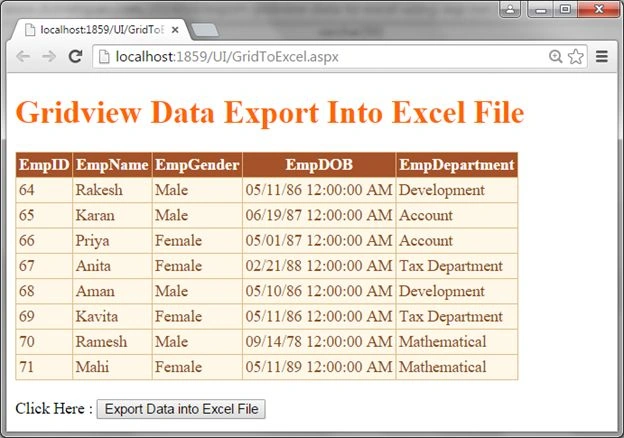
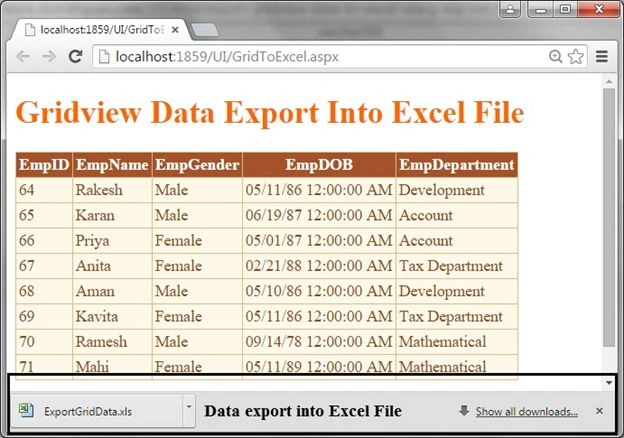
Now click on the button and save the displayed data in the .xls file as in the following:
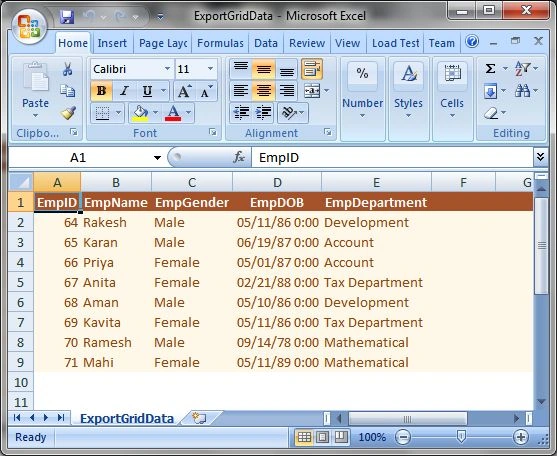
Finally you are seeing the GridView data in the Excel file.
Finally I hope you understand how to GridView data is exported into an Excel file and saved on disk.
Somnath GujarPosted Aug 29, 2018, 2:59 AM
But sir I got Error: RegisterForEventValidation can only be called during Render();Description: An unhandled exception occurred during the execution of the current web request. Please review the stack trace for more information about the error and where it originated in the code. Exception Details: System.InvalidOperationException: RegisterForEventValidation can only be called during Render();
Shaharukh PathanPosted Aug 6, 2018, 2:41 PM
By using this Code Entire Page Is Converted To Excel which is Wrong. I Want Only Gridview Row and Column
AJAY GARGPosted Nov 25, 2016, 2:43 AM
I have two row in header of gridview, now i want to export this into excel. can anybody help me in this???
Opeyemi AdeyeyePosted Aug 19, 2015, 9:02 AM
I need C# code to Export data that i retrieved from mysql database to Excel. Thanks
Pankaj Kumar ChoudharyPosted Jun 27, 2015, 8:56 PM
Nice Explain Sir...........
Gopi ChandPosted Jun 27, 2015, 2:47 PM
Well done