

Hi! In this guide, we will learn how to manage and publicize our events, either in person or online, through two web portals.
Things to consider
For the administration and dissemination of a particular event, the data or functionalities to be considered are as follows,
- Organizers: information about the communities and/or institutions that are organizing the event.
- Speakers: information about the people who will present a session within the event.
- Sessions: where the presentations of the event are recorded, with their respective associated speakers, the type of the session (e.g. Keynote, workshop, talk, etc.), and the level of difficulty (basic, intermediate, advanced).
- Sponsors: information from external communities, institutions, or companies that support the event.
For these purposes, we will have two platforms with the same database. The first to manage the event data, and the second to present this data to the users or attendees of our event.
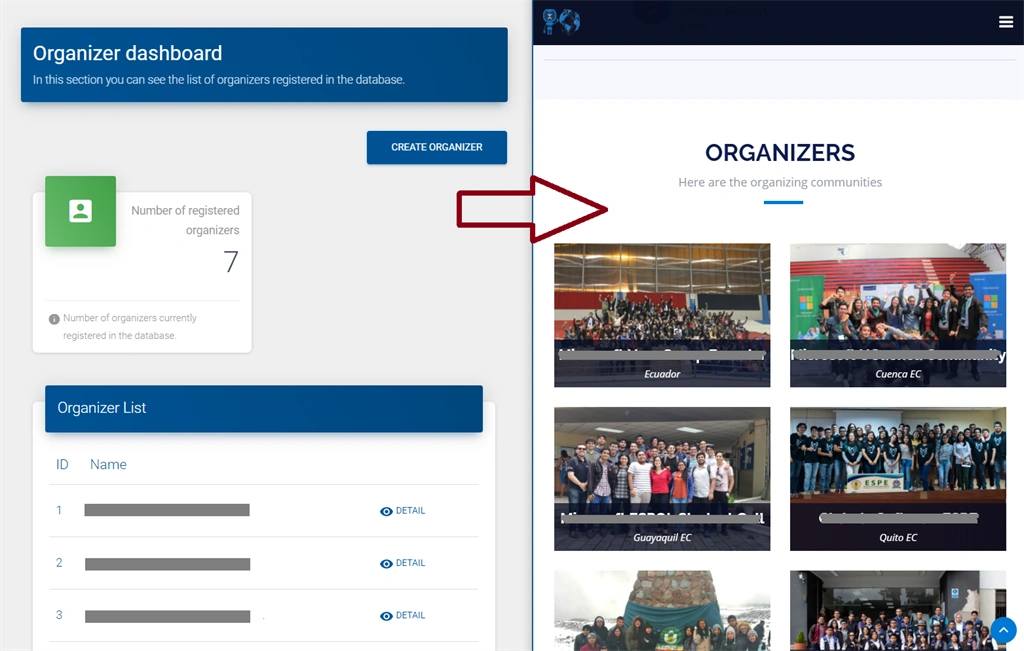
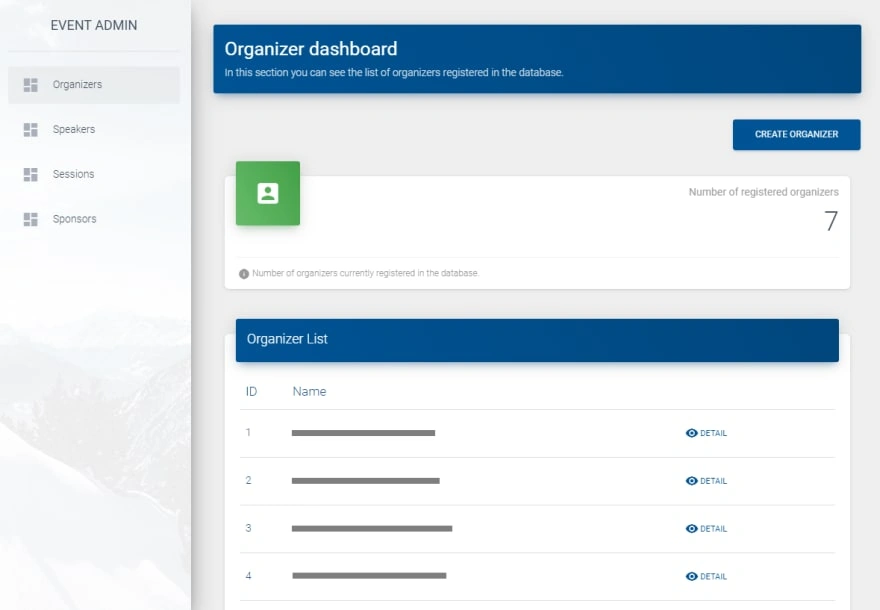
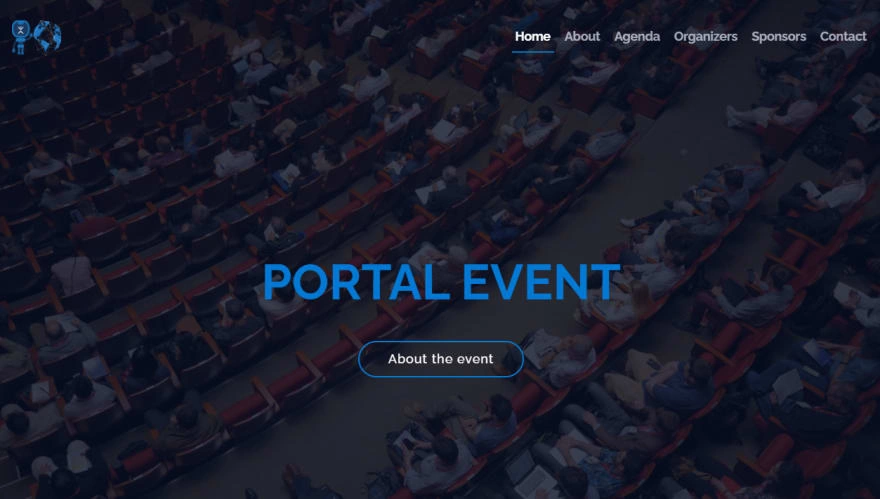
In the case of the organizers section of an event, on both platforms we would have something like this,
Previous articles
In previous tutorial articles, the explanation for the construction of each of these portals is carried out in detail. Also, the source code of both projects can also be found here:
- Tutorial 1: Web portal to manage virtual or in-person events with ASP.NET 5 and DotVVM.
- Demo 1: Event Admin.
- Tutorial 2: Building an event information portal with ASP.NET 5 & DotVVM.
- Demo 2: Event Portal.
Resources and tools required
Both portals have been built with ASP.NET 5 & DotVVM. For configurations or functionalities that need to be implemented, the following working tools are required:
- Visual Studio 2019.
- Workload in Visual Studio 2019: Developing ASP.NET and Web.
- DotVVM Extension for Visual Studio 2019.
Database
Both portals share the same database, whose engine corresponds to SQL Server with entities: Organizer, Sponsor, Event, Speaker, Session, Speaker_has_Session, SessionLevel, and SessionType.
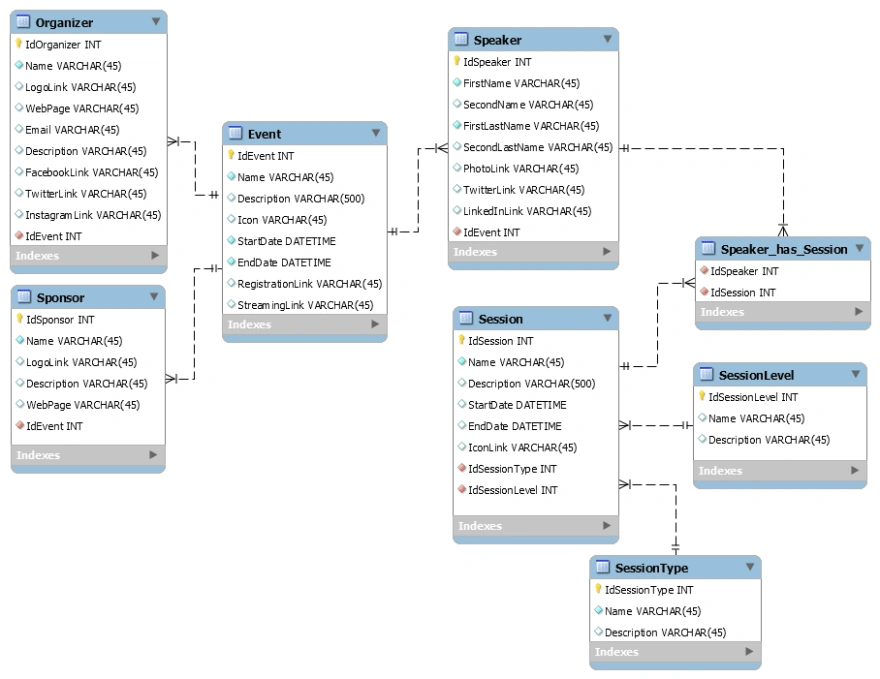
The first thing we have to do is set this database, for this, the SQL script can be found here,
- -- -----------------------------------------------------
- CREATE TABLE Event (
- IdEvent INT NOT NULL IDENTITY(1,1),
- Name VARCHAR(45) NOT NULL,
- Description VARCHAR(500) NULL,
- Icon VARCHAR(45) NULL,
- StartDate DATETIME NOT NULL,
- EndDate DATETIME NOT NULL,
- RegistrationLink VARCHAR(45) NULL,
- StreamingLink VARCHAR(45) NULL,
- PRIMARY KEY (IdEvent))
- ;
- -- -----------------------------------------------------
- CREATE TABLE Speaker (
- IdSpeaker INT NOT NULL IDENTITY(1,1),
- FirstName VARCHAR(45) NOT NULL,
- SecondName VARCHAR(45) NULL,
- FirstLastName VARCHAR(45) NOT NULL,
- SecondLastName VARCHAR(45) NULL,
- PhotoLink VARCHAR(45) NULL,
- TwitterLink VARCHAR(45) NULL,
- LinkedInLink VARCHAR(45) NULL,
- IdEvent INT NOT NULL,
- PRIMARY KEY (IdSpeaker),
- INDEX fk_Speaker_Event_idx (IdEvent ASC),
- CONSTRAINT fk_Speaker_Event
- FOREIGN KEY (IdEvent)
- REFERENCES Event (IdEvent)
- ON DELETE NO ACTION
- ON UPDATE NO ACTION)
- ;
- -- -----------------------------------------------------
- CREATE TABLE SessionType (
- IdSessionType INT NOT NULL IDENTITY(1,1),
- Name VARCHAR(45) NOT NULL,
- Description VARCHAR(45) NULL,
- PRIMARY KEY (IdSessionType))
- ;
- -- -----------------------------------------------------
- CREATE TABLE SessionLevel (
- IdSessionLevel INT NOT NULL IDENTITY(1,1),
- Name VARCHAR(45) NULL,
- Description VARCHAR(45) NULL,
- PRIMARY KEY (IdSessionLevel))
- ;
- -- -----------------------------------------------------
- CREATE TABLE Session (
- IdSession INT NOT NULL IDENTITY(1,1),
- Name VARCHAR(45) NOT NULL,
- Description VARCHAR(500) NULL,
- StartDate DATETIME NULL,
- EndDate DATETIME NULL,
- IconLink VARCHAR(45) NULL,
- IdSessionType INT NOT NULL,
- IdSessionLevel INT NOT NULL,
- PRIMARY KEY (IdSession),
- INDEX fk_Session_SessionType1_idx (IdSessionType ASC),
- INDEX fk_Session_SessionLevel1_idx (IdSessionLevel ASC),
- CONSTRAINT fk_Session_SessionType1
- FOREIGN KEY (IdSessionType)
- REFERENCES SessionType (IdSessionType)
- ON DELETE NO ACTION
- ON UPDATE NO ACTION,
- CONSTRAINT fk_Session_SessionLevel1
- FOREIGN KEY (IdSessionLevel)
- REFERENCES SessionLevel (IdSessionLevel)
- ON DELETE NO ACTION
- ON UPDATE NO ACTION)
- ;
- -- -----------------------------------------------------
- CREATE TABLE Speaker_has_Session (
- IdSpeaker INT NOT NULL,
- IdSession INT NOT NULL,
- INDEX fk_Speaker_has_Session_Session1_idx (IdSession ASC),
- INDEX fk_Speaker_has_Session_Speaker1_idx (IdSpeaker ASC),
- CONSTRAINT fk_Speaker_has_Session_Speaker1
- FOREIGN KEY (IdSpeaker)
- REFERENCES Speaker (IdSpeaker)
- ON DELETE NO ACTION
- ON UPDATE NO ACTION,
- CONSTRAINT fk_Speaker_has_Session_Session1
- FOREIGN KEY (IdSession)
- REFERENCES Session (IdSession)
- ON DELETE NO ACTION
- ON UPDATE NO ACTION)
- ;
- -- -----------------------------------------------------
- CREATE TABLE Organizer (
- IdOrganizer INT NOT NULL IDENTITY(1,1),
- Name VARCHAR(45) NOT NULL,
- LogoLink VARCHAR(45) NULL,
- WebPage VARCHAR(45) NULL,
- Email VARCHAR(45) NULL,
- Description VARCHAR(45) NULL,
- FacebookLink VARCHAR(45) NULL,
- TwitterLink VARCHAR(45) NULL,
- InstagramLink VARCHAR(45) NULL,
- IdEvent INT NOT NULL,
- PRIMARY KEY (IdOrganizer),
- INDEX fk_Organizer_Event1_idx (IdEvent ASC),
- CONSTRAINT fk_Organizer_Event1
- FOREIGN KEY (IdEvent)
- REFERENCES Event (IdEvent)
- ON DELETE NO ACTION
- ON UPDATE NO ACTION)
- ;
- -- -----------------------------------------------------
- CREATE TABLE Sponsor (
- IdSponsor INT NOT NULL IDENTITY(1,1),
- Name VARCHAR(45) NOT NULL,
- LogoLink VARCHAR(45) NULL,
- Description VARCHAR(45) NULL,
- WebPage VARCHAR(45) NULL,
- IdEvent INT NOT NULL,
- PRIMARY KEY (IdSponsor),
- INDEX fk_Sponsor_Event1_idx (IdEvent ASC),
- CONSTRAINT fk_Sponsor_Event1
- FOREIGN KEY (IdEvent)
- REFERENCES Event (IdEvent)
- ON DELETE NO ACTION
- ON UPDATE NO ACTION)
- ;
A good option to consider for deploying our database to the cloud is Azure SQL Database, which is the same as SQL Server, only in the cloud.
Here we can see a little more of this resource.
Organization of projects
Both projects have been developed taking into account the architectural pattern Model, View, Model View (MVVM), where,
- The model. — will be responsible for all application data and related business logic.
- View. — shall correspond to representations for the end-user of the application model. The view will be responsible for displaying the data to the user and for allowing manipulation of application data.
- Model-View or View-Model. — one or more per view; the view-model will be responsible for implementing view behavior to respond to user actions and exposing model data easily.
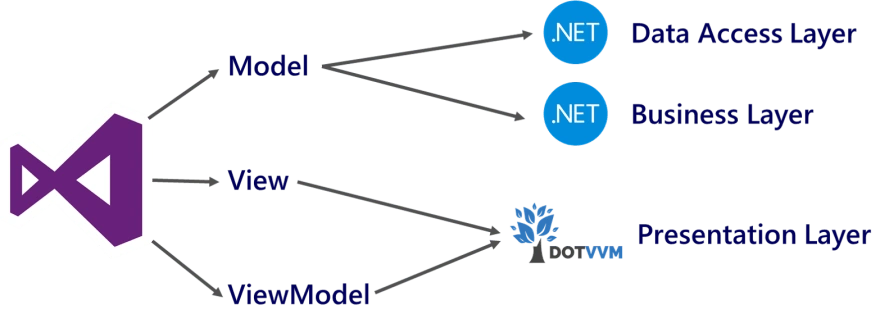
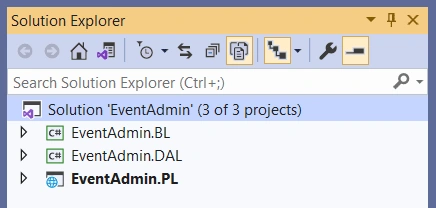
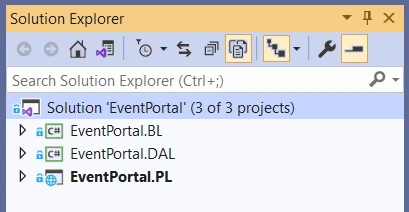
And in Visual Studio 2019 we can visualize something like this for the EventAdmin and EventPortal projects respectively,
All right, with this in mind, let's look at the considerations we should consider when using these two projects.
Settings in BL – Business Layer
For our case study, the database is designed to handle multiple events at once. In this sense, projects in the BL have a class called EventId to handle the ID of the event we want to work with. For both cases, in this class, we will have to place the corresponding Id.
- public class EventId
- {
- private static EventId instance { get; set; } = null;
- public int Id { get; set; } = 1;
- private EventId() { }
- public static EventId GetInstance()
- {
- if (instance == null) {
- instance = new EventId();
- }
- return instance;
- }
- }
Settings in PL – Presentation Layer
At the design level, our websites are composed of the following elements,
- A view, which is based on HTML syntax and describes what the page will look like.
- A view model, which is a class in C# that describes the state of the page (for example, values in form fields) and handles user interactions (for example, button clicks).
Administrative Portal
For the administrative web portal we can find something like this,
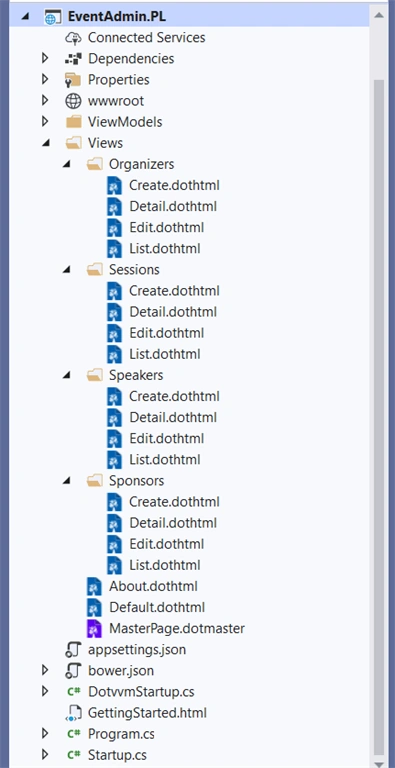
For this particular portal, there are no design changes at the design level that need to be implemented. In the final, on this website we will be able to view the following,
Information Portal
For our second portal, the one that our attendees will see, here if there are changes or design styles that could be contemplated.
The structure in Visual Studio 2019 is as this,
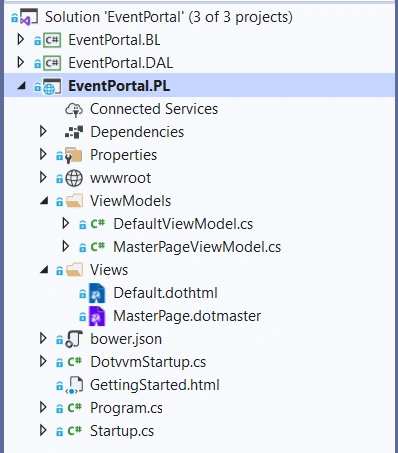
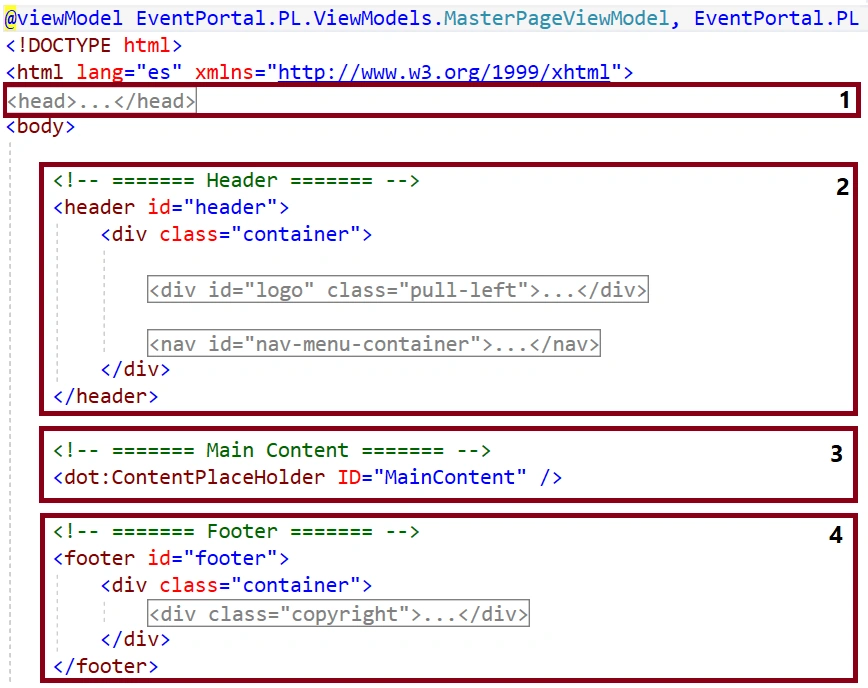
In which, the general structure of the website is located in the MasterPage.dotmaster,
And the content of the page, defined by the ContentPlaceHolder control with the identifier MainContent, is located in the Default.dothtml.
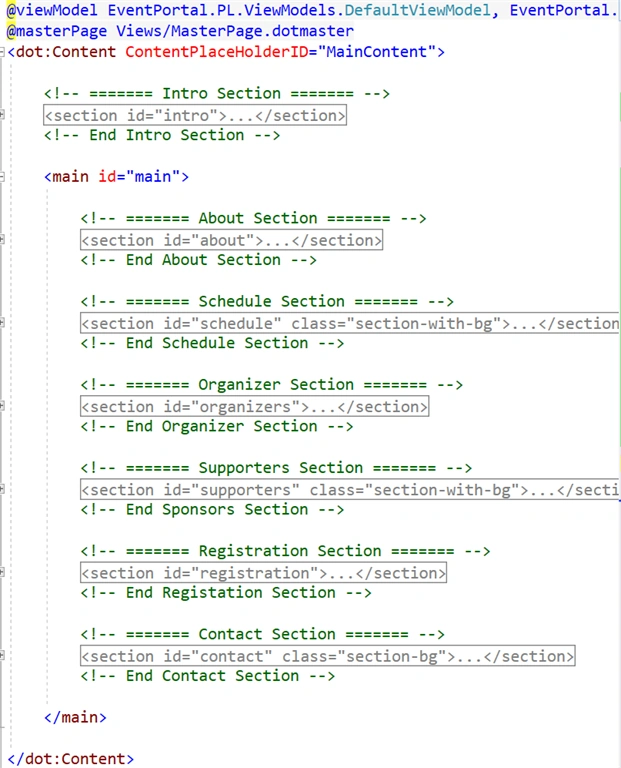
Here we can make the changes that are considered relevant, taking into account the ViewModel where the definitions and collections that reference the corresponding data of the event are located.
- public List<SponsorModel> Sponsors { get; set; }
- public List<OrganizerModel> Organizers { get; set; }
- public List<CalendarSpeakers> Calendar { get; set; } = new List<CalendarSpeakers>();
- public EventModel Event { get; set; }
Publish our informational web portal
To deploy our project so that it can be accessed from the Internet by users in general, for this case we can consider the Azure App Service resource to fulfill this purpose.
In this tutorial article, we can see that process: .NET 5: Deploying Web Applications with Azure App Service.
Thank you very much
Thank you very much for reading, I hope this demo can be of use to you. If you have any questions or ideas that you need to discuss, it will be nice to be able to collaborate and together exchange knowledge with each other.
Jignesh KumarPosted Apr 7, 2021, 8:01 AM
Very good article. Thanks for sharing