

In this article, I will show how to add resources to a windows application using tools provided by the Visual studio 2005 integrated development environment.
Walkthrough:
Open a new project, then select the project properties menu item at the end of the "Project" menu as the figure shows below:
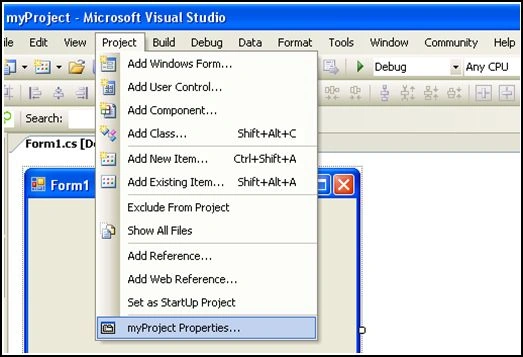
Figure 1
The properties page will appear, it looks like as follow:
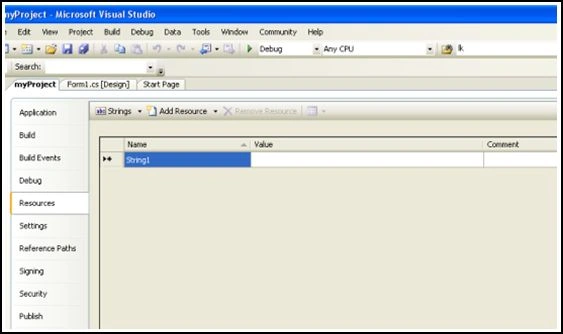
Figure 2
Select resource tab. You can remark a menu just above the resources grid. I mean this.

Figure 3
This menu helps us add resources like strings, text files, bitmaps images and remove them without using a single line of code.
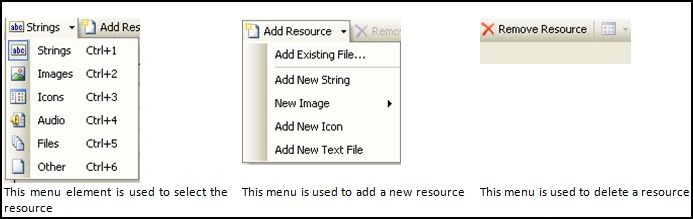
Figure 4
Now, you can add resource into your application. For example, my project needs a given image to be used. I select the Add resource file, then, Add existing file; finally, I can add an image file, via the open dialog box, into the application resources as below.
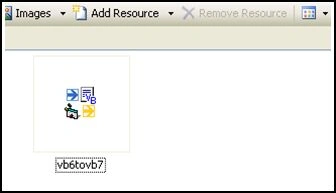
Figure 5
It is very important to
save all changes before closing the properties pages. Now, the question is, how
can I use the new resource in my application?
Add a picture box control into
your project, then, you see this small snippet just in the control right corner
above. Select it and choose project resource as the figure shows.
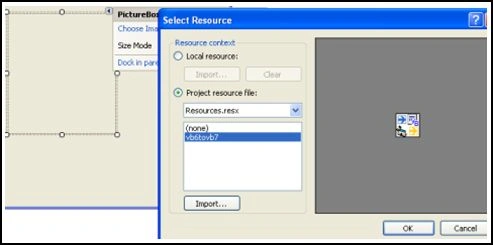
Figure 6
Click OK and the picture box will display the given image. That's it
Good dotneting!!!
Shaijil SPosted Nov 18, 2008, 11:23 PM
Is there any difference adding resources via 'Solution explorer -->Resources -->Add Existing Item... ' method ?.