

Other functionality provided by the resgen.exe witch I appreciate a lot. This tool gives you the possibility to generate an entire class with strong typed properties issued from the resources elements. It's very similar to the serialization process where objects are serialized/desterilized.
To go a head and perform this task, follow this walkthrough:
Open a new text file and add some elements on it. Elements should respect certain rules, for someone who wants to know how elements have to be disposed in a text class in order to generate resources files correctly without mistakes and failures, it is important to read the Part V handle resource files.
For example, this is a sample how elements should be disposed:
; My first name
FirstName = Bechir
; My last name
LastName = Bejaoui
; My region
Region = North Africa
; My education
Level = Master degree
; My profession
Profession = Freelance
Save it as C:\myResourcesTextFiles.txt. Now, open the Framework SDK by selecting all programs>Microsoft .Net Framework SDK v2.0>SDK Command prompt. Then execute the command as follow
Figure1
If you browse to the "C:\" repertory, you can find there both new generated files. I mean the C:\Resources.ResourceClass.resources and the new generated class C:\myResourcesClass.cs that wraps strongly typed properties issued from the resources elements. Note that it is better to specify the new generated resource file [namespace].[class name].resources, otherwise the resgen.exe warns you that the resources file name doesn't match the class name.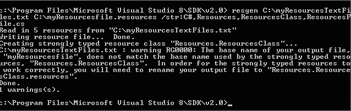
Figure 2
Now, open the C:\myResourcesClass.cs, you can explore the new properties:
// <auto-generated>
// This code was generated by a tool.
// Runtime Version:2.0.50727.1433
//
// Changes to this file may cause incorrect behavior and will be lost if
// the code isregenerated.
// </auto-generated>
namespace Resources
{
using System;
/// <summary>
/// A strongly-typed resource class, for looking up localized strings, etc.
/// </summary>
// This class was auto-generated by the StronglyTypedResourceBuilder
// class via a tool like ResGen or Visual Studio.
// To add or remove a member, edit your .ResX file then rerun ResGen
// with the /str option, or rebuild your VS project.
[global::System.CodeDom.Compiler.GeneratedCodeAttribute
("System.Resources.Tools.StronglyTypedResourceBuilder", "2.0.0.0")]
[global::System.Diagnostics.DebuggerNonUserCodeAttribute()]
[global::System.Runtime.CompilerServices.CompilerGeneratedAttribute()]
internal class ResourcesClass
{
private static global::System.Resources.ResourceManager resourceMan;
private static global::System.Globalization.CultureInfo resourceCulture;
[global::System.Diagnostics.CodeAnalysis.SuppressMessageAttribute("Microsoft.Performance", "CA1811:AvoidUncalledPrivateCode")]
internal ResourcesClass()
{
}
/// <summary>
/// Returns the cached ResourceManager instance used by this class.
/// </summary>
[global::System.ComponentModel.EditorBrowsableAttribute(global::System.ComponentModel.EditorBrowsableState.Advanced)]
internal static global::System.Resources.ResourceManager ResourceManager
{
get
{
if (object.ReferenceEquals(resourceMan, null))
{
global::System.Resources.ResourceManager temp = new global::System.Resources.ResourceManager("Resources.ResourcesClass", typeof(ResourcesClass).Assembly);
resourceMan = temp;
}
return resourceMan;
}
Join the conversation! Your thoughts help the community grow.