

Recently I came across a requirement in which I was supposed to data bind a command from my viewModel to an event. In other words, my code-behind was not supposed to contain any code related to event handlers of a control.
After digging more into Prism, luckily I found my answer. That requirement can be satisfied using the InvokeCommandAction provided in Prism 5.0.
Well, so my article will elaborate more on how to do this.
InvokeCommandAction
InvokeCommandAction allows us to invoke an ICommand implementation on our viewModel to an event that exists on our control. It basically means we are no longer bound or required to have a command property on a control to invoke a command.
Now, you may say you have seen this similar thing before. And you are right because the Blend SDK ships one. But the InvokeCommandAction that Prism provides is a little bit different in two ways.
- First, it manages the state of the element. It updates the enable state of the control that it is attached to based on the return value of the command CanExecute. So, here you are getting the same behavior that you do for any control, which is super cool. Isn't it?
- Second, it allows us to pass event arguments as a parameter to the command.
Now one may ask whether we need to pass an entire EventArgs as the parameter or can we just pass the required stuff?
And the answer is yes. Of course, you are not forced to pass an entire EventArgs to your ViewModel. One can also pass a specific portion of an EventArgs that is really required. This can be done by setting a TriggerPathParameter on the InvokeCommandAction. Let's quickly jump to the code.
Using Code
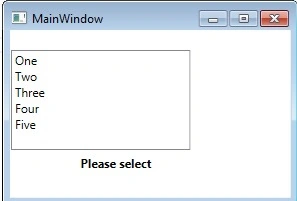
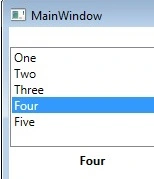
To explain the notion of InvokeCommandAction, I'll create a very simple application having a ListBox and a Label. The Label will be updated based on the selected item in the list.
Expectation, Whenever an item is selected in the list, we need to listen to the SelectionChanged event and then handle that event in the ViewModel through the command and then update the selected text item on the Label.
Setting up a View
<StackPanel HorizontalAlignment="Left" VerticalAlignment="Top">
    <ListBox Height="100" Width="300" Margin="1,20,0,0" ItemsSource="{Binding ListOfItems}" SelectionMode="Single"/>
    <Label FontWeight="Bold" Width="170" Height="30" Content="Please select"/>
</StackPanel>
I am setting a data context for this view in the code behind it. But the same can be done in XAML also.
Setting up a ViewModel
Here I'll not explain each and every line of the viewModel's code since I already covered the same in my other articles in a detailed manner.
public class MainWindowViewModel : BindableBase
{
    public ObservableCollection<string> ListOfItems { get; set; }
    public ICommand SelectCommand { get; set; }

    private string _selectedItem = string.Empty;
    public string SelectedItem
    {
        get { return _selectedItem; }
        set { SetProperty<string>(ref _selectedItem, value); }
    }

    public MainWindowViewModel()
    {
        ListOfItems = new ObservableCollection<string>() { "One", "Two", "Three", "Four", "Five" };
        SelectCommand = new DelegateCommand<object[]>(SetSelectedItem);
    }

    private void SetSelectedItem(object[] listOfItems)
    {
        if (listOfItems != null && listOfItems.Count() > 0)
        {
            SelectedItem = listOfItems.FirstOrDefault().ToString();
        }
    }
}

Krishna Rajput SinghPosted Nov 25, 2014, 4:56 AM
u welcome
Shweta LodhaPosted Nov 24, 2014, 12:47 PM
Thanks :)
Krishna Rajput SinghPosted Nov 24, 2014, 1:05 AM
nice article helpful