
Background processing is an essential part of modern web applications. Tasks such as sending emails, generating reports, processing files, syncing data with external services, or running scheduled maintenance should not block user requests. Hangfire is one of the most popular libraries in the .NET ecosystem for handling these background tasks reliably.
This article covers Hangfire configuration, different types of jobs, and the modern features available in recent versions of Hangfire.
What is Hangfire?
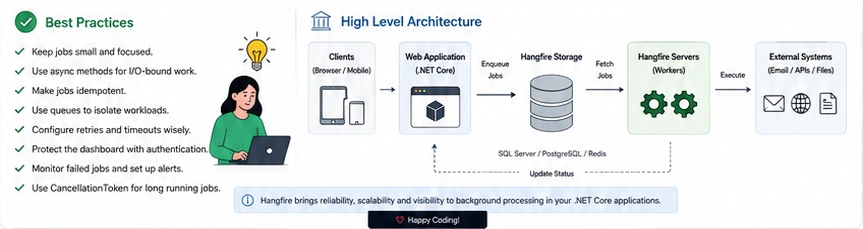
Hangfire is an open-source framework for performing background job processing in .NET and ASP.NET Core applications. It stores job information in persistent storage (such as SQL Server, PostgreSQL, or Redis), ensuring that jobs survive application restarts and server failures.
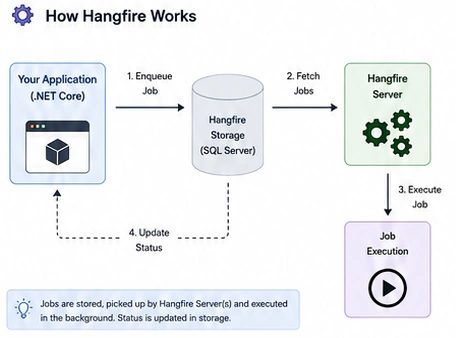
Unlike simple background services, Hangfire provides:
Persistent job storage
Automatic retries
Job scheduling
Dashboard for monitoring
Distributed processing
Queue management
Cron scheduling
Dependency Injection support
When Should You Use Hangfire?
Hangfire is ideal for operations that do not need to complete during the HTTP request.
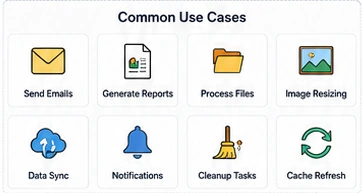
Examples include:
Sending emails
Processing uploaded files
Generating PDF reports
Image resizing
Import/Export operations
Database cleanup
Scheduled synchronization
Notification processing
Cache refresh
Data migration
Instead of making users wait, these tasks can run in the background.
Installing Hangfire
Install the required NuGet packages:
dotnet add package Hangfire.AspNetCore
dotnet add package Hangfire.SqlServer
For PostgreSQL:
dotnet add package Hangfire.PostgreSql
Configuring Hangfire in .NET Core
appsettings.json
 {
  "ConnectionStrings": {
    "HangfireConnection": "Server=.;Database=HangfireDb;Trusted_Connection=True;"
 }
Program.cs (.NET 8)
using Hangfire;
using Hangfire.SqlServer;

var builder = WebApplication.CreateBuilder(args);

builder.Services.AddHangfire(config =>
{
    config.SetDataCompatibilityLevel(CompatibilityLevel.Version_180)
          .UseSimpleAssemblyNameTypeSerializer()
          .UseRecommendedSerializerSettings()
          .UseSqlServerStorage(
              builder.Configuration.GetConnectionString("HangfireConnection"));
});

builder.Services.AddHangfireServer();

var app = builder.Build();

app.UseHangfireDashboard();

app.Run();
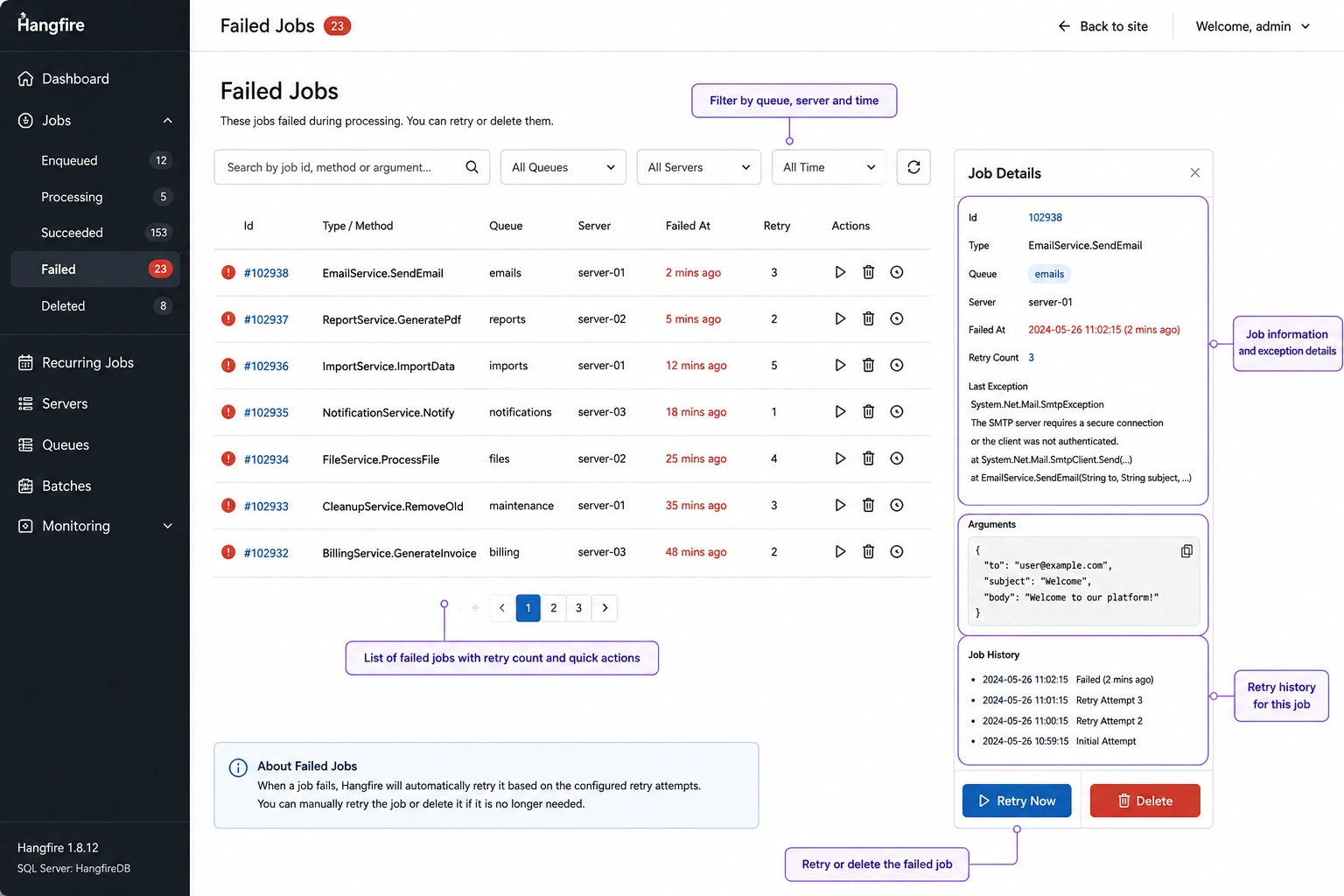
Hangfire Dashboard
The dashboard provides a web interface for monitoring jobs.
https://localhost:5001/hangfire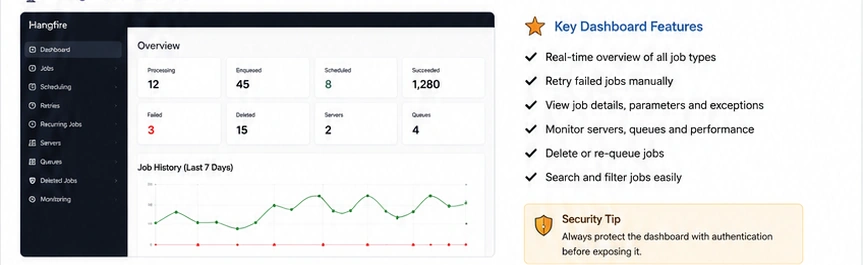
The dashboard displays:
Processing jobs
Scheduled jobs
Recurring jobs
Failed jobs
Deleted jobs
Servers
Queues
Job history
Retry information
It also allows manual retries and job deletion.
Creating Your First Background Job
Create a service:
    public class EmailService
{
    public void SendWelcomeEmail(string email)
    {
        Console.WriteLine($"Sending email to {email}");
    }
}
Enqueue a job:
BackgroundJob.Enqueue<EmailService>(
x => x.SendWelcomeEmail("[email protected]"));
The job executes immediately after the request finishes.
Types of Hangfire Jobs
Hangfire supports several job types.
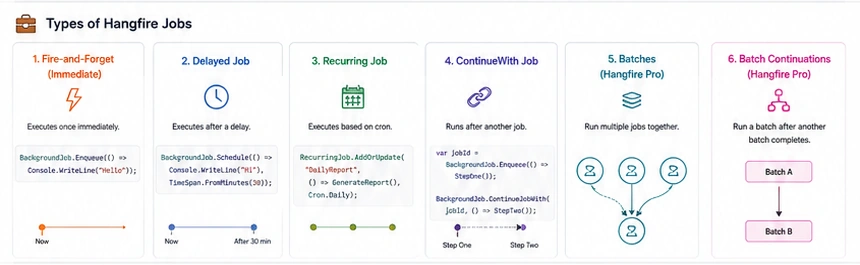
1. Fire-and-Forget Jobs
Executed only once immediately.
    BackgroundJob.Enqueue(() =>
    Console.WriteLine("Job Executed"));
Use cases:
Send email
Process image
Create invoice
Generate PDF
2. Delayed Jobs
Execute after a specified delay.
    BackgroundJob.Schedule(
    () => Console.WriteLine("Executed after 30 minutes"),
    TimeSpan.FromMinutes(30));
Use cases:
Reminder emails
Delayed notifications
Payment reminders
3. Recurring Jobs
Run on a schedule using Cron expressions.
    RecurringJob.AddOrUpdate(
    "DailyReport",
    () => GenerateDailyReport(),
    Cron.Daily);
Other schedules:
Cron.Hourly
Cron.Daily
Cron.Weekly
Cron.Monthly
Cron.Yearly
Custom Cron:
"0 */2 * * *"Runs every two hours.
4. ContinueWith Jobs
Run after another job completes successfully.
var jobId = BackgroundJob.Enqueue(() => StepOne());
BackgroundJob.ContinueJobWith(
    jobId,
    () => StepTwo());
Useful for:
Multi-stage workflows
ETL processing
Report generation pipeline
5. Batches (Hangfire Pro)
Allows multiple jobs to execute together.
    BatchJob.StartNew(batch =>
{
    batch.Enqueue(() => Job1());
    batch.Enqueue(() => Job2());
    batch.Enqueue(() => Job3());
});
Useful for:
Bulk email sending
Import processing
Parallel execution
6. Batch Continuations (Hangfire Pro)
Execute another batch after the first completes.
Batch A
   ↓
Batch B
Useful for:
Data import
Data validation
Report generation
Dependency Injection Support
Hangfire integrates seamlessly with ASP.NET Core DI.
public class NotificationService
{
    private readonly IEmailService _email;

    public NotificationService(IEmailService email)
    {
        _email = email;
    }

    public async Task SendAsync()
    {
        await _email.SendAsync();
    }
}

Join the conversation! Your thoughts help the community grow.