

Artificial Intelligence (AI) has transformed the way businesses operate, making advanced models accessible for various applications. One of the most exciting developments in this space is Azure OpenAI Service, a platform that allows developers to integrate powerful AI capabilities into their applications using OpenAI’s cutting-edge models, including GPT and Codex.
Why Choose Azure OpenAI Service?
Azure OpenAI Service combines the best of OpenAI's language models with the security, scalability, and compliance of Microsoft Azure. This service enables developers to:
- Utilize state-of-the-art AI models for text generation, summarization, code completion, and more.
- Ensure enterprise-grade security and compliance with Azure’s robust infrastructure.
- Easily scale AI applications with managed resources and API-driven integration.
- Fine-tune AI models to meet specific business needs.
This article walks through setting up Azure OpenAI Service, integrating it into an application, and optimizing its use for real-world scenarios.
Setting Up Azure OpenAI Service
To begin using Azure OpenAI, you need an Azure subscription and access to OpenAI’s models. Follow these steps:
1. Create an Azure OpenAI Resource
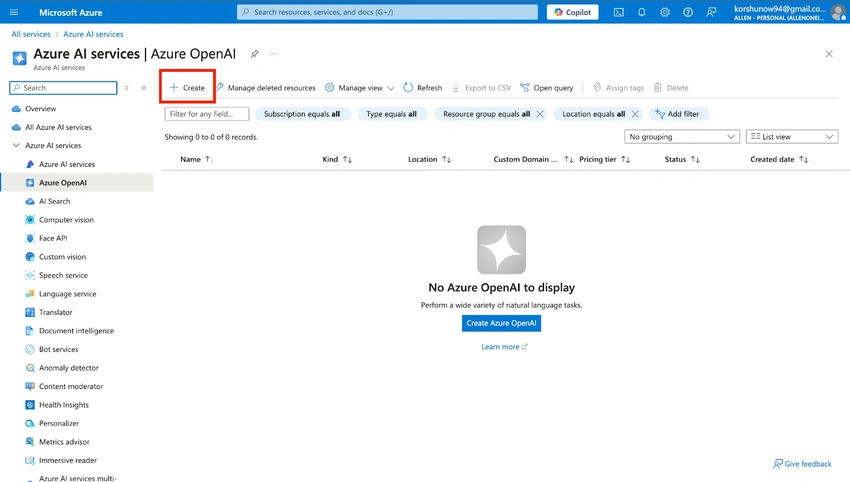
- Log in to Azure Portal.
- Search for Azure OpenAI and click Create.
- Choose a pricing tier and deploy the resource.
- Navigate to the Keys and Endpoints section to retrieve API credentials.
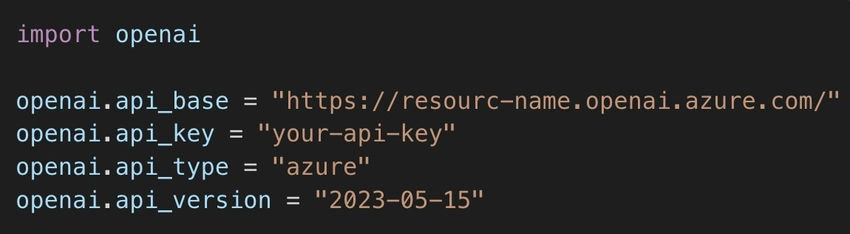
2. Install Required SDKs
For Python development, install the OpenAI Python package:
pip install openai
Then, set up authentication:
Implementing Azure OpenAI in Applications
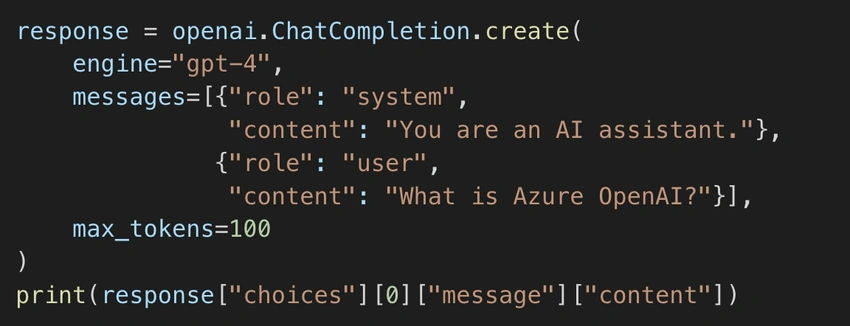
Text Generation with GPT
Using Azure OpenAI’s GPT models, developers can generate human-like text for chatbots, content creation, and automation.
Code Generation with Codex
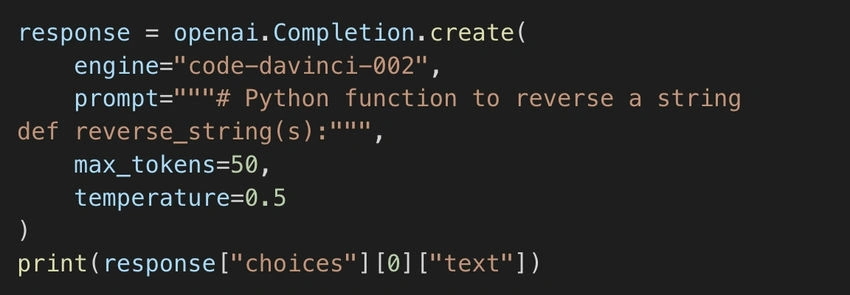
Codex, part of Azure OpenAI, helps developers with code completion and generation. For example, generating a Python function:
Fine-Tuning Models for Custom Use Cases
One of Azure OpenAI’s most powerful features is fine-tuning. Businesses can train models on domain-specific data to achieve better results.
- Prepare Your Dataset: Structure data in JSONL format.
- Upload and Train: Use Azure’s OpenAI fine-tuning API.
- Deploy Custom Model: Utilize the trained model in applications.
Fine-tuning allows models to understand industry-specific terminology, making them more effective for legal, healthcare, or finance applications.
Optimizing Performance and Cost
Azure OpenAI Service offers different pricing tiers based on usage. Here’s how to optimize costs:
- Choose the right model: Use GPT-3.5 for standard tasks and GPT-4 for advanced AI applications.
- Limit API calls: Implement caching to avoid redundant requests.
- Batch processing: Send multiple queries in a single request for efficiency.
Security and Compliance
Since AI models process sensitive data, Azure OpenAI offers built-in security features:
- Role-Based Access Control (RBAC) for user management.
- Data encryption for secure storage.
- Azure Private Link to keep API communications private.
Real-World Applications
Azure OpenAI Service is being used across various industries:
- Customer Support: AI-powered chatbots providing 24/7 assistance.
- Content Creation: Automated article generation for news and marketing.
- Software Development: AI-assisted coding with Codex.
- Business Intelligence: AI-driven insights for decision-making.
Future of AI with Azure OpenAI
As AI technology continues to evolve, Azure OpenAI is paving the way for smarter applications and enhanced automation. With advancements in multimodal AI, future updates may include AI models capable of processing text, images, and voice seamlessly. Microsoft’s investment in OpenAI ensures continuous improvements, making it a go-to platform for AI-powered solutions.
By integrating Azure OpenAI Service into your applications, you unlock powerful AI-driven capabilities that can transform workflows, enhance user experiences, and drive business growth.
🔗 Further Learning
Join the conversation! Your thoughts help the community grow.