In today's fast-paced digital landscape, keeping your web applications reliable and responsive is more critical than ever. Health checks continuously monitor vital components—from databases and external APIs to network connections—providing real-time insights into potential issues. Whether you're managing a small service or a large-scale microservices architecture, effective health checks help you detect problems early, streamline diagnostics, and automate recovery processes.
This article will show you how to implement robust health checks in an ASP.NET Web API using .NET 8. You'll learn how to verify the status of your SQL Server database, monitor an external API, and run a custom ping test for network connectivity, all while returning a clear, JSON-formatted response that integrates seamlessly with modern monitoring tools. By ensuring each essential part of your application is continuously checked, you can enhance resilience and guarantee smooth, reliable operations.
In this article, we will:
- Create a new ASP.NET Web API project.
- Implement health checks for a SQL Server database, an external API, and a custom ping test.
- Convert the health check response to JSON.
- Discuss the benefits and potential drawbacks of using health checks.
Prerequisites
Before you begin, make sure you have:
- .NET 8 SDK installed.
- A basic understanding of ASP.NET Web API and C#.
- A valid connection string for your SQL Server database.
- An external API URL to monitor (e.g., C# Corner API).
Step 1. Create the ASP.NET Web API Project
Open your command prompt (or terminal) and run the following bash command to create a new ASP.NET Web API project named HealthCheckDemo:
dotnet new webapi -n HealthCheckDemo
cd HealthCheckDemo
This command creates a basic Web API project using the minimal hosting model found in .NET 8.
You will also need the following NuGet packages:
dotnet add package AspNetCore.HealthChecks.SqlServer
dotnet add package AspNetCore.HealthChecks.Uris
Step 2. Implement a Custom Ping Test Health Check
A custom ping test can help verify network connectivity by pinging a specific host. Create a new file called PingHealthCheck.cs in your project and add the following code:
using System;
using System.Net.NetworkInformation;
using System.Threading;
using System.Threading.Tasks;
using Microsoft.Extensions.Diagnostics.HealthChecks;

public class PingHealthCheck : IHealthCheck
{
    private readonly string _host;

    public PingHealthCheck(string host)
    {
        _host = host;
    }

    public async Task<HealthCheckResult> CheckHealthAsync(
        HealthCheckContext context,
        CancellationToken cancellationToken = default)
    {
        using var ping = new Ping();
        try
        {
            // Send a ping with a 2-second timeout
            var reply = await ping.SendPingAsync(_host, 2000);
            if (reply.Status == IPStatus.Success)
            {
                return HealthCheckResult.Healthy(
                    $"Ping to {_host} succeeded with roundtrip time {reply.RoundtripTime}ms");
            }
            return HealthCheckResult.Unhealthy(
                $"Ping to {_host} failed with status {reply.Status}");
        }
        catch (Exception ex)
        {
            return HealthCheckResult.Unhealthy(
                $"Ping to {_host} resulted in an exception: {ex.Message}");
        }
    }
}
This custom health check pings the host (such as "8.8.8.8") and returns a healthy status if the ping is successful.
Step 3. Configure Health Checks in Program.cs
Open your Program.cs file and update it to register health checks for your SQL Server database, the external API, and the custom ping test. In addition, configure the endpoint to output a JSON response.
using System.Text.Json;
using Microsoft.AspNetCore.Diagnostics.HealthChecks;
using Microsoft.Extensions.Diagnostics.HealthChecks;

var builder = WebApplication.CreateBuilder(args);

// Add services for controllers (if you plan to use controllers)
builder.Services.AddControllers();

// Retrieve the connection string from configuration (set in appsettings.json)
string connectionString = builder.Configuration.GetConnectionString("DefaultConnection");

// Register health checks.
builder.Services.AddHealthChecks()
    // SQL Server Health Check: Execute a simple query to evaluate connectivity.
    .AddSqlServer(connectionString,
                  name: "SQL Server",
                  healthQuery: "SELECT 1;",
                  failureStatus: HealthStatus.Unhealthy)
    // External API Health Check: Verify that an external API (e.g., C#-Corner) is reachable.
    .AddUrlGroup(new Uri("https://www.c-sharpcorner.com/"),
                 name: "C# Corner API",
                 failureStatus: HealthStatus.Degraded)
    // Custom Ping Test Health Check: Ping an external host (e.g., Google's public DNS).
    .AddCheck("Ping Test", new PingHealthCheck("8.8.8.8"));

var app = builder.Build();

app.UseRouting();

app.UseEndpoints(endpoints =>
{
    endpoints.MapControllers();

    // Map the health check endpoint with a custom JSON response writer.
    endpoints.MapHealthChecks("/health", new HealthCheckOptions
    {
        ResponseWriter = async (context, report) =>
        {
            context.Response.ContentType = "application/json";

            var response = new
            {
                status = report.Status.ToString(),
                // Provide details about each health check.
                checks = report.Entries.Select(entry => new
                {
                    key = entry.Key,
                    status = entry.Value.Status.ToString(),
                    description = entry.Value.Description,
                    duration = entry.Value.Duration.ToString()
                }),
                totalDuration = report.TotalDuration.ToString()
            };

            // Serialize the response in indented JSON format.
            await context.Response.WriteAsync(JsonSerializer.Serialize(response, new JsonSerializerOptions
            {
                WriteIndented = true
            }));
        }
    });
});

app.Run();
Explanation of the Code
- Service Registration
- SQL Server Check: Executes a simple query (e.g.,
"SELECT 1;") to ensure that the database is reachable.
- External API Check: Checks the availability of an external API (such as C# Corner's API).
- Ping Test: Uses the custom
PingHealthCheck class to verify network connectivity by pinging "8.8.8.8".
- Custom JSON Response Writer: The response writer builds a structured JSON object that includes overall health status, details of each health check (name, status, description, and duration), plus the total duration of the process.
Step 4. Configure the Connection String
In your appsettings.json file, add your SQL Server connection string under the "DefaultConnection" key:
json
{
  "ConnectionStrings": {
    "DefaultConnection": "Server=YOUR_SERVER;Database=YOUR_DATABASE;User Id=YOUR_USER;Password=YOUR_PASSWORD;"
  }
}
Replace the placeholders with your actual SQL Server credentials.
Step 5. Testing the Health Check Endpoint
-
Run Your Application: In your command prompt, run:
dotnet run
- Access the Health Endpoint: Open your browser or use a tool like Postman and navigate to:
http://localhost:<port>/health
A typical JSON response might look like this:
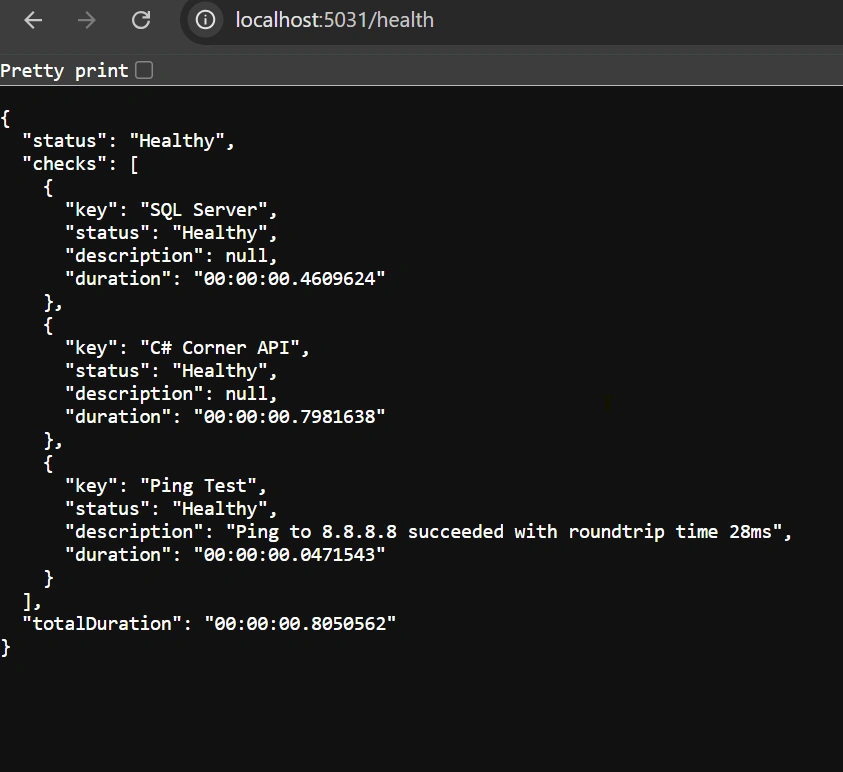
This JSON response gives a clear overview of the health status of each dependency and ensures easy integration with monitoring tools.
Benefits of Using Health Checks
- Proactive Monitoring: Regular health checks allow for early detection of issues, enabling quick corrective actions or automated recovery processes.
- Simplified Diagnostics: Aggregating multiple checks into a single endpoint simplifies troubleshooting by providing clear, structured output via JSON.
- Enhanced Resilience: Health checks are integral to modern orchestration systems like Kubernetes, which use them to manage service restarts and traffic routing based on real-time status.
- Easy Integration: A JSON-formatted health response is readily consumable by dashboards and third-party monitoring tools, providing comprehensive insights over time.
Drawbacks and Considerations
- Performance Overhead: Detailed or numerous health checks might add overhead, particularly if they perform resource-intensive operations. Balance thorough monitoring with performance.
- False Positives: Overly aggressive or sensitive checks might incorrectly flag transient issues as failures, resulting in unnecessary alerts.
- Maintenance Effort: As your application evolves, updating health checks to reflect new dependencies or architectural changes may require additional maintenance.
- Security Concerns: Exposing detailed internal health information can be risky. Consider securing the health endpoint, especially in production environments.
Conclusion
Implementing comprehensive health checks in your ASP.NET Web API using .NET 8 significantly enhances your system's resilience and reliability. These checks—whether it's verifying SQL Server connectivity, ensuring external API availability, or performing a custom ping test—offer proactive monitoring that simplifies diagnostics and facilitates automated recovery in orchestration environments. Although careful consideration is needed to balance monitoring detail with performance overhead and potential security concerns, fine-tuning these checks can lead to a robust infrastructure that minimizes downtime and improves user experience. In essence, health checks serve as a crucial asset, empowering you to maintain a healthy, high-performing application in an ever-changing digital landscape.


Meet ShahPosted Jun 18, 2025, 6:34 AM
Very well explained.