
Introduction
In this article we will create a "Hello World" Windows Store (Metro) App using C#. It's a simple app to open a Windows picture library.
Step 1
We will select the "C#" template Windows Store Blank App.
Step 2
We will add a simple button control with click event.
If we right-click the "Button_Click_1" event name in XAML and click the "Navigate to Event Handler", it will redirect to the code behind file of this method. It's similar to double-clicking the button in our existing Windows/Web UI.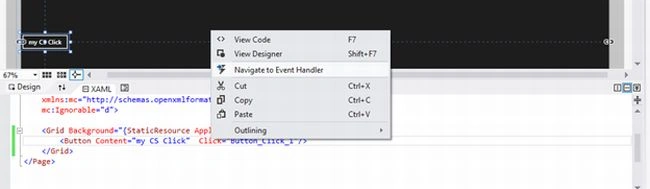
It will result in the UI being as shown below:
Step 3
Navigate to the button click event and add the following code to show the alert message using the WinRT API.
And we will see the result as shown below:
Step 4
Using the WinRT API, we will use the Pickers object to select the file with ".jpg" format.
We will see the result as below:
Summary
We need to use the System.IO namespace to do the Windows file related operations. But we are able to do that using the WinRT API in C#.

Join the conversation! Your thoughts help the community grow.