
Introduction
Galileo is an Arduino compatible Microcontroller board. Arduino is an open-source platform used for building electronics projects. A microcontroller is an integrated computer on a chip.
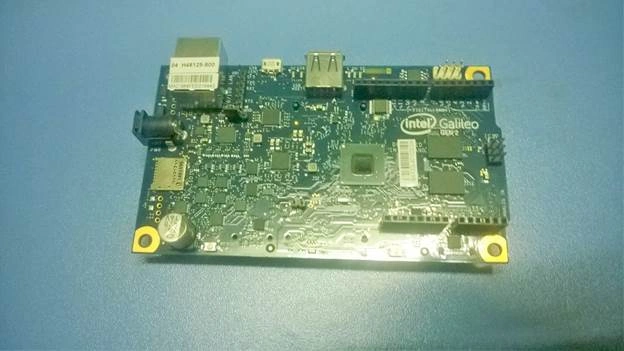 “Arduino is an open-source electronics prototyping platform based on flexible, easy-to-use hardware and software. It’s intended for artists, designers, hobbyists, and anyone interested in creating interactive objects or environments.”
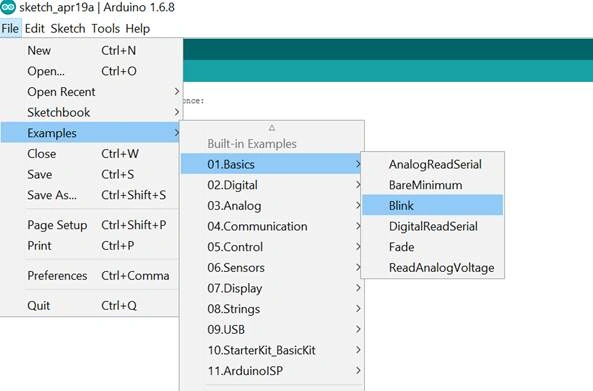
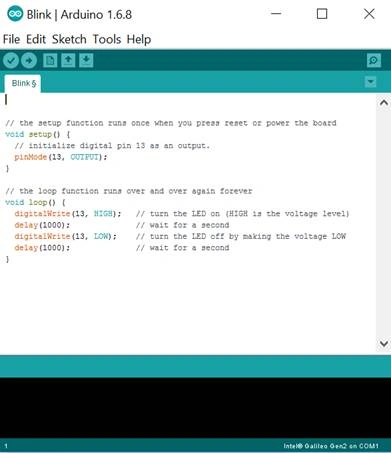
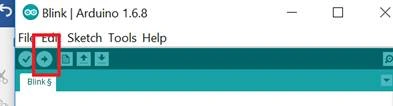
When you set up the dev environment the first program you run is Blinking the LED, hence it is called the Hello World of Electronics. So before learning complex programs let us see how we can blink an LED with the Intel Galileo board.
Requirements:
“Arduino is an open-source electronics prototyping platform based on flexible, easy-to-use hardware and software. It’s intended for artists, designers, hobbyists, and anyone interested in creating interactive objects or environments.”
When you set up the dev environment the first program you run is Blinking the LED, hence it is called the Hello World of Electronics. So before learning complex programs let us see how we can blink an LED with the Intel Galileo board.
Requirements:
- Intel Galileo
- Power Supply
- An LED
We will be using the Arduino IDE for coding. Download the IDE from the software page of the Arduino website.
Unzip the application. You don’t need to install it, when you open the application it will look like this.
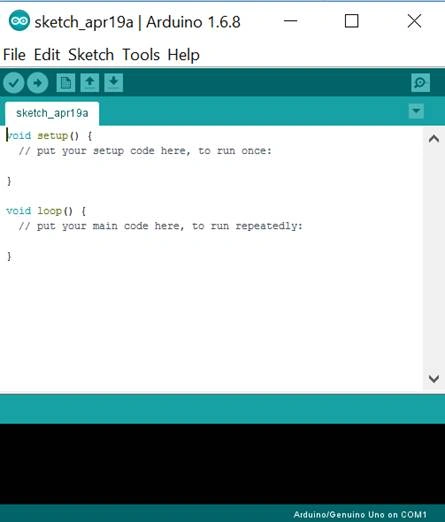 The programs you write in Arduino are called sketches. There are two functions in a sketch.
- Loop
- Setup
The setup method runs only once and the loop method runs again and again.
The basic sketch of program should look like this:
- void setup()
- {
- }
- void loop()
- {
- }
Santhakumar MunuswamyPosted May 21, 2016, 2:34 AM
Thank you for nice work
Vignesh ManiPosted Apr 22, 2016, 5:34 PM
good
Gowtham KPosted Apr 22, 2016, 12:52 PM
Good One, Thanks for Sharing:)
Kuppurasu NagarajPosted Apr 22, 2016, 11:50 AM
Nice Sharing..
Michael GriffithsPosted Apr 22, 2016, 11:49 AM
Nice
Debasis SahaPosted Apr 22, 2016, 10:16 AM
Good One..
Sr KarthigaPosted Apr 22, 2016, 7:55 AM
good one
Sr KarthigaPosted Apr 22, 2016, 7:55 AM
nice start
Sr KarthigaPosted Apr 22, 2016, 7:55 AM
welcome sir
Gurunatha DogiPosted Apr 22, 2016, 7:36 AM
Nice article sir