

In this article, you will see a Web API solution template which is built on Hexagonal Architecture with all essential features using .NET Core.
Introduction
This is a kick-off project which will have all essential things integrated into it. When we have to start with a new project, then we should think of the business needs. When the business requirement is ready, then we have to start focusing the business and we should be ready with basic/essential libraries.
We will see some important libraries in order, which should be integrated to our project for kick-off.
- Essentials Libraries/ Steps to be Ready for ASP.NET Core
- Application is implemented on Hexagonal architecture
- Web API
- Entityframework Core
- Expection handling
- Unit testing via NUnit
- Versioning
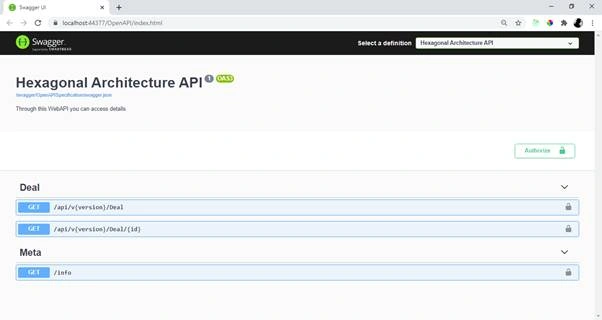
- Swagger UI
- Loggings — seriLog
- Health checks UI
- JWT authentication
Table of Contents
- What is Hexagonal Architecture
- Benefits of Hexagonal Architecture
- Disadvantages of Hexagonal Architecture
- Layers of the Hexagonal Architecture
- Getting Started with Hexagonal Architecture
- Step 1: Download and install Visual Studio extension from project template
- Step 2: Create Project
- Step 3: Select Hexagonal Architecture project template
- Step 4: Project is ready
- Step 5: Build and run application
- Diving inside the code snippets
- What problem does this solution solve?
- How does this help someone else?
- How does the code actually work?
- References
- Conclusion
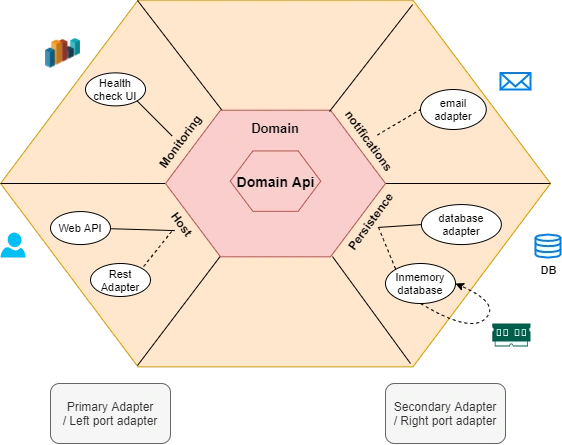
What is Hexagonal Architecture
It is an architecture pattern which was introduced by Alistair Cockburn in 2005, which will solve problems in maintaining applications in traditional architecture, which we used to implement by Database-centric architecture.
Hexagonal Architecture, or to call it properly, “Ports and Adapters pattern”, is driven by the idea that the application is central to your system. All inputs and outputs reach or leave the core of the application through a port that isolates the application from external technologies, tools and delivery mechanics.
Benefits of Hexagonal Architecture
- Plug & play
We can add or remove adapter based on our development, like we can replace Rest adapter with GraphQL or gRPC adapter. The rest of the logic will be remain the same
- Testability
As it decoupled all layers, so it is easy to write a test case for each components
- Adaptability/Enhance
Adding a new way to interact with applications is very easy
- Sustainability
We can keep all third party libraries in Infrastructure layer and hence maintainence will be easy
- Database Independent
Since database is separated from data access, it is quite easy to switch database providers
- Clean code
As business logic is away from presentation layer, it is easy to implement UI (like React, Angular or Blazor)
- Well organized
Project is well organized for better understanding and for onboarding for new joinee to project
Disadvantages of Hexagonal Architecture
Domain layer will be heavy
Lots of logic will be implemented in Domain layer (sometimes called as Core layer)
Layers of the Hexagonal Architecture
In this approach, we can see that all the Layers are dependent only on the Core Layers.
Domain Api layer
Domain Api Layers (Core layer) is implemented in the center and never depends on any other layer. It is a contract for domain layer interaction (ports) so that primary and secondary adapters can implement the contract. This is also known and DIP or Dependency Inversion Principle Domain layer
Domain Layers (Business layer)
These layers have business logic and are kept clean with no other dependencies.
Rest Adapter layer
Rest Adapter also known as left port’s adapter and primary adapter where we implement restful service (i.e., GET, POST, PUT, DELETE, etc.)
Persistence Adapter layer
Rest Adapter, also known as right port's adapter and secondary adapter, is where we have implemented Entity framework core which already implements a repository design pattern. DbContext will be UOW (Unit of Work) and each DbSet is the repository. This interacts with our database using dataproviders
Bootstrap/Presentation Layer
This is the final build of project, where it all begins.
You will understand more when we start implementing the project below.
Getting Started with Hexagonal Architecture
Step 1
Download and install Visual Studio Extension from Project Template
Download and install Visual Studio extension from Microsoft marketplace.

Step 2 - Create Project
Select project type as WebAPI, and select Hexagonal Architecture.
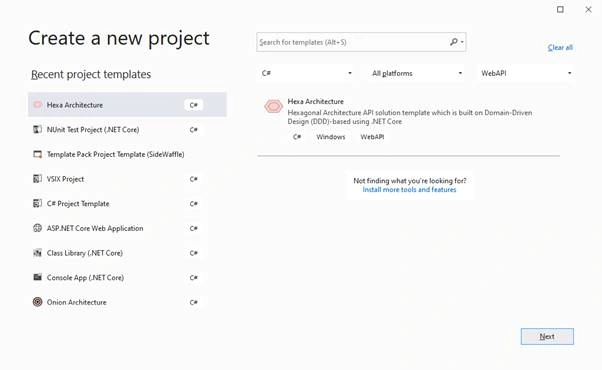
Step 3 - Select Hexagonal Architecture Project Template
Select project type as Web API, and select Hexagonal Architecture.
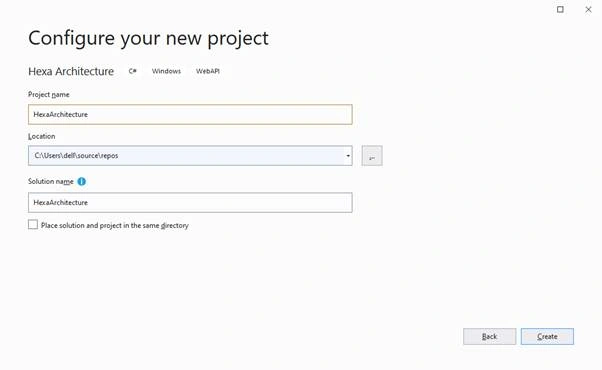
Step 4
Project Is Ready
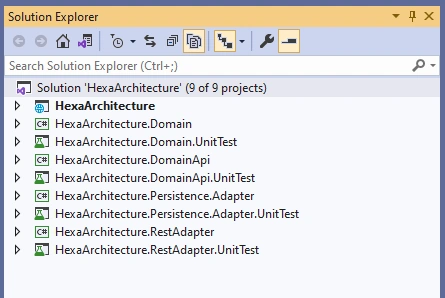
Step 5
Build and run application
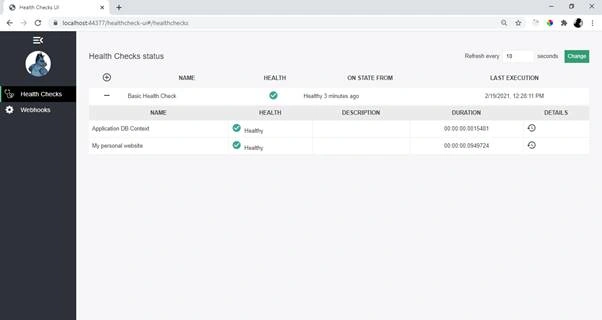
Health check UI
Navigate to Health Checks UI https://localhost:44377/healthcheck-ui and make sure everything is green.
** Change port number according to your application
Anthony MaisakPosted Sep 14, 2021, 8:57 AM
Thanks for the article Amit. But I'm a bit confused by a DbSet in a DealDomain, doesn't that mean that EF is crawled into domain? And to change the persistence storage you will need to change the domain too? Isn't that a violation of what hexagonal architecture is trying to achieve?