

This article shows how to hide a checkbox on a label click using jQuery. Here I've described the jQuery method like hide() and show() and how to find the Id of the controls.
INITIAL CHAMBER
Step 1
Open your Visual Studio and create an empty website, provide a suitable name such as HideCheckboxOnLable.
Step 2
In Solution Explorer you get your empty website, then add web forms.
For Web Form
HideCheckboxOnLable (your empty website). Right-click and select Add New Item -> Web Form. Name it hidecheckboxonlable.aspx.
DESIGN CHAMBER
Step 3
Open the hidecheckboxonlable.aspx file and write some code for the design of the application.
First add a jQuery plugin to your head section. Here I have used the jquery-2.1.4.min.js plugin for demonstration purposes.
How to add in your page
- <script src="https://code.jquery.com/jquery-2.1.4.min.js"></script>
- <div>
- <asp:Label ID="lblForHide" CssClass="LableText" runat="server" Text="Click me for see checkboxed hide"></asp:Label>
- <br />
- <asp:Label ID="lblForshow" CssClass="LableText" runat="server" Text="Click me for see checkboxed hide"></asp:Label>
- <br />
- <asp:CheckBox ID="CheckBox1" runat="server" class="hide" Text="Upendra" />
- <br />
- <asp:CheckBox ID="CheckBox2" runat="server" class="hide" Text="Ashish" />
- <br />
- <asp:CheckBox ID="CheckBox3" runat="server" class="hide" Text="Gitendra" />
- <br />
- <asp:CheckBox ID="CheckBox4" runat="server" class="hide" Text="Amit" />
- <br />
- <asp:CheckBox ID="CheckBox5" runat="server" class="hide" Text="Sheelu" />
- <br />
- </div>
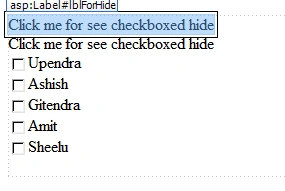
Now write some script for jQuery for our purposes.
Here we write to show and hide the jQuery code to execute the purpose:
- < script type = "text/javascript" > $(document).ready(function() {
- $('#lblForshow').hide();
- $('#lblForHide').click(function() {
- $('.hide').hide();
- $('#lblForHide').hide();
- $('#lblForshow').show();
- });
- $('#lblForshow').click(function() {
- $('#lblForHide').show();
- $('.hide').show();
- $('#lblForshow').hide();
- });
- }); < /script>
hidecheckboxonlable.aspx.cs
- <%@ Page Language="C#" AutoEventWireup="true" CodeFile="hidecheckboxonlable.aspx.cs" Inherits="hidecheckboxonlable" %>
- <!DOCTYPE html>
- <html>
- <head id="Head1" runat="server">
- <title>C-Sharpcorner articles</title>
- <script src="https://code.jquery.com/jquery-2.1.4.min.js"></script>
- <script type="text/javascript">
- $(document).ready(function () {
- $('#lblForshow').hide();
- $('#lblForHide').click(function () {
- $('.hide').hide();
- $('#lblForHide').hide();
- $('#lblForshow').show();
- });
- $('#lblForshow').click(function () {
- $('#lblForHide').show();
- $('.hide').show();
- $('#lblForshow').hide();
- });
- });
- </script>
- </head>
- <body>
- <form id="form1" runat="server">
- <div>
- <asp:Label ID="lblForHide" CssClass="LableText" runat="server" Text="Click me for see checkboxed hide"></asp:Label>
- <br />
- <asp:Label ID="lblForshow" CssClass="LableText" runat="server" Text="Click me for see checkboxed hide"></asp:Label>
- <br />
- <asp:CheckBox ID="CheckBox1" runat="server" class="hide" Text="Upendra" />
- <br />
- <asp:CheckBox ID="CheckBox2" runat="server" class="hide" Text="Ashish" />
- <br />
- <asp:CheckBox ID="CheckBox3" runat="server" class="hide" Text="Gitendra" />
- <br />
- <asp:CheckBox ID="CheckBox4" runat="server" class="hide" Text="Amit" />
- <br />
- <asp:CheckBox ID="CheckBox5" runat="server" class="hide" Text="Sheelu" />
- <br />
- </div>
- </form>
- </body>
- </html>
No need to write here something because I've put everyting from the front end.
- using System;
- using System.Collections.Generic;
- using System.Linq;
- using System.Web;
- using System.Web.UI;
- using System.Web.UI.WebControls;
- public partial class hidecheckboxonlable: System.Web.UI.Page
- {
- protected void Page_Load(object sender, EventArgs e) {}
- }
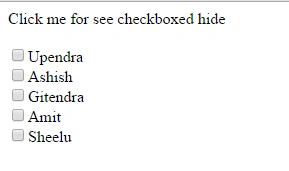
When load on default
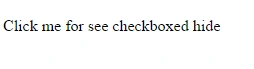
Load after label click
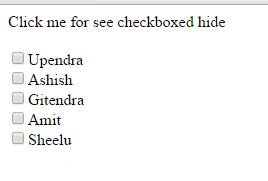
After re click on this
I hope you liked this. Have a good day. Thank you for reading.
kalu singh raoPosted Jul 8, 2016, 1:25 AM
Nice...
Shrinath GuravPosted Nov 21, 2015, 5:05 AM
Nice one but you can also apply this class="hide" to div tag and put all check box in one div instead of applying to individual check box
Anil KumarPosted Oct 29, 2015, 10:37 AM
nyc
Rajkiran SwainPosted Sep 11, 2015, 11:01 AM
good
Vinodh NarayananPosted Sep 9, 2015, 12:38 AM
nice article
Vipul MalhotraPosted Sep 2, 2015, 9:01 AM
nice article.
Lalit RaghavPosted Sep 1, 2015, 8:49 AM
thanks
Javed Ur RehmanPosted Aug 30, 2015, 11:50 PM
Nice share Upendra :)
Mohammed IbrahimPosted Aug 27, 2015, 9:17 AM
nice idea
Ranjan SenapatiPosted Aug 27, 2015, 9:15 AM
Very Nice.....
Yashwanth MuthineniPosted Aug 26, 2015, 6:22 AM
Nice Share sir
Sanghamitra MohantyPosted Aug 25, 2015, 8:55 AM
nice one
Rajkiran SwainPosted Aug 25, 2015, 3:11 AM
nice one ..
Vaikesh K PPosted Aug 22, 2015, 4:34 AM
Good One sir :)
Pankaj Kumar ChoudharyPosted Aug 16, 2015, 5:15 AM
Nice explain sir....
Santhakumar MunuswamyPosted Aug 16, 2015, 2:13 AM
Great Article. Thanks for sharing
Karthikeyan KPosted Aug 15, 2015, 3:01 PM
Good one sir....
Sumit JoshiPosted Aug 15, 2015, 10:10 AM
nice upendra.
Sandeep KumarPosted Aug 15, 2015, 8:53 AM
Nice Share sir :)
Nilesh JadavPosted Aug 15, 2015, 5:12 AM
Great Upendra Pratap Shahi thanks for sharing
Sibeesh VenuPosted Aug 15, 2015, 4:35 AM
Nice Share :)
RakeshPosted Aug 15, 2015, 3:33 AM
Good one
Rajeesh MenothPosted Aug 15, 2015, 3:33 AM
Good One Upendra Pratap Shahi