

SharePoint provides a calendar which can be used to track upcoming events and schedules. OOB calendar is quite powerful - It can be used to track deadlines, implement reminder alert, add workflow to achieve business logic, integrate with other OOB web parts and so on. By default the Calendar would be displayed as the following:
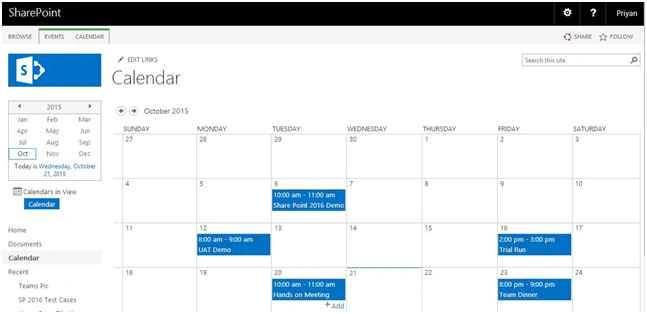
As you can see it even includes the weekends in the view which is by design. In one of the project requirements I had to hide the weekends from the view so that the users see only the week days.
Let’s see how to do it
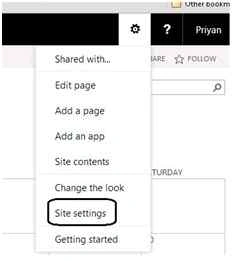
First step is to set Monday as start date in the calendar view. In order to do this go to Site settings.
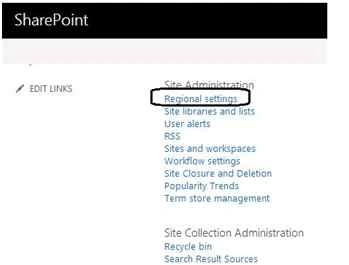
Click on Regional settings.
By default the first day of the week is set to Sunday.
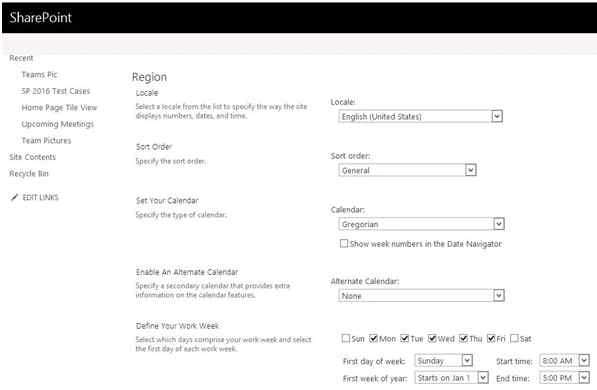
Change first day of week to Monday.
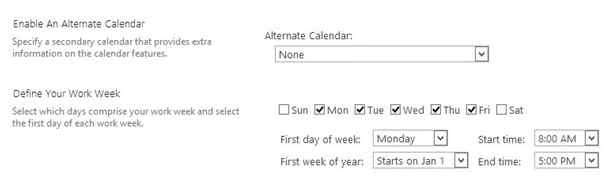
Now the Saturday and Sunday columns would align towards the end the calendar. We can hide those using CSS.
In order to do this, from Site settings edit the calendar view page.
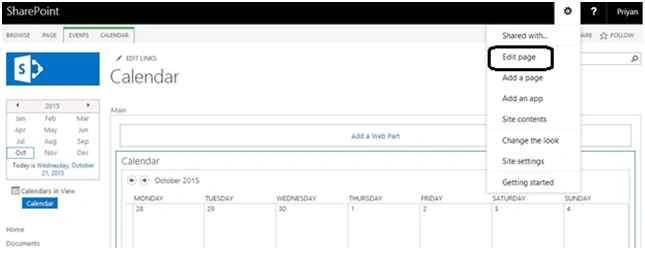
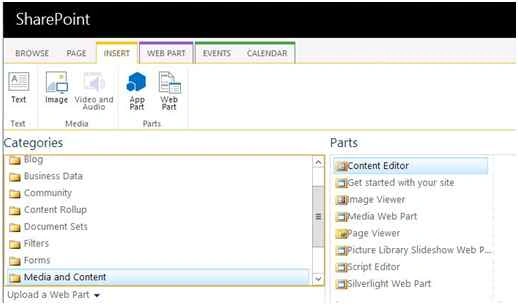
Add Content Editor Web Part (CEWP) to the calendar page as below:
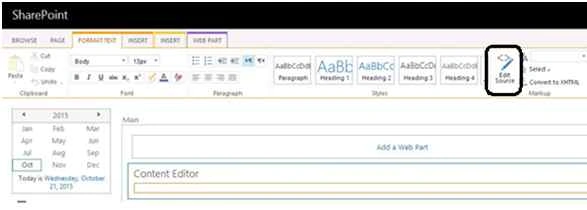
From the CEWP, click on Edit Source and add the css to hide the calendar columns that correspond to Saturday and Sunday.
Place the following CSS on to the CEWP script window:
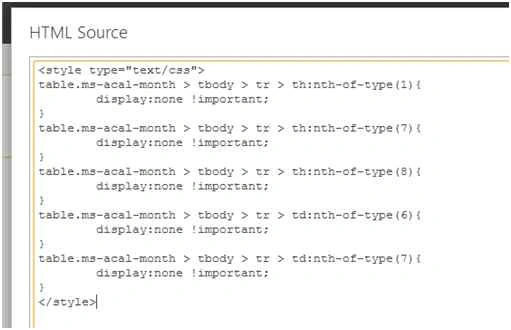
- <style type="text/css">
- table.ms-acal-month > tbody > tr > th:nth-of-type(1) {
- display: none !important;
- }
- table.ms-acal-month > tbody > tr > th:nth-of-type(7) {
- display: none !important;
- }
- table.ms-acal-month > tbody > tr > th:nth-of-type(8) {
- display: none !important;
- }
- table.ms-acal-month > tbody > tr > td:nth-of-type(6) {
- display: none !important;
- }
- table.ms-acal-month > tbody > tr > td:nth-of-type(7) {
- display: none !important;
- }
- </style>
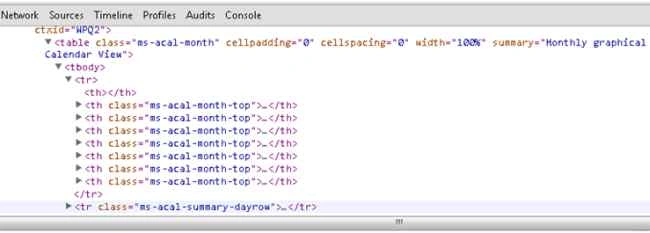
On applying this CSS to the above calendar table we can hide the weekend columns.
Finally the calendar view shows only week days.
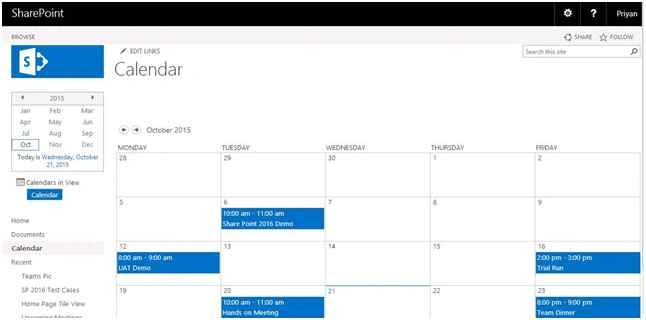
Thus we have seen how we can remove weekends from the default calendar view. This has been tested with both Share Point 2013 and 2016.
Josh DPosted Jul 17, 2024, 3:36 AM
This doesnt work.....this one works <style><span id="ms-rterangecursor-start"></span><span id="ms-rterangecursor-end"></span>table.ms-acal-month > tbody > tr > th:nth-of-type(1) {display:none !important;} table.ms-acal-month > tbody > tr > th:nth-of-type(2) { display:none !important; } table.ms-acal-month > tbody > tr > th:nth-of-type(8) { display:none !important; } table.ms-acal-month > tbody > tr > td:nth-of-type(6) { display:none !important; } table.ms-acal-month > tbody > tr > td:nth-of-type(7) { display:none !important; } .ms-acal-item { width:19.8% !important; } </style> - what you have shows Sunday - Thursday - possibly due to my calendar not responding to changing of the first day of week or days of the work week?
Sarah GulmanPosted Sep 5, 2018, 12:19 PM
I had the same issue with Friday's appointments not spanning the column and the add item was button missing. I found the solution on this page, second answer "If the Saturday and Sunday doesn't have events..." https://social.msdn.microsoft.com/Forums/office/en-US/90243228-51f6-47f7-9639-a78eed304df4/hide-or-remove-weekends-in-calendar-app?forum=sharepointdevelopment
Akash KumharPosted Sep 28, 2016, 4:24 PM
Great Share, Sir
frank sengersPosted Aug 18, 2016, 3:37 AM
Hi, when I use the css in the article or the css in the comments, appointment that span over the weekend do not work properly. Appointment does not show on the Friday and Add button moves out of the box.
Viral SavaliyaPosted May 5, 2016, 4:07 PM
Pardon my css as i have implemented in SP 2010 so css3 is not supported so need to do the dirty work :P
Viral SavaliyaPosted May 5, 2016, 4:06 PM
<style type="text/css">TABLE.ms-acal-month TR TH:first-child + TH + TH + TH + TH + TH + TH { DISPLAY: none !important } TABLE.ms-acal-month TR TH:first-child + TH + TH + TH + TH + TH + TH + TH { DISPLAY: none !important } TABLE.ms-acal-month TR TH:first-child { DISPLAY: none !important } TABLE.ms-acal-month TR TD + TD + TD + TD + TD + TD DIV { WIDTH: 1px; DISPLAY: none !important } TABLE.ms-acal-month TR TD + TD + TD + TD + TD + TD { WIDTH: 0.5% } TABLE.ms-acal-month TR TD + TD + TD + TD + TD + TD + TD { DISPLAY: none !important } TABLE.ms-acal-detail TR TD + TD + TD + TD + TD + TD { WIDTH: 0.5% !important } TABLE.ms-acal-detail TR TD + TD + TD + TD + TD + TD DIV { DISPLAY: none !important } TABLE.ms-acal-detail TR TD + TD + TD + TD + TD + TD + TD { DISPLAY: none !important } .ms-acal-month-top SPAN { DISPLAY: inline !important } .ms-acal-month-top SPAN + SPAN { DISPLAY: none !important } .ms-acal-week-top TD DIV SPAN { DISPLAY: inline !important } .ms-acal-week-top TD DIV SPAN + SPAN { DISPLAY: none !important }</style>
Viral SavaliyaPosted May 5, 2016, 4:06 PM
Add Following css which will hide sat column content and reduce the size of the empty TD so it will appear like col is hidden and Fri column will work properly with Add button.
Robert WoodsPosted Apr 26, 2016, 5:27 PM
Same issue, no ADD button on fridays anymore
Tony ManPosted Feb 1, 2016, 10:33 PM
Follow your instructions, the button "Add" disappears in the columns Friday in SharePoint 2013. Could you please tell me why?
Santhakumar MunuswamyPosted Oct 25, 2015, 11:30 AM
Good one
Sibeesh VenuPosted Oct 23, 2015, 1:36 AM
Nice Share
Mukesh KumarPosted Oct 22, 2015, 2:46 PM
Good Job Sir
Nilesh JadavPosted Oct 22, 2015, 6:14 AM
Nice one sir !!
Upendra Pratap ShahiPosted Oct 22, 2015, 5:00 AM
nice one...good info...
Priyaranjan K SPosted Oct 22, 2015, 3:19 AM
Thanks Harshad Pansuriya
Harshad PansuriyaPosted Oct 22, 2015, 3:17 AM
Nice one
Harshad PansuriyaPosted Oct 22, 2015, 3:17 AM
Nice one
Priyaranjan K SPosted Oct 22, 2015, 3:07 AM
Thank You Jacob Robinson
Jacob RobinsonPosted Oct 22, 2015, 3:05 AM
Good Show...