

ASP.NET Core is a modern, open-source, cross-platform framework designed for building high-performance and scalable web applications. From microservices to enterprise-grade APIs, its architecture ensures developers can achieve excellent throughput, minimal latency, and efficient resource utilization.
In this article, we’ll explore key strategies, configuration tips, and code snippets to maximize performance and scalability in your ASP.NET Core applications.
🚀 Understanding Performance and Scalability
Before diving into implementation, let’s define two crucial concepts:
Performance: How fast your application responds to a single request.
(Example: Reducing response time from 300ms to 100ms).Scalability: How well your application handles increased load.
(Example: Handling 10,000 concurrent users without crashing).
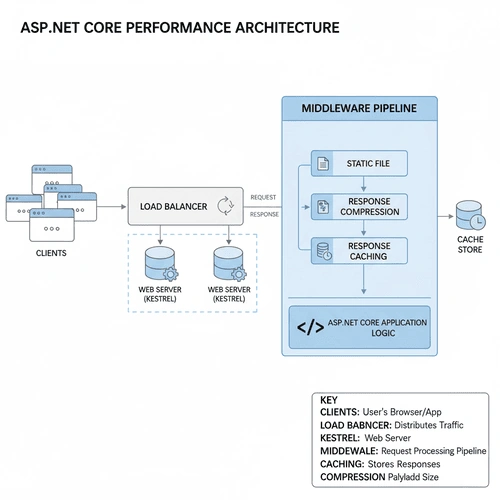
ASP.NET Core achieves both through efficient memory management, asynchronous programming, dependency injection, caching, and built-in support for distributed systems.
⚙️ Using Asynchronous Programming
The ASP.NET Core runtime is optimized for asynchronous I/O operations. By using the async and await keywords, you can free up threads to handle more requests concurrently.
✅ Example: Asynchronous Controller Action
    [ApiController]
[Route("api/[controller]")]
public class ProductsController : ControllerBase
{
    private readonly IProductService _productService;

    public ProductsController(IProductService productService)
    {
        _productService = productService;
    }

    [HttpGet("{id}")]
    public async Task<IActionResult> GetProductById(int id)
    {
        var product = await _productService.GetProductAsync(id);

        if (product == null)
            return NotFound();

        return Ok(product);
    }
}
By using Task<IActionResult> , the thread doesn’t block while waiting for I/O-bound operations such as database queries or API calls. This dramatically improves scalability under heavy load.
🧩 Optimize Middleware Pipeline
Middleware components handle each request sequentially. Keep your middleware lightweight and avoid unnecessary processing.
✅ Example: Custom Lightweight Middleware
    public class RequestTimingMiddleware
{
    private readonly RequestDelegate _next;
    private readonly ILogger<RequestTimingMiddleware> _logger;

    public RequestTimingMiddleware(RequestDelegate next, ILogger<RequestTimingMiddleware> logger)
    {
        _next = next;
        _logger = logger;
    }

    public async Task InvokeAsync(HttpContext context)
    {
        var start = DateTime.UtcNow;
        await _next(context);
        var elapsed = DateTime.UtcNow - start;

        _logger.LogInformation($"Request took {elapsed.TotalMilliseconds} ms");
    }
}

// Registration in Program.cs
app.UseMiddleware<RequestTimingMiddleware>();
👉 Tip :
Place lightweight middleware at the top (like routing or compression), and heavy middleware (like authentication) lower in the pipeline.
⚡ Enable Response Caching
Caching reduces the need to recompute results or hit the database repeatedly. ASP.NET Core provides a built-in Response Caching Middleware .
✅ Example: Enable Response Caching
    // In Program.cs
builder.Services.AddResponseCaching();

var app = builder.Build();
app.UseResponseCaching();

app.MapGet("/time", (HttpContext context) =>
{
    context.Response.GetTypedHeaders().CacheControl =
        new Microsoft.Net.Http.Headers.CacheControlHeaderValue()
        {
            Public = true,
            MaxAge = TimeSpan.FromSeconds(30)
        };

    return DateTime.UtcNow.ToString("T");
});
Now, subsequent requests within 30 seconds will be served from cache — drastically improving performance.
🧠 Optimize Data Access with EF Core
Database access is often the main bottleneck. Use Entity Framework Core efficiently by applying:
AsNoTracking() for read-only queries
Compiled queries for repeated access
Connection pooling
✅ Example: Using AsNoTracking()
    public async Task<IEnumerable<Product>> GetAllProductsAsync()
{
    return await _context.Products
        .AsNoTracking()  // Improves performance
        .ToListAsync();
}
If you frequently run similar queries, consider compiled queries :
    private static readonly Func<AppDbContext, int, Task<Product?>> _getProductById =
    EF.CompileAsyncQuery((AppDbContext context, int id) =>
        context.Products.FirstOrDefault(p => p.Id == id));

public Task<Product?> GetProductAsync(int id) =>
    _getProductById(_context, id);
🧰 Use Output Compression
Compressing responses before sending them to the client reduces bandwidth usage and speeds up delivery.
✅ Example: Enable Response Compression
    // In Program.cs
builder.Services.AddResponseCompression(options =>
{
    options.EnableForHttps = true;
    options.MimeTypes = new[] { "text/plain", "application/json" };
});

var app = builder.Build();
app.UseResponseCompression();
Now all application/json responses will be automatically GZIP-compressed.
🌍 Scaling Out with Load Balancing
Performance tuning is not enough when traffic grows. Scalability often involves distributing load across multiple servers using:
Horizontal Scaling : Adding more servers
Load Balancers : NGINX, Azure Front Door, AWS ELB, etc.
In distributed systems, session state and caching should be externalized (e.g., Redis).
✅ Example: Configure Distributed Cache (Redis)
    builder.Services.AddStackExchangeRedisCache(options =>
{
    options.Configuration = "localhost:6379";
});

public class CacheService
{
    private readonly IDistributedCache _cache;

    public CacheService(IDistributedCache cache)
    {
        _cache = cache;
    }

    public async Task SetCacheAsync(string key, string value)
    {
        await _cache.SetStringAsync(key, value, new DistributedCacheEntryOptions
        {
            AbsoluteExpirationRelativeToNow = TimeSpan.FromMinutes(5)
        });
    }

    public Task<string?> GetCacheAsync(string key) => _cache.GetStringAsync(key);
}
This makes your app stateless, which is essential for load balancing.
🧩 Configure Kestrel and Hosting for High Throughput
Kestrel, the built-in ASP.NET Core web server, can handle hundreds of thousands of requests per second when configured properly.
✅ Example: Optimize Kestrel Configuration
    builder.WebHost.ConfigureKestrel(options =>
{
    options.Limits.MaxConcurrentConnections = 10000;
    options.Limits.MaxConcurrentUpgradedConnections = 1000;
    options.Limits.RequestHeadersTimeout = TimeSpan.FromSeconds(30);
});
Additionally:
Use reverse proxy servers (like NGINX or IIS) for static file handling and TLS termination.
Deploy in containerized environments for auto-scaling (e.g., Kubernetes).
🧮 Use Memory and Object Pooling
To avoid frequent object allocations and garbage collection, ASP.NET Core supports object pooling .
✅ Example: Using ArrayPool<T>
    using System.Buffers;

public class BufferService
{
    public void ProcessData()
    {
        var pool = ArrayPool<byte>.Shared;
        var buffer = pool.Rent(1024); // Rent 1KB buffer

        try
        {
            // Use the buffer
        }
        finally
        {
            pool.Return(buffer);
        }
    }
}
This approach minimizes heap allocations and reduces GC pressure — crucial for performance-sensitive applications.
🧱 Minimize Startup Time and Memory Footprint
Avoid unnecessary services in
Program.cs.Use AddSingleton instead of AddTransient where appropriate.
Trim dependencies in
*.csprojfiles.
✅ Example: Minimal API Setup
    var builder = WebApplication.CreateBuilder(args);

builder.Services.AddSingleton<IProductService, ProductService>();

var app = builder.Build();

app.MapGet("/products", async (IProductService service) =>
    await service.GetAllProductsAsync());

app.Run();
Minimal APIs reduce boilerplate and improve startup performance.
📊 Monitoring and Benchmarking
You can’t improve what you don’t measure. Use tools like:
dotnet-trace and dotnet-counters
Application Insights
BenchmarkDotNet
✅ Example: Using BenchmarkDotNet
    [MemoryDiagnoser]
public class PerformanceTests
{
    private readonly ProductService _service = new();

    [Benchmark]
    public async Task FetchProducts()
    {
        await _service.GetAllProductsAsync();
    }
}
Run this benchmark to identify bottlenecks and memory inefficiencies.
🧩 Additional Optimization Tips
Enable HTTP/2 or HTTP/3 for better parallelism.
Use CDNs for static assets.
Employ connection pooling for database and HTTP clients.
Use
IHttpClientFactoryto prevent socket exhaustion.
    builder.Services.AddHttpClient("MyClient")
    .SetHandlerLifetime(TimeSpan.FromMinutes(5));
🏁 Conclusion
High performance and scalability in ASP.NET Core are achieved through a combination of asynchronous design , caching , efficient data access , and smart infrastructure choices.
By applying the strategies discussed — from optimizing middleware and Kestrel configuration to leveraging Redis and compression — your ASP.NET Core application can handle massive workloads with low latency and high reliability.
Join the conversation! Your thoughts help the community grow.