

Introduction
The world is full of information and there are all kinds of ways to access it. The Microsoft .NET framework provides several convenient ways to access data from different data sources, whether it's an XML file, a web stream, or a database. For databases, Microsoft offers several techniques for retrieving the data. One of the simplest forms is through an ADO.NET Data Provider. The Data Provider architecture gives us an easy way to extract data from a table and put it in an in-memory data structure called a DataSet. ADO.NET also provides a way to perform other common database tasks such as querying the data or calling stored procedures. If you have used ADO.NET in the past, you are probably familiar with using a Data Provider to control data inside a database. But what if you want to access data that is not available in a database? What if you want to find data that is inside your Google account? Is there a way to access Google account data through the ADO.NET mechanism many of us are already using? Fortunately the answer is a resounding "yes!". That choice is available through the RSSBus Google Data Provider which works like any other Data Provider, as you will soon find out.
Installing the Software
Installing the RSSBus Google DataProvider walks you through like most wizards these days. Just launch the executable and follow the steps. The only unusual part is that you are prompted for the registration keys twice: once from the web when downloading the installer, and again while running the executable. When I asked the company about the dual registration, RSSBus has indicated that customers are provided with direct links and a customer would only have to enter the serial number and registration key once.
You are also required to run a registry file for desktop applications. Because this is a developer application, the registry file is not too inconvenient, but it should probably be made more transparent in the future. In the case of ASP.NET apps, RSSBus has alternative licensing available that does not require registry access for deployment such as shared server support.
The Data Provider Schema
The RSSBus Google Provider is laid out similarly to a SqlServer database with Tables, Views, and Stored Procedures. Tables consist of Calendar, ContactGroups, and Contacts which gives you access to Google's online calendar and contacts. Views consist of Google Docs which consist of Documents, MailMessages, SpreadSheets, and Worksheets. As you can see, the Views give you access to practically every other Google online application including GoogleDocs and Gmail. The stored procedures also supply a rich set of tools to use with Google applications enabling you to perform functions like a Google search, or to export GoogleDocs to Microsoft Word.
Using the Data Provider
Once the DataProvider is installed, it works just like a Sql Data Provider.This is great, because you can access the RSSBus Google Provider directly from Server Explorer, giving you all the drag and drop magic you are used to with other Data Providers. For example, you can create a new connection to a Google account simply by choosing the RSSBus Data Source as shown in figure 1:
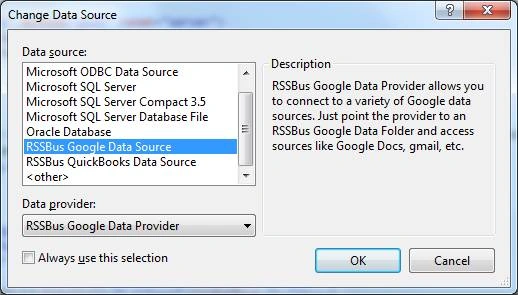
Figure 1 - Choosing the RSSBus Google Data Souce in Server Explorer
Then you can create a connection as you would any other Sql Connection; you just use your Google account credentials instead:
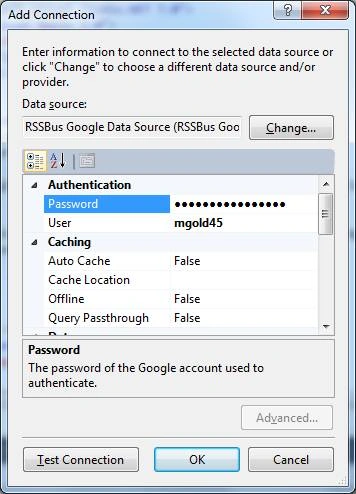
Figure 2 - Filling in the Google Account Information
Once you hit Test Connection and it succeeds, you are all hooked up to Google and ready to go. You can immediately examine your data through Server Explorer and begin to imagine all the cool applications you can create for Google users. For example, the RSSBus Google Provider shows all my contact information from Google if I right click on contacts and retrieve the data:
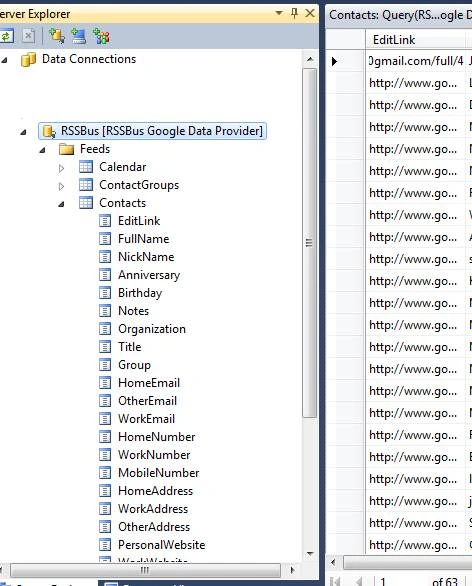
Figure 3 - Retrieving Contact Data Directly from a Google Account in Server Explorer
I could easily drag the Contacts table onto a Windows Form and bind it to a Data Grid, giving me an instant application that allowed me to organize my contact information from Google. Or I could create an ASP.NET web page that does the same thing. Although I don't know if I'd want to share all my Google contacts with the world, I could filter just those contacts I wanted to make available through a password protected site. Consider another scenario: Let's say I wanted to list all the people in my company's sales department on a page on the web. I could use the RSSBus Google Data Provider to query just the contacts in my sales ContactGroup and put them in the sales page. Anytime I hired new salesman (or lost an existing salesman), I could just change my Google ContactGroups and the page would auto-magically update itself to reflect the new information. You might say, "Well I can just as well do that in a database". That's true, but if you are using the convenient web interface of Google to change contacts all the time, this is a way more convenient solution.
Query Limitations
Before delving further into an example of using the RSSBus Google Provider, it's important to understand that there are limitations to what you can do with a non-database provider as opposed to a provider that internally calls the Google API. Here are some of them:
- Table joins are not supported.
- Table aliases are not supported.
- GROUP BY, HAVING, ORDER BY clauses and nested statements are not supported at the time of this article (though the developers assured me that support for these queries will be available soon).
- Scalar or aggregation functions are not supported.
The Data Provider does support Selects and Where clauses. Fortunately, this would be sufficient most of the time because I can manipulate the items above through LINQ once I have the requested data from the RSSBus Data Provider.
The Code
If you are already familiar with using the Sql Data Provider, than using the RSSBus Google Data Provider is fairly straightforward. Listing 1 is a snippet from RSSBus's sample code for connecting Google Calendar Data to a Grid in your ASP.NET web page:
Listing 1 - Binding the RSSBus DataSource to a GridView in ASP.NET
<asp:GridView ID="gvCustomers" runat="server" AutoGenerateColumns="False"
DataSourceID="GoogleDataSource" BorderStyle="Dotted" BorderWidth="2px"
CellPadding="3" CellSpacing="3">
<Columns>
<asp:BoundField DataField="where" HeaderText="Where"
SortExpression="where" />
<asp:BoundField DataField="authoremail" HeaderText="AuthorEmail"
SortExpression="authoremail" />
<asp:BoundField DataField="description" HeaderText="Description"
SortExpression="description" />
<asp:BoundField DataField="endtime" HeaderText="EndTime"
SortExpression="endtime" />
<asp:BoundField DataField="starttime" HeaderText="StartTime"
SortExpression="starttime" />
<asp:BoundField DataField="id" HeaderText="Id" ReadOnly="True"
SortExpression="id" />
<asp:BoundField DataField="title" HeaderText="Title"
SortExpression="title" />
</Columns>
</asp:GridView>
<asp:SqlDataSource ID="GoogleDataSource" runat="server"
ConnectionString="<%$ ConnectionStrings:GoogleConnectionString %>"
ProviderName="<%$ ConnectionStrings:GoogleConnectionString.ProviderName %>"
SelectCommand="SELECT * FROM [Calendar.rsd]"></asp:SqlDataSource>
Remember: You will also need to list the connection string in the web.config file:
<add name="GoogleConnectionString" connectionString="Location=C:\Program Files (x86)\RSSBus\RSSBus Google Data Provider\db;[email protected];Password=csharpcornerrocks" providerName="System.Data.RSSBus.Google"/>
As you can see, there is little difference between binding a Sql Server data source and a RSSBus Data Source. The only detail that I didn't recognize in the sample code is that the table name has an rsd extension, but removing the extension did not seem to affect the application. Figure 4 shows part of the resulting page with the minimum coding shown in Listing 1.
|
Where |
AuthorEmail |
Description |
EndTime |
StartTime |
Id |
Title |
|
Liberal Arts and Science Academy (LASA) HS at 7309 Lazy Creek Drive,. Austin, TX 78724 |
Hi Bob, Just wanted to pass this on as an opportunity for the Robot Club here in Austin. Best, -Mike (an education based community service announcement) What : Judges Needed for FIRST LEGO League (FLL) Robotics Tournament When : Saturday, November 13th & Sunday, November 14th 7AM – 5PM (Volunteer one day or both days) Where : Liberal Arts and Science Academy (LASA) HS at 7309 Lazy Creek Drive,. Austin, TX 78724 On Saturday, November 13 and Sunday, November 14th, 2010, the Liberal Arts and Scienc... P |
11/14/2010 12:00:00 AM |
11/13/2010 12:00:00 AM |
http://www.Google. |
Judges Needed for FIRST LEGO League (FLL) Robotics Tournament |
Jason DouglasPosted Feb 21, 2017, 9:15 AM
It's a bit old post but I'd like to mention another data provider for QuickBooks from Devart - https://www.devart.com/dotconnect/quickbooks/ It saves a lot of time, and I really love its support for Entity Framework Core