

Now in this application we describe a ListView control, using two ListViews we manage customer orders. In one ListView there are various menu items and the second ListView displays the specified order menu item. This application provides add and delete order features. As per the given order it also manages the price of a customer order.
Step 1
-
Create a new project in Visual Studio 2010.
-
In the File Menu choose "New project" and "Project" (Ctrl+Shift+N).
Step 2
In the New project wizard select "Visual C#" (from the left side tree view) and select Windows Forms Application.
And provide the application a name. Here we use "PRG16_HOTEL_MENU" (ListView).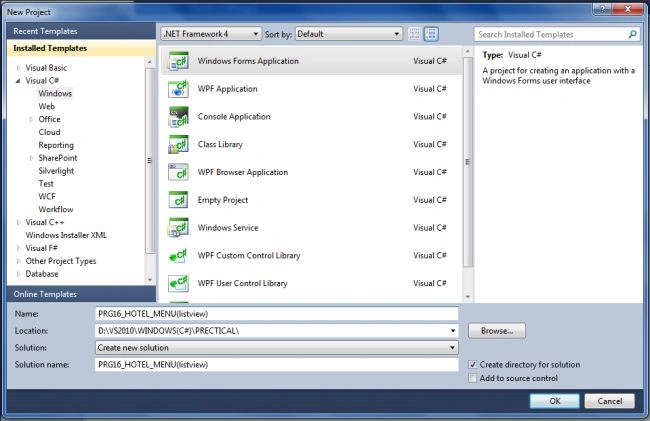
Step 3
Now we create the design interface for the user in the Windows Forms form.
We add two ListViews as in the following:
-
MENU ITEMS
-
ORDER ITEMS
We also add two buttons for "ADD ORDER" and "CANCEL ORDER" and add a TextBox for the Quantity.
Finally we have the following User Interface design.
Step 4
Now it's time for the coding. Here we fire a different button click event for the given order and to cancel an order.
We write the following code in the "FORM1.CS" file:
FORM1.CS
using System;
using System.Collections.Generic;
using System.ComponentModel;
using System.Data;
using System.Drawing;
using System.Linq;
using System.Text;
using System.Windows.Forms;
namespace PRG16_HOTEL_MENU_listview_
{
public partial class Form1 : Form
{
static int i = 0,total=0;
public Form1()
{
InitializeComponent();
}
private void btn_order_Click(object sender, EventArgs e)
{
int price, quantity;
string item;
price = int.Parse(listView1.SelectedItems[0].SubItems[1].Text);
quantity = int.Parse(txt_quantity.Text);
price = price * quantity;
item = listView1.SelectedItems[0].Text;
listView2.Items.Add(item);
listView2.Items[i].SubItems.Add(price.ToString());
i++;
total = total + price;
lbl_total.Text = total.ToString();
lbl_total.Visible = true;
}
private void btn_orderCancle_Click(object sender, EventArgs e)
{
if (listView2.SelectedItems != null)
{
int deduct=0;
var confirm = MessageBox.Show("Are Sure You Want Cancle Order", "DELETE ORDER", MessageBoxButtons.YesNo, MessageBoxIcon.Warning);
if (confirm == DialogResult.Yes)
{
for (int i = 0; i < listView2.Items.Count; i++)
{
if (listView2.Items[i].Selected)
{
deduct = int.Parse(listView2.Items[i].SubItems[1].Text);
listView2.Items[i].Remove();
i--;
}
}
}
total = total - deduct;
lbl_total.Text=total.ToString();
lbl_total.Visible = true;
}
else
{
MessageBox.Show("Select Item For Cancle order", "Cancle Order", MessageBoxButtons.OK, MessageBoxIcon.Error);
}
}
}
}
Finally we get the following output in the application:

I hope this article is helpful for you.
puneethkumar sPosted Aug 23, 2022, 4:24 AM
How to edit price in list view
Abdulrhman BsshraheelPosted Oct 24, 2018, 8:04 AM
When i paste the code it appears alot of red lines , could you tell me what the problem is ??
Rajeesh MenothPosted Aug 16, 2015, 2:21 AM
Good One
Pranay PatelPosted Dec 4, 2013, 11:04 AM
ohk sir
Mahesh ChandPosted Dec 4, 2013, 10:47 AM
Welcome to C# Corner. Some feedback on your writing style. You don't need to use CAPITAL in entire word. For example, the title APPLICATION and WINDOWS should just be "Application" and "Windows". Also ListView is not all capital as well. Thanks!