What is State management?
HTTP is stateless and no matter how advanced an application framework is, it will always remain stateless. Which is after every web request, the client is disconnected from the server and all the page objects are discarded. So there should be a technique for storing information between web requests and retrieving it when required.
What techniques are available in ASP.NET (the most popular one)?
| |
ViewState |
Query String |
Custom Cookies |
Session State |
Application State |
| Data types supported |
All.NET
data types which are serializable |
Part of string data. |
String data. |
All.NET data types are serializable. Nonserializable types are also supported in some cases. |
All .NET data types. |
| |
|
|
|
|
|
| Storage location |
A hidden field in the
current web page. |
The browser's URL string. |
The client's computer (in memory or a small text file, depending on its lifetime settings). |
Server memory
or a dedicated database,
depending on the mode
|
Server memory. |
| |
|
|
|
|
|
| Lifetime |
Retained permanently
for postbacks
to a single page.
|
Lost when the user
enters a new URL or
closes the browser.
However, can be
stored and can persist
between visits.
|
Set by the
programmer. It can be
used in multiple pages
and it persists
between visits.
|
Times out after a predefined
period (usually 20 minutes
but can be altered globally or
programmatically).
|
The lifetime of the application
(typically, until the server
is rebooted).
|
| |
|
|
|
|
|
| Scope |
Limited to the
current page.
|
Limited to the
target page.
|
The whole ASP.NET
application.
|
The whole ASP.NET
application.
|
The whole ASP.NET application.
Unlike most other types
of methods, application data
is global to all users.
|
| |
|
|
|
|
|
| Security |
Tamper-proof by
default but easy to
read. You can use the
Page directive to
enforce encryption.
|
Clearly visible and
easy for the user to
modify.
|
Insecure and can be modified by the user
|
Secure, because data is never
transmitted to the client.
However, subject to session
hijacking if you don't use SSL.
|
Very secure, because data
is never transmitted to the
client.
|
| |
|
|
|
|
|
| Performance |
Storing a large
amount of information
will slow
transmission but
will not affect the server
performance.
|
None, because the
amount of data is
trivial.
|
None, because the
amount of data is
trivial.
|
Storing a large amount of
information can slow down
the server severely, especially
if there are a large number of
users at once, because each
user will have a separate set of
session data.
|
Storing a large amount of
information can slow down
the server, because this data
will never time out and be
removed.
|
| |
|
|
|
|
|
| Mostly used areas |
Page-specific
settings. |
Sending a product ID
from a catalog page
to a details page.
|
Personalization preferences
for a website. |
Store items in a shopping
basket. |
Storing any type of global data. |
What are client-side state management techniques?
- Cookies,
- Query Strings (URL),
- Hidden fields,
- View State and Control state
What does client-side state management mean? When your user clicks on a URL or button or server-side control, the information goes from your page to the server and then back again to the user's web browser. How do you remember the information that is currently on the page. These are the techniques to save the information on the client side and not the server side.
What are server-side state management techniques?
- Session State,
- Application State,
- Profiles
- Caching
What does server-side state management mean? The server-side option for storing page information tends to have more security than client-side options, but they can use more web server resources, which may lead to scalability issues when the size of the information store is large.
What is important to keep in mind for choosing the right state management?
- data need to be stored,
- the length of time needed to store it,
- the scope of data (whether it's limited to individual users or shared across multiple requests),
- Additional security and performance considerations.
Note: Although it depends we will almost always use a combination of them in the same web application (and often the same page).
HOUR ONE View State
Points to remember.
- View state is used natively by the ASP.NET web controls. It allows them to retain their properties between postbacks.
- ViewState is a page's built-in property for storing our own custom data in view state collection
- View State uses a dictionary collection
- How to store.
ViewState["Counter"] = 1;
- How to retrieve.
int counter;
if (ViewState["Counter"] != null)
{
    counter = (int)ViewState["Counter"];
}
Scenario 1. Storing and Retrieving control data in View State
Step 1. We will create a customer input form, like below.
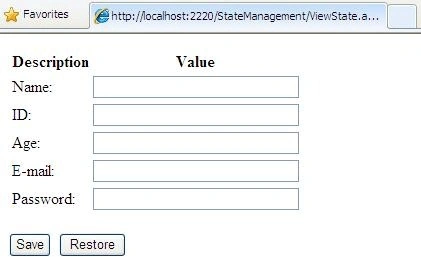
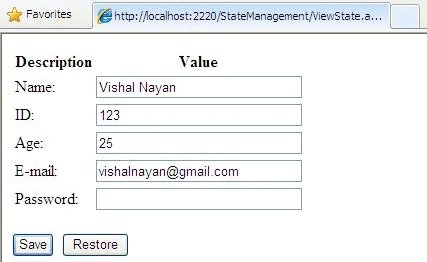
Step 2. On Sale: from here on, clicking save will save all the control's data into the view state.
protected void cmdSave_Click(object sender, EventArgs e)
{
    // Save the current text.
    SaveAllText(Page.Controls, true);
}
private void SaveAllText(ControlCollection controls, bool saveNested)
{
    foreach (Control control in controls)
    {
        if (control is TextBox)
        {
            // Store the text using the unique control ID.
            ViewState[control.ID] = ((TextBox)control).Text;
            // Clear text from controls
            ((TextBox)control).Text = "";
        }

        if ((control.Controls != null) && saveNested)
        {
            SaveAllText(control.Controls, true);
        }
    }
}
Step 3. On Restore click, retrieve all data from the view state.
protected void cmdRestore_Click(object sender, EventArgs e)
{
    // Retrieve the last saved text.
    RestoreAllText(Page.Controls, true);
}

private void RestoreAllText(ControlCollection controls, bool saveNested)
{
    foreach (Control control in controls)
    {
        if (control is TextBox)
        {
            if (ViewState[control.ID] != null)
                ((TextBox)control).Text = (string)ViewState[control.ID];
        }

        if ((control.Controls != null) && saveNested)
        {
            RestoreAllText(control.Controls, true);
        }
    }
}
Scenario 2. Storing and Retrieving own created custom objects in View State
Point to remember
- We can store our own object in a view state like numeric and string types.
- ASP.NET converts these objects into a stream of bytes so that they can be added to hidden input fields on the page. This is called Serialization
- To make our object serializable, we need to add a Serializable attribute before the class.
Step 1. Create a class with a Serializable attribute.
[Serializable]
public class User
{
    public string FirstName;
    public string LastName;

    public User(string firstName, string lastName)
    {
        FirstName = firstName;
        LastName = lastName;
    }
}
Step 2. After this, we can store information in the view state.
// Store a customer in view state.
User user = new User("Vishal", "Nayan");
ViewState["CurrentUser"] = user;
Step 3. When we want to retrieve, we will need to cast the object.
// Retrieve a customer from view state.
User user;
user = (User)ViewState["CurrentUser"];
Step 4. It's important and mandatory that all member variables of the class must use serializable data types. Any non-serializable data type must be decorated with the Non-serialized attribute (which means it is simply ignored during the serialization process).
Step 5. if the Serializable attribute isn't present, the object isn't serializable, and you won't be able to store it in a view state.
Why not use View State?
View state is ideal because it doesn't take up any memory on the server and doesn't restrict any arbitrary usage limits (such as a time-out).
- Any important data should not be stored in a view state, because hackers can access and modify that information when the page is posted back.
- If we need to share data with multiple pages, then a view state cannot be used.
- When we need to store a large amount of data, avoid viewing the state
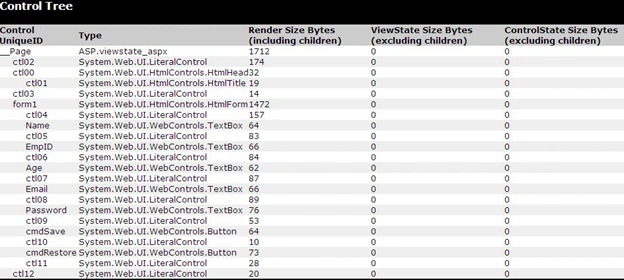
How to see view State value for the page?
Step 1. Enable trace to see the value.
<%@ Page Language="C#" Trace="true" AutoEventWireup="true" CodeFile="ViewState.aspx.cs" Inherits="ViewState" %>
How to secure View State?
Hashing. A hash code is a cryptographically strong checksum.
How it works?
When the page is posted back, ASP.NET recalculates the checksum and ensures that it
Matches: If a malicious user changes the view state data, ASP.NET will be able to detect the change,
and it will reject the postback.
Status: enabled by default
How to disable it.
<%@ Page Language="C#" EnableViewStateMac="false" %>
OR
Change settings on the web. config.
<system.web>
    <pages enableViewStateMac="false" />
</system.web>
Encryption: prevent users from getting any view state information
Status: Auto by default.
How to enable it.
<system.web>
    <pages enableViewStateMac="false" />
</system.web>
This is the end of your first hour of reading; I hope you enjoyed it.
Click below to continue to the second hour of reading.
Cheers.


Murugavel SPosted Nov 11, 2011, 1:41 AM
Hi Vishal, Very nice article.....
vaibhavPosted Aug 31, 2011, 2:54 PM
Very nice article. Thanks vishal for sharing.
AmarPosted Aug 1, 2011, 3:16 AM
great article!! :)
hamida khanamPosted Apr 28, 2011, 3:11 AM
This is really awesome topic.Thanks for sharing and helping.............. May God bless you.........