Introduction

In this article, you will see how to add a row to a table with HTML TextBox using JavaScript and maintain the TextBox value after post-back.
Create a JavaScript function to add a row in a table
  1. //Default value
  2. var rows = 1;
  3. function addRow(tableID, options) {
  4. //Get table by tableid
  5. var table = document.getElementById(tableID);
  6. //Get no of rows in the table
  7. var rowCount = table.rows.length;
  8. var arr;
  9. if (options != "") {
  10. arr = options.split("[oP]");
  11. if (arr.length > 0)
  12. rows = arr.length;
  13. }
  14. for (var i = 0; i < rows; i++) {
  15. //Create a row in table
  16. var row = table.insertRow(rowCount);
  17. //Create first column in added row
  18. var cell0 = row.insertCell(0);
  19. //Get the text box values for maintain state
  20. var values
  21. if (options != "" && arr.length > i)
  22. values = arr[i].split("[vaL]");
  23. //Create first element
  24. element1.type = "text";
  25. element1.setAttribute("id", "Test1TextBox" + rowCount);
  26. element1.setAttribute("name", "Test1TextBox");
  27. element1.setAttribute("MaxLength", "120");
  28. element1.setAttribute("size", "44");
  29. element1.setAttribute("style", "width:120px");
  30. if (options != "" && arr.length > i)
  31. element1.setAttribute("value", values[0]);
  32. //Added first element in column 1
  33. cell0.appendChild(element1);
  34. //Create the second column in added row
  35. var element2 = (/MSIE (6|7|8)/).test(navigator.userAgent) ? document.createElement('<input name="Test2TextBox">') : document.createElement("input");
  36. element2.type = "text";
  37. element2.setAttribute("id", "Test2TextBox" + rowCount);
  38. element2.setAttribute("name", "Test2TextBox");
  39. element2.setAttribute("MaxLength", "120");
  40. element2.setAttribute("size", "44");
  41. element2.setAttribute("style", "width:120px");
  42. if (options != "" && arr.length > i)
  43. element2.setAttribute("value", values[1]);
  44. //Added second element in column 2
  45. cell1.appendChild(element2);
  46. rowCount++;
  47. }
In aspx page
  1. <!—Create table in which we will add row -->
  2. <table id="TestTable" cellspacing="0" cellpadding="3" border="1" style="width: 250px;">
  3. <tr>
  4. <td>
  5. Name
  6. </td>
  7. <td>
  8. Designation
  9. </td>
  10. </tr>
  11. </table>
  12. <!--Add hyper link button for add row in above table which call the javascript function created above-->
  13. <div style="margin-top: 5px;">
  14. <asp:HyperLink ID="addRowLink" href="#" runat="server" Visible="true" CssClass="StandaloneLink"
  15. onclick="addRow('TestTable',''); return false;">
  16. <img src="Image/PlusSign.gif" border=0 style="margin-right:4px;vertical-align: middle;" alt="Add Row" />Add Row</asp:HyperLink>
  17. </div>
  18. <!-- button for check text box is maintaining values after post back-->
  19. <asp:Button ID="btn1" runat="server" Text="Post Back" />
In aspx.cs page
Create a function. In the following function, we are passing two parameters that are the values of textboxes to be maintained after post-back.
  1. protected void CreateTable(string[] Tes1ItemTextBoxValue, string[] Tes2ItemTextBoxValue)
  2. {
  3. StringBuilder options = new StringBuilder();
  4. if (Tes1ItemTextBoxValue != null)
  5. {
  6. //For persistence value of text box
  7. for (int i = 0; i < Tes1ItemTextBoxValue.Length; i++)
  8. {
  9. if (i > 0)
  10. options.Append("[oP]");
  11. string Test1TextBoxValue = Tes1ItemTextBoxValue[i];
  12. Test1TextBoxValue = Test1TextBoxValue.Replace("\r\n", "\\r\\n");
  13. options.Append(Test1TextBoxValue + "[vaL]" + Tes2ItemTextBoxValue[i] + "[vaL]");
  14. }
  15. }
  16. // Add row dynamically to the table
  17. Page.ClientScript.RegisterStartupScript(this.GetType(), "AddRowDynamically", "addRow('TestTable','" + options.ToString().Replace("'", @"\'") + "');", true);
  18. }
In the page load event call that function:
  1. protected void Page_Load(object sender, EventArgs e)
  2. {
  3. if (!IsPostBack)
  4. {
  5. //Add one row in the table
  6. CreateTable(new string[1], new string[1]);
  7. }
  8. else
  9. {
  10. //For maintain value of text box
  11. string[] Tes1ItemTextBoxValue = Request.Form.GetValues("Test1TextBox");
  12. CreateTable(Tes1ItemTextBoxValue, Tes2ItemTextBoxValue);
  13. }
  14. }
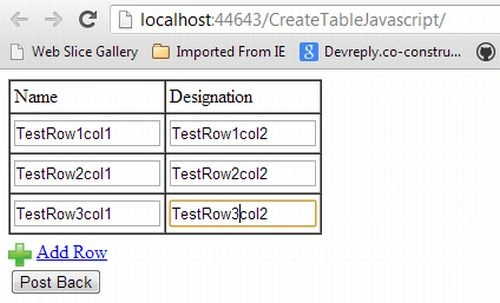
Result
Test2.jpg