
Overview
Agentic AI is changing how we browse the internet. Instead of just showing search results, browsers like Chrome, Edge, and Firefox are beginning to integrate AI that can act on our behalf. This means AI doesn't just answer questions—it can also take actions, automate tasks, and personalize browsing experiences. In simple terms, Agentic AI turns your browser into a smart assistant that understands intent, retrieves information, and helps you complete tasks faster.
Conceptual Background
Traditional Browsing: You type queries, click links, and manually gather information.
With Agentic AI: The AI expands your query, pulls information from trusted sources, summarizes it, and sometimes even executes tasks (like filling forms, comparing products, or drafting emails).
Agentic AI vs Normal AI: Regular AI answers questions. Agentic AI also takes actions inside the browser, such as navigating, organizing data, or running automations.
This builds on Generative Engine Optimization (GEO) principles, ensuring the AI can retrieve structured, citable content from the web.
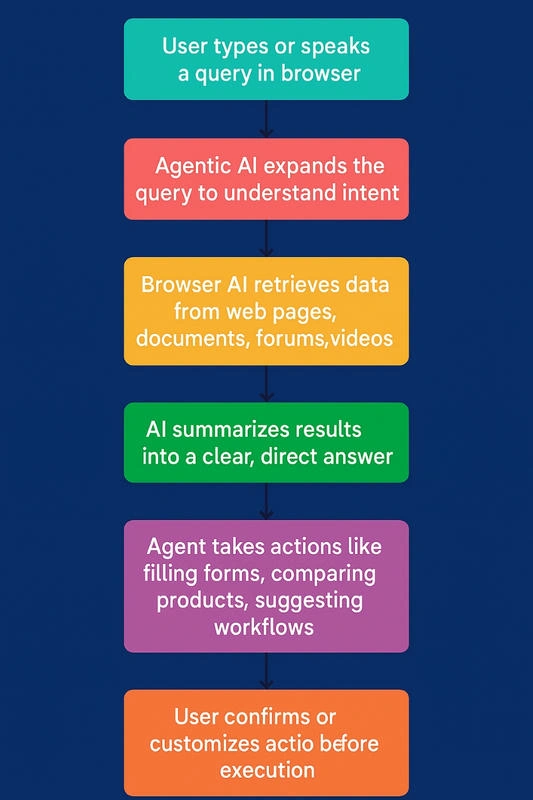
Step-by-Step Walkthrough of How It Works
Image alt-text (SEO): Flowchart showing how Agentic AI processes queries inside browsers like Chrome, Edge, and Firefox.
SEO-friendly image filename: agentic-ai-browser-workflow.png
Use Cases / Scenarios
Chrome (Google Gemini Integration): Suggests direct answers above search results, organizes content, and assists with writing emails in Gmail.
Edge (Copilot AI): Summarizes long articles, generates quick notes, and compares product reviews in shopping sites.
Firefox (Third-Party AI Add-ons): Uses extensions like ChatGPT or Perplexity to offer contextual summaries, Q&A, and smart recommendations.
Limitations / Considerations
Accuracy: AI can sometimes misinterpret intent or give outdated answers.
Privacy: Browsers collect data to power AI; sensitive data handling is a concern.
Dependence: Over-relying on AI may reduce critical thinking in browsing.
Compatibility: Not all sites are AI-ready; some complex formats may not parse well.
Fixes (Common Pitfalls & Solutions)
If AI gives wrong results, refine your query with more context.
If worried about privacy, adjust browser AI settings to limit data sharing.
If AI cannot summarize a complex webpage, use multi-format publishing sources (PDFs, videos, forums) for better coverage.
FAQs
Q 1: What is Agentic AI in a browser?
Agentic AI is an assistant inside browsers like Chrome, Edge, and Firefox that not only provides answers but also takes actions like summarizing pages, filling forms, and automating workflows.
Q 2: Is Agentic AI available in all browsers?
Not yet. Chrome and Edge have built-in AI assistants (Gemini, Copilot), while Firefox relies on extensions.
Q 3: Can Agentic AI replace search engines?
It doesn’t fully replace search engines, but it reduces the need to click multiple links by giving direct, actionable answers.
Q 4: Is Agentic AI safe?
It’s generally safe, but users should review data-sharing settings and verify answers before acting.
Q 5: What is the future of Agentic AI in browsers?
By 2030, Agentic AI is expected to handle complex workflows like research automation, shopping assistance, and even coding directly inside browsers.
Conclusion
Agentic AI inside browsers like Chrome, Edge, and Firefox is transforming web browsing. Instead of manually searching and clicking, you now have an AI-powered assistant that understands intent, retrieves the best answers, and helps with actions. This shift makes browsing faster, smarter, and more personalized—but users should balance convenience with caution regarding accuracy and privacy.
Join the conversation! Your thoughts help the community grow.