

Artificial Intelligence (AI) tools like ChatGPT, Google Gemini, and others have become part of our everyday life. Whether you're a student, developer, content creator, or just curious, AI can feel like a helpful assistant ready to answer anything. But sometimes, AI gets things wrong—and those mistakes can waste your time, confuse your process, or even break your systems.
Let’s me explain how AI can mislead, using a real-life example which happened with me last night. I asked a simple question to ChatGPT: "How to install Google Gemini CLI on Windows?"
What AI responded:
"First, install Python, then install the
google-generativeaipackage, set up the Gemini API key, and then test the Gemini CLI."
Here are the snapshot of ChatGPT chat -
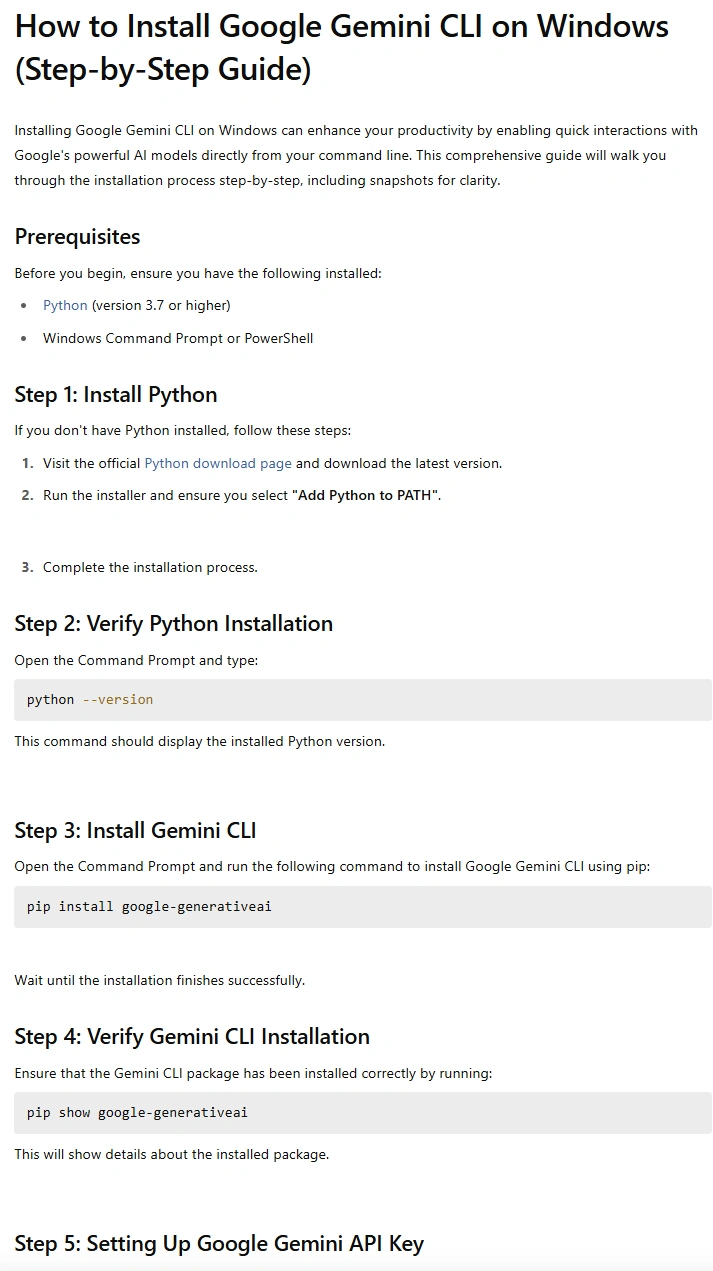
Sounds detailed, right? But it’s completely wrong for this task.
Why? Because the Google Gemini CLI tool is written in Node.js, not Python. You don’t need to install Python or any google-generativeai package to use it. The correct installation method is:
npx @google/gemini-cli
# or
npm install -g @google/gemini-cli
Why Did AI Get It Wrong?
AI doesn’t understand the difference between:
- The Gemini API client for Python
- The Gemini CLI built using Node.js
It assumed they were the same thing—just because the names are similar. This is a common limitation in AI: it doesn't truly grasp context unless the user is very specific.
Why This Matters
When you trust AI blindly:
- You may install unnecessary tools
- You may follow outdated or broken steps
- You may delay your project by hours or days
In this case, following the AI’s answer would lead you down the wrong path.
How to Spot Misleading AI Responses
Here are a few tips:
- Check if the commands match the expected platform (Python vs Node.js)
- Look at whether the steps feel generic or unrelated
- Compare with official documentation
How to Cross-Check AI Answers
Always take 2 minutes to verify:
- Search for the official installation guide
- Visit GitHub repositories for active tools
- Ask in community forums like C# Corner forums or Reddit
Tips to Prompt AI Better
If you ask:
"How to install Google Gemini CLI?"
Try improving the prompt:
"How to install Google Gemini CLI using Node.js (not Python) on Windows?"
The clearer your prompt, the better the answer you’ll get.
AI is a Tool, Not a Truth Machine
AI is powerful, but not perfect. Treat it like a helpful intern: fast, creative, and useful—but always in need of review.
The moment we stop reviewing AI-generated content is the moment we allow mistakes to slip through. Whether it’s installing software, writing code, or even giving advice, always validate important steps yourself.
Conclusion
- Don’t fully rely on AI for critical tasks like installations, configurations or writing code to implement any logic.
- AI often mixes up tools with similar names or technologies.
- Cross-check everything with official sources.
- Use AI as a guide, not a final answer.
Join the conversation! Your thoughts help the community grow.