

When the value of XACT_ABORT is set to ON, the error – “The current transaction cannot be committed” occurs when another transaction is begun before a commit or rollback of the previous executing transaction. Here are few instances that invite this error:
Syntax
- SET XACT_ABORT { ON | OFF }
Explanation- When ON, if there is a run-time error, the entire transaction is terminated and error is thrown.
- When OFF, the Transact-SQL statement that raised the error is rolled back without any error indication.
Example:
Inserting duplicate value in a Primary Key column within a transaction.
- drop table EmpSalary
- drop table Emp
- create table Emp([EmpId][int] primary key)
- create table EmpSalary(Salary money)
- set xact_abort on
- begin
- try
- begin tran
- insert into Emp([EmpId]) values(1)
- insert into Emp([EmpId]) values(2)
- insert into Emp([EmpId]) values(1) --duplicate value
- commit
- end
- try
- begin
- catch
- insert into EmpSalary(Salary) values(10000)
- if @ @trancount > 0
- rollback
- end
- catch
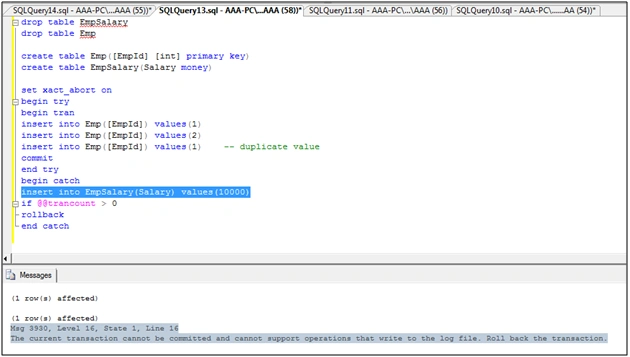
As seen in the above picture, the error occurs when the XACT_ABORT is set to ON.
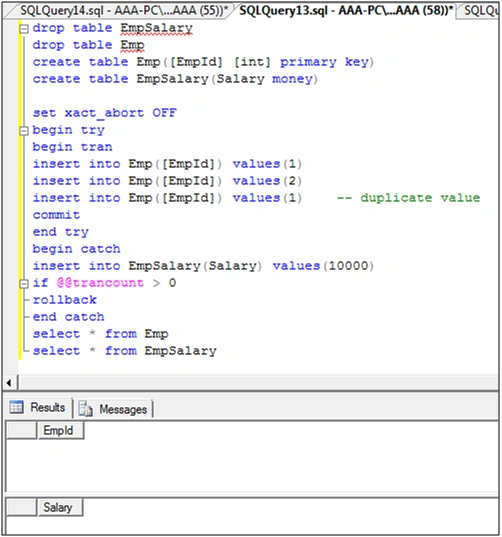
You can find below that the same query executes with error and all insert statements are rolled back when the value is set to OFF.
Santhakumar MunuswamyPosted Jan 23, 2016, 1:59 AM
Thanks for nice share
Muhammad Aqib ShehzadPosted Jan 23, 2016, 1:54 AM
nice info
Shubham KumarPosted Jan 22, 2016, 11:48 PM
nice
Pankaj Kumar ChoudharyPosted Jan 22, 2016, 7:29 PM
Nice Information Sir.......