

Architectural Mechanics, System-Versioning Patterns, and High-Scale Enterprise Use Cases
In modern enterprise software engineering, storing only the current state of a database record is no longer sufficient. Regulations like HIPAA, GDPR, and SOX require rigorous auditability, while business operations increasingly demand "time-travel" capabilities to analyze historical trends, reconstruct past data states, and recover from accidental data corruptions.
While techniques like custom audit triggers, Change Data Capture (CDC), or event sourcing exist, SQL Server’s System-Versioned Temporal Tables provide a built-in, declarative solution. By binding a current operational table to an automated system history table, temporal tables give developers point-in-time querying capabilities with zero application-level change tracking code.
1. Engine-Level Architecture: Dual-Table Binding
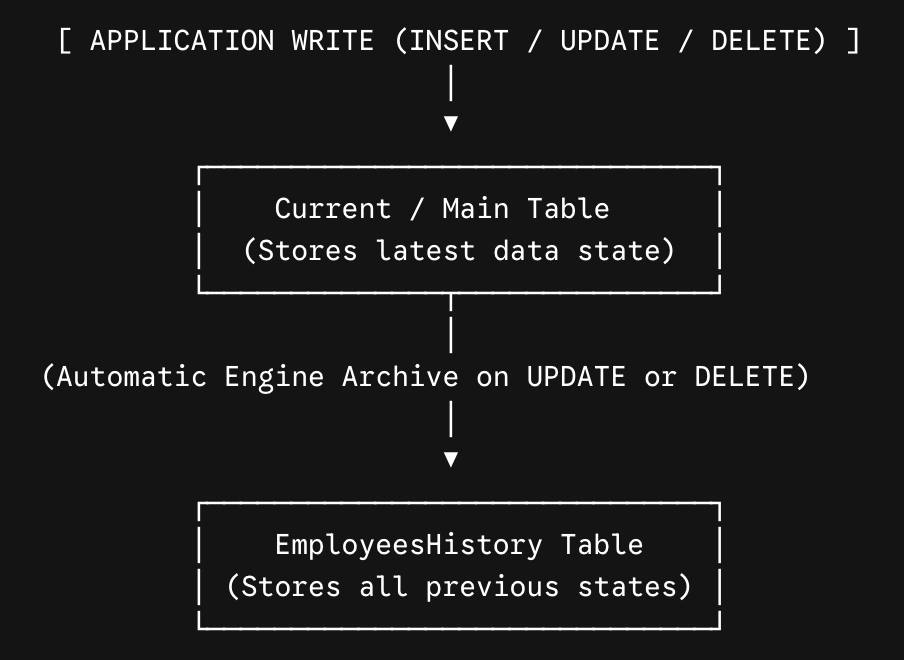
A temporal table consists of two separate, physically linked storage entities managed entirely by the database engine:
Current / Primary Table (
dbo.Employees): Stores active, latest-state records.History Table (
dbo.EmployeesHistory): Stores superseded or deleted historical versions of records.
Period Columns (SysStartTime and SysEndTime)
Temporal tables require two non-nullable datetime2 columns designated as the system period. These determine the exact UTC validity window of every row version:
SysStartTime: The precise UTC timestamp when the row version became active.SysEndTime: The UTC timestamp when the row version was modified or deleted. (Active rows in the main table haveSysEndTimeset to9999-12-31 23:59:59.9999999).
2. DDL Implementation & Clean Schema Design
Creating a temporal table requires declaring the period columns and attaching the SYSTEM_VERSIONING table option. Marking period columns as HIDDEN prevents them from dirtying standard application SELECT * payloads.
CREATE TABLE dbo.Employees (
    EmployeeID INT NOT NULL PRIMARY KEY CLUSTERED,
    Name VARCHAR(100) NOT NULL,
    Position VARCHAR(100) NOT NULL,
    Salary DECIMAL(12, 2) NOT NULL,
    DepartmentID INT NOT NULL,

    -- Mandatory System-Versioning Period Columns
    SysStartTime DATETIME2 GENERATED ALWAYS AS ROW START HIDDEN NOT NULL,
    SysEndTime DATETIME2 GENERATED ALWAYS AS ROW END HIDDEN NOT NULL,
    PERIOD FOR SYSTEM_TIME (SysStartTime, SysEndTime)
)
WITH (
    SYSTEM_VERSIONING = ON (HISTORY_TABLE = dbo.EmployeesHistory)
);
Automatic DML Mechanics
INSERT: The record entersdbo.Employees.SysStartTimeis stamped with the UTC commit time;SysEndTimeis set to max value (9999-12-31). Nothing is written todbo.EmployeesHistory.UPDATE: SQL Server executes a two-step atomic operation:The existing active row is copied to
dbo.EmployeesHistory, updating itsSysEndTimeto the current transaction timestamp.The row in
dbo.Employeesis updated in-place with new values, updating itsSysStartTimeto the transaction timestamp.
DELETE: The row is removed fromdbo.Employeesand inserted intodbo.EmployeesHistorywithSysEndTimeset to the deletion timestamp.
3. Querying Temporal Tables: The Time-Travel Extensions
Applications query temporal tables by adding the FOR SYSTEM_TIME clause directly after the primary table name in T-SQL. The database engine automatically generates an execution plan that performs a UNION ALL across dbo.Employees and dbo.EmployeesHistory.
A. Point-in-Time Reconstruction (AS OF)
Retrieves the exact state of a record or entire database schema at a specific historical moment.
-- What was Employee 101's salary and position on October 15, 2025?
SELECT EmployeeID, Name, Position, Salary
FROM dbo.Employees
FOR SYSTEM_TIME AS OF '2025-10-15 09:30:00'
WHERE EmployeeID = 101;
B. Full Audit Trail (ALL)
Returns every version of a record throughout its entire lifecycle.
-- Inspect the full career and compensation history for Employee 101
SELECT
    EmployeeID,
    Position,
    Salary,
    SysStartTime AS ValidFrom,
    SysEndTime AS ValidTo
FROM dbo.Employees
FOR SYSTEM_TIME ALL
WHERE EmployeeID = 101
ORDER BY SysStartTime ASC;
C. Interval Filtering (BETWEEN ... AND ...)
Retrieves all row versions active at any point inside a date range.
SELECT *
FROM dbo.Employees
FOR SYSTEM_TIME BETWEEN '2026-01-01' AND '2026-06-30'
WHERE DepartmentID = 4;
4. How Enterprise Applications Leverage Temporal Tables
Enterprise Use Case 1: Regulatory Compliance & Zero-Code Auditing
In financial, healthcare, and e-commerce systems (governed by SOX, HIPAA, or PCI-DSS), auditing who altered critical data—and what the previous value was—is mandatory.
Legacy Approach: Writing explicit
AFTER UPDATE, DELETEtriggers on every table or relying on application-level logging libraries.Temporal Solution: Enabling system-versioning provides an immutable, engine-managed audit trail. Because application code cannot modify or delete rows in the history table directly, audit data remains tamper-proof.
Enterprise Use Case 2: Slow Changing Dimensions (SCD Type 2) in BI & Data Warehousing
Data warehouses require tracking historical changes to dimensions (e.g., tracking a customer's address changes over time to attribute past sales to the correct territory).
Enterprise Pattern: Instead of building complex ETL pipelines to handle Type 2 SCD logic, business intelligence tools (like Power BI or Azure Synapse) run point-in-time joins (
FOR SYSTEM_TIME AS OF FactTable.TransactionDate) directly against temporal dimension tables.
Enterprise Use Case 3: "Point-in-Time" Financial Calculations & Invoicing
Billing systems often need to re-calculate invoices based on historical pricing rules or retroactively audit customer balances.
Enterprise Pattern: A SaaS application computes usage metrics by joining transaction logs against
PricingPlans FOR SYSTEM_TIME AS OF UsageDate. Even if a pricing tier changes today, historical invoice calculations stay accurate.
Enterprise Use Case 4: Instant Data Repair & Accidental Mass-Delete Recovery
If a bug or improper UPDATE statement without a WHERE clause corrupts 100,000 active customer records, traditional recovery requires restoring a full database backup to a staging server.
Temporal Solution: Engineers execute an in-place
MERGEorUPDATEquery bringing data directly back from the history table:
-- Restore current table state from 1 hour ago
MERGE INTO dbo.Employees AS target
USING (
    SELECT * FROM dbo.Employees FOR SYSTEM_TIME AS OF '2026-08-05 08:00:00'
) AS source
ON target.EmployeeID = source.EmployeeID
WHEN MATCHED THEN
    UPDATE SET
        target.Position = source.Position,
        target.Salary = source.Salary;
5. Enterprise Storage & Index Optimization
Because history tables grow indefinitely as data mutates, unoptimized temporal tables can bloat database storage and degrade query performance over time.
1. Indexing the History Table
For optimal performance with AS OF and interval queries, create a Clustered Columnstore Index or a composite B-Tree index on the history table structured around the period columns:
-- Optimal B-Tree Index for Time-Travel Lookups
CREATE CLUSTERED INDEX IX_EmployeesHistory_PK
ON dbo.EmployeesHistory (SysEndTime ASC, SysStartTime ASC, EmployeeID);
2. Automated History Retention Policies
SQL Server allows setting an automatic retention policy on history tables to drop historical records older than a configured threshold:
ALTER TABLE dbo.Employees
SET (
    SYSTEM_VERSIONING = ON (
        HISTORY_TABLE = dbo.EmployeesHistory,
        HISTORY_RETENTION_PERIOD = 12 MONTHS -- Automatically purges history older than 1 year
    )
);
Conclusion
SQL Server Temporal Tables shift the responsibility of auditability and state history from complex application logic into the database engine. By leveraging system-versioned history tables and FOR SYSTEM_TIME syntax, enterprise applications achieve point-in-time time travel, seamless compliance auditing, instant data recovery, and simplified analytical reporting—all through declarative, maintainable SQL code.
Join the conversation! Your thoughts help the community grow.