
Introduction
In this article, I will explain how to add a Radiobutton in Tkinter in Python.
Definition
The Radiobutton keyword is used as a multiple-choice button, which is a way to offer many possible selections to the user and let the user choose only one of them.
Syntax
- w = Radiobutton ( a, option)
Parameters
a − This represents the parent window of the computer.
option − The list of most used options for this widget.
Option & Description
-
active background - The active background is used to change Background color when the mouse is over the radio button.
-
active foreground - The active foreground is used to change the Foreground color when the mouse is over the radio button.
-
bd - The bd is used to change the border width in pixels. The default is 2.
-
bg - The bg is used to change the Normal background color background.
-
Cursor - The cursor is used to set this option to a cursor name, the mouse cursor will change to that pattern when it is over the radio button
Program
- from tkinter import *
- a=Tk()
- a.geometry("400x400")
- a.title("test")
- radiobutton1=Radiobutton(a, text="Radiobutton 1",activebackground="black" ,
- activeforeground="green",bg="pink",bd=10,cursor = "target").pack()
- radiobutton2=Radiobutton(a, text="Radiobutton 2",activebackground="black" ,
- activeforeground="green",bg="pink",bd=10,cursor = "target").pack()
- radiobutton3=Radiobutton(a, text="Radiobutton 3",activebackground="black" ,
- activeforeground="green",bg="pink",bd=10,cursor = "target").pack()
- radiobutton4=Radiobutton(a, text="Radiobutton 4",activebackground="black" ,
- activeforeground="green",bg="pink",bd=10,cursor = "target").pack()
- a.mainloop()
Output
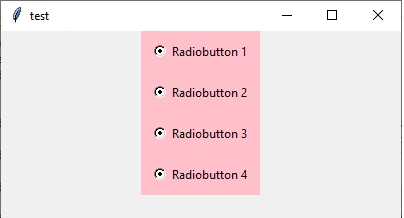
-
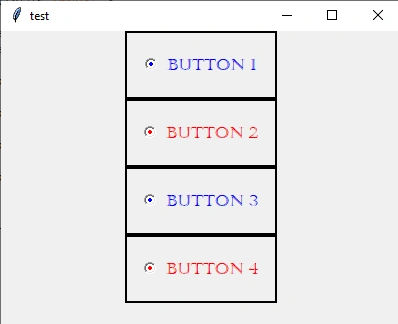
fg - The fg is used to change the normal foreground (text) color.
-
font - The font is used to change the text font .
-
height - The height is used to change the height on the radio button. in text lines (text buttons) or pixels (images).
-
width - The width is used to change the width on the radio button in letters.
-
Relief - Relief is used to specify the type of the border. The values are SUNKEN, RAISED, GROOVE, and RIDGE.
Join the conversation! Your thoughts help the community grow.