

In this article, we will learn how to add Syncfusion Spreadsheet component in the Angular application.
Prerequisites
- Basic Knowledge of Angular 2 or higher
- Visual Studio Code
- Node and NPM installed
- Bootstrap
Create an Angular Project
Create an Angular project by using the following command,
ng new rdata
Open this project in Visual Studio Code install the Syncfusion Spreadsheet library, To install, use the following command,
npm install @syncfusion/ej2-spreadsheet
Now install Bootstrap by using the following command,
npm install bootstrap --save
Now open the styles.css file and add Bootstrap file reference. To add a reference in the styles.css file add this line.
@import '~bootstrap/dist/css/bootstrap.min.css';
Now import dropdown module in app.module.ts file, add the following code in this file.
import { NgModule } from '@angular/core';
import { BrowserModule } from '@angular/platform-browser';
import { FormsModule, ReactiveFormsModule } from '@angular/forms';
import { AppRoutingModule } from './app-routing.module';
import { AppComponent } from './app.component';
import { HomeComponent } from './home/home.component';
import { SpreadsheetAllModule } from '@syncfusion/ej2-angular-spreadsheet';
@NgModule({
  declarations: [
    AppComponent,
    HomeComponent
  ],
  imports: [
    BrowserModule,
    AppRoutingModule,FormsModule,
    ReactiveFormsModule,
    SpreadsheetAllModule
  ],
  providers: [],
  bootstrap: [AppComponent]
})
export class AppModule { }
Now create a new component by using the following command,
ng g c home
Now open home.component.ts file and add the following code,
import { Component, OnInit, ViewChild } from '@angular/core';
import { FormBuilder, FormGroup, NgForm, Validators } from '@angular/forms';
import { getDefaultData } from '../data';
import { SpreadsheetComponent } from '@syncfusion/ej2-angular-spreadsheet';
@Component({
  selector: 'app-home',
  templateUrl: './home.component.html',
  styleUrls: ['./home.component.css']
})
export class HomeComponent implements OnInit {

empdata=
  [
    {
        Id: "100",
        Name: "Sanwar",
        Age: "25",
        Address: "Jaipur",
        City: "Jaipur",
        Salary: "500000",
        Department: "IT",

    },
    {
        Id: "2",
        Name: "Nisha",
        Age: "25",
        Address: "C-Scheme",
        City: "Jaipur",
        Salary: "500000",
        Department: "IT",
    },
    {
        Id: "3",
        Name: "David",
        Age: "25",
        Address: "C-Scheme",
        City: "Jaipur",
        Salary: "500000",
        Department: "IT",
    },
    {
        Id: "4",
        Name: "Sam",
        Age: "25",
        Address: "C-Scheme",
        City: "Jaipur",
        Salary: "500000",
        Department: "IT",
    },
    {
        Id: "5",
        Name: "Jyotsna",
        Age: "25",
        Address: "C-Scheme",
        City: "Mumbai",
        Salary: "500000",
        Department: "IT",
    },
    {
        Id: "6",
        Name: "Sid",
        Age: "25",
        Address: "C-Scheme",
        City: "Bangalore",
        Salary: "500000",
        Department: "IT",
    },
    {
        Id: "7",
        Name: "Chavi",
        Age: "25",
        Address: "C-Scheme",
        City: "Noida",
        Salary: "500000",
        Department: "IT",
    },
    {
        Id: "8",
        Name: "Nisha",
        Age: "25",
        Address: "C-Scheme",
        City: "Delhi",
        Salary: "500000",
        Department: "IT",
    }
]

 constructor(){

 }
 @ViewChild('default')
    public spreadsheetObj: SpreadsheetComponent;
    public data: Object[] = this.empdata;

    created() {
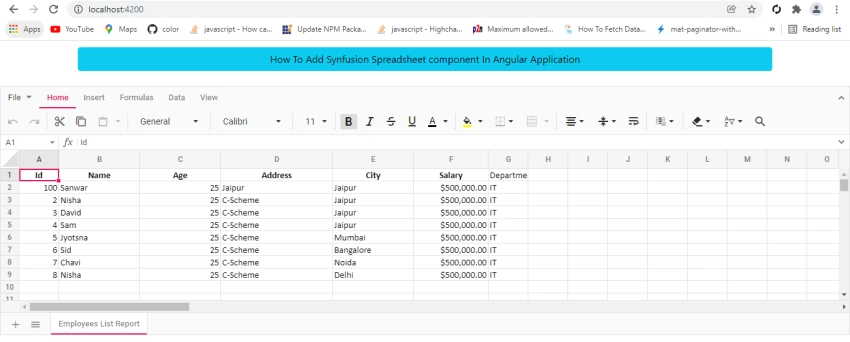
        this.spreadsheetObj.cellFormat({ fontWeight: 'bold', textAlign: 'center', verticalAlign: 'middle' }, 'A1:F1');
        this.spreadsheetObj.cellFormat({ fontWeight: 'bold' }, 'E31:F31');
        this.spreadsheetObj.cellFormat({ textAlign: 'right' }, 'E31');
        this.spreadsheetObj.numberFormat('$#,##0.00', 'F2:F31');
    }
  ngOnInit(): void {
  }
}
jose loraPosted Dec 18, 2021, 2:01 AM
Excelent article, could you tell me how can i make a generte a report using angular and asp.net core mvc using total a subtotal